# skill-creator
Adopt this skill: https://proskills.md/skills/other/aipexstudio-aipex-packages-browser-runtime-src-skill-built-in-skill-creator-brow
Page: https://proskills.md/skills/other/aipexstudio-aipex-packages-browser-runtime-src-skill-built-in-skill-creator-brow
This document is the public skill bundle for that page. It contains SKILL.md and every helper file the catalog carries. No login is required.
## File: packages/browser-runtime/src/skill/built-in/skill-creator-browser/SKILL.md
size: 13956
sha: 1bf17aa52ca74427d7f3ef0b68a2eaaa2e324325
upstream: https://github.com/aipexstudio/aipex/blob/main/packages/browser-runtime/src/skill/built-in/skill-creator-browser/SKILL.md
````text
---
name: skill-creator
description: Guide for creating effective skills. This skill should be used when users want to create a new skill (or update an existing skill) that extends AIPex's capabilities with specialized knowledge, workflows, or tool integrations.
license: Complete terms in LICENSE.txt
---
# Skill Creator
This skill provides guidance for creating effective skills.
## About Skills
Skills are modular, self-contained packages that extend AIPex's capabilities by providing
specialized knowledge, workflows, and tools. Think of them as "onboarding guides" for specific
domains or tasks—they transform AIPex from a general-purpose agent into a specialized agent
equipped with procedural knowledge that no model can fully possess.
### What Skills Provide
1. Specialized workflows - Multi-step procedures for specific domains
2. Tool integrations - Instructions for working with specific file formats or APIs
3. Domain expertise - Company-specific knowledge, schemas, business logic
4. Bundled resources - Scripts, references, and assets for complex and repetitive tasks
### Anatomy of a Skill
Every skill consists of a required SKILL.md file and optional bundled resources:
```
skill-name/
├── SKILL.md (required)
│ ├── **YAML frontmatter metadata** (required)
│ │ ├── name: (required)
│ │ └── description: (required)
│ └── Markdown instructions (required)
└── Bundled Resources (optional)
├── scripts/ - Executable code (JavaScript/Browser/etc.)
├── references/ - Documentation intended to be loaded into context as needed
└── assets/ - Files used in output (templates, icons, fonts, etc.)
```
#### SKILL.md (required)
**Metadata Quality:** The `name` and `description` in YAML frontmatter determine when AIPex will use the skill. Be specific about what the skill does and when to use it. Use the third-person (e.g. "This skill should be used when..." instead of "Use this skill when...").
#### Bundled Resources (optional)
##### Scripts (`scripts/`)
Executable code (JavaScript/Browser/etc.) for tasks that require deterministic reliability or are repeatedly rewritten.
- **When to include**: When the same code is being rewritten repeatedly or deterministic reliability is needed
- **Example**: `scripts/rotate_pdf.js` for PDF rotation tasks
- **Benefits**: Token efficient, deterministic, may be executed without loading into context
- **Main function requirement**: Every script must export a `main` function or have a `main` function as the entry point. This function serves as the standard interface for executing the script's functionality.
- **Export examples**:
```javascript
// Option 1: Direct export
function main(args) {
// script logic here
}
module.exports = main;
// Option 2: Object export
function main(args) {
// script logic here
}
module.exports = { main };
```
- **Note**: Scripts may still need to be read by AIPex for patching or environment-specific adjustments
##### References (`references/`)
Documentation and reference material intended to be loaded as needed into context to inform AIPex's process and thinking.
- **When to include**: For documentation that AIPex should reference while working
- **Examples**: `references/finance.md` for financial schemas, `references/mnda.md` for company NDA template, `references/policies.md` for company policies, `references/api_docs.md` for API specifications
- **Use cases**: Database schemas, API documentation, domain knowledge, company policies, detailed workflow guides
- **Benefits**: Keeps SKILL.md lean, loaded only when AIPex determines it's needed
- **Best practice**: If files are large (>10k words), include grep search patterns in SKILL.md
- **Avoid duplication**: Information should live in either SKILL.md or references files, not both. Prefer references files for detailed information unless it's truly core to the skill—this keeps SKILL.md lean while making information discoverable without hogging the context window. Keep only essential procedural instructions and workflow guidance in SKILL.md; move detailed reference material, schemas, and examples to references files.
##### Assets (`assets/`)
Files not intended to be loaded into context, but rather used within the output AIPex produces.
- **When to include**: When the skill needs files that will be used in the final output
- **Examples**: `assets/logo.png` for brand assets, `assets/slides.pptx` for PowerPoint templates, `assets/frontend-template/` for HTML/React boilerplate, `assets/font.ttf` for typography
- **Use cases**: Templates, images, icons, boilerplate code, fonts, sample documents that get copied or modified
- **Benefits**: Separates output resources from documentation, enables AIPex to use files without loading them into context
### Progressive Disclosure Design Principle
Skills use a three-level loading system to manage context efficiently:
1. **Metadata (name + description)** - Always in context (~100 words)
2. **SKILL.md body** - When skill triggers (<5k words)
3. **Bundled resources** - As needed by AIPex (Unlimited\*)
\*Unlimited because scripts can be executed without reading into context window.
## Browser Environment Usage
This skill creator is designed to work in browser environments (such as Chrome Extensions) using memfs for file operations and JSZip for packaging. The scripts are browser-compatible and can be used with virtual filesystems.
### Function Signatures
```javascript
// Initialize a new skill
const result = initSkill(skillName, basePath, fs)
// Write a file to the file system
const writeResult = await writeFile({
path: "/skills/my-skill/SKILL.md",
content: "YAML frontmatter and Markdown content"
})
// Delete a file or directory from the file system
const deleteResult = await deleteFile({ path: "/skills/my-skill/old-file.md" })
// Package an existing skill and trigger download
const result = await packageSkill(skillPath)
// Validate a skill
const validation = validateSkill(skillPath, fs)
```
#### writeFile
Write content to a file in the file system. Creates parent directories if they don't exist.
**Parameters:**
- `path` (required): Absolute path to the file to write
- `content` (required): Content to write to the file
**Returns:** `{ success: boolean, error?: string }`
#### deleteFile
Delete a file or directory from the file system. Supports recursive directory deletion.
**Parameters:**
- `path` (required): Absolute path to the file or directory to delete
**Returns:** `{ success: boolean, error?: string }`
### Requirements
- memfs instance for file operations
- JSZip library for zip file generation
- Browser environment with IndexedDB support
## Skill Creation Process
To create a skill, follow the "Skill Creation Process" in order, skipping steps only if there is a clear reason why they are not applicable.
### Step 1: Understanding the Skill with Concrete Examples
Skip this step only when the skill's usage patterns are already clearly understood. It remains valuable even when working with an existing skill.
To create an effective skill, clearly understand concrete examples of how the skill will be used. This understanding can come from either direct user examples or generated examples that are validated with user feedback.
For example, when building an image-editor skill, relevant questions include:
- "What functionality should the image-editor skill support? Editing, rotating, anything else?"
- "Can you give some examples of how this skill would be used?"
- "I can imagine users asking for things like 'Remove the red-eye from this image' or 'Rotate this image'. Are there other ways you imagine this skill being used?"
- "What would a user say that should trigger this skill?"
To avoid overwhelming users, avoid asking too many questions in a single message. Start with the most important questions and follow up as needed for better effectiveness.
Conclude this step when there is a clear sense of the functionality the skill should support.
### Step 2: Planning the Reusable Skill Contents
To turn concrete examples into an effective skill, analyze each example by:
1. Considering how to execute on the example from scratch
2. Identifying what scripts, references, and assets would be helpful when executing these workflows repeatedly
Example: When building a `pdf-editor` skill to handle queries like "Help me rotate this PDF," the analysis shows:
1. Rotating a PDF requires re-writing the same code each time
2. A `scripts/rotate_pdf.js` script would be helpful to store in the skill
Example: When designing a `frontend-webapp-builder` skill for queries like "Build me a todo app" or "Build me a dashboard to track my steps," the analysis shows:
1. Writing a frontend webapp requires the same boilerplate HTML/React each time
2. An `assets/hello-world/` template containing the boilerplate HTML/React project files would be helpful to store in the skill
Example: When building a `big-query` skill to handle queries like "How many users have logged in today?" the analysis shows:
1. Querying BigQuery requires re-discovering the table schemas and relationships each time
2. A `references/schema.md` file documenting the table schemas would be helpful to store in the skill
To establish the skill's contents, analyze each concrete example to create a list of the reusable resources to include: scripts, references, and assets.
### Step 3: Initializing the Skill
At this point, it is time to actually create the skill.
Skip this step only if the skill being developed already exists, and iteration or packaging is needed. In this case, continue to the next step.
When creating a new skill from scratch, always run the `init_skill.js` script. The script conveniently generates a new template skill directory that automatically includes everything a skill requires, making the skill creation process much more efficient and reliable.
Usage:
```javascript
initSkill(skillName, basePath, fs)
```
The script:
- Creates the skill directory at the specified path
- Generates a SKILL.md template with proper frontmatter and TODO placeholders
- Creates example resource directories: `scripts/`, `references/`, and `assets/`
- Adds example files in each directory that can be customized or deleted
After initialization, customize or remove the generated SKILL.md and example files as needed.
### Step 4: Edit the Skill
When editing the (newly-generated or existing) skill, remember that the skill is being created for another instance of AIPex to use. Focus on including information that would be beneficial and non-obvious to AIPex. Consider what procedural knowledge, domain-specific details, or reusable assets would help another AIPex instance execute these tasks more effectively.
#### Start with Reusable Skill Contents
To begin implementation, start with the reusable resources identified above: `scripts/`, `references/`, and `assets/` files. Note that this step may require user input. For example, when implementing a `brand-guidelines` skill, the user may need to provide brand assets or templates to store in `assets/`, or documentation to store in `references/`.
Also, delete any example files and directories not needed for the skill. The initialization script creates example files in `scripts/`, `references/`, and `assets/` to demonstrate structure, but most skills won't need all of them.
#### Update SKILL.md
**Writing Style:** Write the entire skill using **imperative/infinitive form** (verb-first instructions), not second person. Use objective, instructional language (e.g., "To accomplish X, do Y" rather than "You should do X" or "If you need to do X"). This maintains consistency and clarity for AI consumption.
To complete SKILL.md, answer the following questions:
1. What is the purpose of the skill, in a few sentences?
2. When should the skill be used?
3. In practice, how should AIPex use the skill? All reusable skill contents developed above should be referenced so that AIPex knows how to use them.
4. If the skill contains scripts, what are the arguments to pass to the `main` function? What is the expected output of the script? Remember that each script must export a `main` function or have a `main` function as the entry point.
### Step 5: Packaging a Skill
Once the skill is ready, package it into a distributable zip file and trigger a browser download. The packaging process automatically validates the skill first to ensure it meets all requirements:
```javascript
const result = await packageSkill(skillPath)
```
The packaging script will:
1. **Validate** the skill automatically, checking:
- YAML frontmatter format and required fields
- Skill naming conventions and directory structure
- Description completeness and quality
- File organization and resource references
2. **Package** the skill if validation passes, creating a zip file named after the skill (e.g., `my-skill.zip`) that includes all files and maintains the proper directory structure for distribution.
3. **Trigger download** automatically using the browser's download API, presenting a save dialog to the user.
The function returns:
- `{ success: true, filename: "skill-name.zip", downloadId: number, message: "..." }` if successful
- `{ success: false, error: "...", message: "..." }` if validation or packaging fails
If validation fails, the script will report the errors. Fix any validation errors and run the packaging function again.
### Step 6: Iterate
After testing the skill, users may request improvements. Often this happens right after using the skill, with fresh context of how the skill performed.
**Iteration workflow:**
1. Use the skill on real tasks
2. Notice struggles or inefficiencies
3. Identify how SKILL.md or bundled resources should be updated
4. Implement changes and test again
````
## File: packages/browser-runtime/src/skill/built-in/skill-creator-browser/scripts/delete_file.js
size: 948
sha: 90960810986d44a6f8a4e75f102f7dd25b14c256
upstream: https://github.com/aipexstudio/aipex/blob/main/packages/browser-runtime/src/skill/built-in/skill-creator-browser/scripts/delete_file.js
```text
/**
* Delete File - Deletes a file or directory from the file system
* Browser-compatible JavaScript version using memfs and JSZip
*
* Usage:
* main({ path: '/skills/my-skill/SKILL.md' })
*
* Example:
* main({ path: '/skills/my-skill/SKILL.md' })
*/
// biome-ignore lint/correctness/noUnusedVariables: QuickJS invokes this entry point by name.
async function main(args) {
const { path } = args;
if (!path) {
throw new Error("path is required");
}
if (!fs.existsSync(path)) {
console.log(`❌ Error: File or directory not found: ${path}`);
return { success: false, error: `File or directory not found: ${path}` };
}
try {
fs.rmSync(path, { recursive: true });
console.log(`✅ Deleted file or directory: ${path}`);
return { success: true };
} catch (error) {
console.log(`❌ Error deleting file or directory: ${error.message}`);
return { success: false, error: error.message };
}
}
```
## File: packages/browser-runtime/src/skill/built-in/skill-creator-browser/scripts/init_skill.js
size: 10949
sha: 4ec22d48cb31932c893effa797c6dc832ad217ca
upstream: https://github.com/aipexstudio/aipex/blob/main/packages/browser-runtime/src/skill/built-in/skill-creator-browser/scripts/init_skill.js
```text
/**
* Skill Initializer - Creates a new skill from template
* Browser-compatible JavaScript version using memfs
*
* Usage:
* initSkill(skillName, basePath, fs)
*
* Examples:
* initSkill('my-new-skill', '/skills/public', fs)
* initSkill('my-api-helper', '/skills/private', fs)
* initSkill('custom-skill', '/custom/location', fs)
*/
const SKILL_TEMPLATE = `---
name: {skill_name}
description: [TODO: Complete and informative explanation of what the skill does and when to use it. Include WHEN to use this skill - specific scenarios, file types, or tasks that trigger it.]
---
# {skill_title}
## Overview
[TODO: 1-2 sentences explaining what this skill enables]
## Structuring This Skill
[TODO: Choose the structure that best fits this skill's purpose. Common patterns:
**1. Workflow-Based** (best for sequential processes)
- Works well when there are clear step-by-step procedures
- Example: DOCX skill with "Workflow Decision Tree" → "Reading" → "Creating" → "Editing"
- Structure: ## Overview → ## Workflow Decision Tree → ## Step 1 → ## Step 2...
**2. Task-Based** (best for tool collections)
- Works well when the skill offers different operations/capabilities
- Example: PDF skill with "Quick Start" → "Merge PDFs" → "Split PDFs" → "Extract Text"
- Structure: ## Overview → ## Quick Start → ## Task Category 1 → ## Task Category 2...
**3. Reference/Guidelines** (best for standards or specifications)
- Works well for brand guidelines, coding standards, or requirements
- Example: Brand styling with "Brand Guidelines" → "Colors" → "Typography" → "Features"
- Structure: ## Overview → ## Guidelines → ## Specifications → ## Usage...
**4. Capabilities-Based** (best for integrated systems)
- Works well when the skill provides multiple interrelated features
- Example: Product Management with "Core Capabilities" → numbered capability list
- Structure: ## Overview → ## Core Capabilities → ### 1. Feature → ### 2. Feature...
Patterns can be mixed and matched as needed. Most skills combine patterns (e.g., start with task-based, add workflow for complex operations).
Delete this entire "Structuring This Skill" section when done - it's just guidance.]
## [TODO: Replace with the first main section based on chosen structure]
[TODO: Add content here. See examples in existing skills:
- Code samples for technical skills
- Decision trees for complex workflows
- Concrete examples with realistic user requests
- References to scripts/templates/references as needed]
## Resources
This skill includes example resource directories that demonstrate how to organize different types of bundled resources:
### scripts/
Executable code (JavaScript/Node.js/etc.) that can be run directly to perform specific operations.
**Examples from other skills:**
- PDF skill: \`fill_fillable_fields.js\`, \`extract_form_field_info.js\` - utilities for PDF manipulation
- DOCX skill: \`document.js\`, \`utilities.js\` - JavaScript modules for document processing
**Appropriate for:** JavaScript scripts, Node.js modules, or any executable code that performs automation, data processing, or specific operations.
**Note:** Scripts may be executed without loading into context, but can still be read by AIPex for patching or environment adjustments.
### references/
Documentation and reference material intended to be loaded into context to inform AIPex's process and thinking.
**Examples from other skills:**
- Product management: \`communication.md\`, \`context_building.md\` - detailed workflow guides
- BigQuery: API reference documentation and query examples
- Finance: Schema documentation, company policies
**Appropriate for:** In-depth documentation, API references, database schemas, comprehensive guides, or any detailed information that AIP e x should reference while working.
### assets/
Files not intended to be loaded into context, but rather used within the output AIPex produces.
**Examples from other skills:**
- Brand styling: PowerPoint template files (.pptx), logo files
- Frontend builder: HTML/React boilerplate project directories
- Typography: Font files (.ttf, .woff2)
**Appropriate for:** Templates, boilerplate code, document templates, images, icons, fonts, or any files meant to be copied or used in the final output.
---
**Any unneeded directories can be deleted.** Not every skill requires all three types of resources.
`;
const EXAMPLE_SCRIPT = `
/**
* Example helper script for {skill_name}
*
* This is a placeholder script that can be executed directly.
* Replace with actual implementation or delete if not needed.
*
* Example real scripts from other skills:
* - pdf/scripts/fill_fillable_fields.js - Fills PDF form fields
* - pdf/scripts/convert_pdf_to_images.js - Converts PDF pages to images
*/
function main() {
console.log("This is an example script for {skill_name}");
// TODO: Add actual script logic here
// This could be data processing, file conversion, API calls, etc.
}
if (require.main === module) {
main();
}
module.exports = { main };
`;
const EXAMPLE_REFERENCE = `# Reference Documentation for {skill_title}
This is a placeholder for detailed reference documentation.
Replace with actual reference content or delete if not needed.
Example real reference docs from other skills:
- product-management/references/communication.md - Comprehensive guide for status updates
- product-management/references/context_building.md - Deep-dive on gathering context
- bigquery/references/ - API references and query examples
## When Reference Docs Are Useful
Reference docs are ideal for:
- Comprehensive API documentation
- Detailed workflow guides
- Complex multi-step processes
- Information too lengthy for main SKILL.md
- Content that's only needed for specific use cases
## Structure Suggestions
### API Reference Example
- Overview
- Authentication
- Endpoints with examples
- Error codes
- Rate limits
### Workflow Guide Example
- Prerequisites
- Step-by-step instructions
- Common patterns
- Troubleshooting
- Best practices
`;
const EXAMPLE_ASSET = `# Example Asset File
This placeholder represents where asset files would be stored.
Replace with actual asset files (templates, images, fonts, etc.) or delete if not needed.
Asset files are NOT intended to be loaded into context, but rather used within
the output AIPex produces.
Example asset files from other skills:
- Brand guidelines: logo.png, slides_template.pptx
- Frontend builder: hello-world/ directory with HTML/React boilerplate
- Typography: custom-font.ttf, font-family.woff2
- Data: sample_data.csv, test_dataset.json
## Common Asset Types
- Templates: .pptx, .docx, boilerplate directories
- Images: .png, .jpg, .svg, .gif
- Fonts: .ttf, .otf, .woff, .woff2
- Boilerplate code: Project directories, starter files
- Icons: .ico, .svg
- Data files: .csv, .json, .xml, .yaml
Note: This is a text placeholder. Actual assets can be any file type.
`;
function titleCaseSkillName(skillName) {
/**Convert hyphenated skill name to Title Case for display.*/
return skillName
.split("-")
.map((word) => word.charAt(0).toUpperCase() + word.slice(1))
.join(" ");
}
function initSkill(skillName, basePath, fs) {
/**
* Initialize a new skill directory with template SKILL.md.
*
* Args:
* skillName: Name of the skill
* basePath: Base path where the skill directory should be created
* fs: memfs instance for file operations
*
* Returns:
* Object with skill structure, or null if error
*/
// Determine skill directory path
const skillDir = `${basePath}/${skillName}`;
// Check if directory already exists
if (fs.existsSync(skillDir)) {
console.log(`❌ Error: Skill directory already exists: ${skillDir}`);
return null;
}
// Create skill directory
try {
fs.mkdirSync(skillDir, { recursive: true });
console.log(`✅ Created skill directory: ${skillDir}`);
} catch (e) {
console.log(`❌ Error creating directory: ${e.message}`);
return null;
}
// Create SKILL.md from template
const skillTitle = titleCaseSkillName(skillName);
const skillContent = SKILL_TEMPLATE.replace(
/{skill_name}/g,
skillName,
).replace(/{skill_title}/g, skillTitle);
const skillMdPath = `${skillDir}/SKILL.md`;
try {
fs.writeFileSync(skillMdPath, skillContent);
console.log("✅ Created SKILL.md");
} catch (e) {
console.log(`❌ Error creating SKILL.md: ${e.message}`);
return null;
}
// Create resource directories with example files
try {
// Create scripts/ directory with example script
const scriptsDir = `${skillDir}/scripts`;
fs.mkdirSync(scriptsDir, { recursive: true });
const exampleScript = `${scriptsDir}/example.js`;
const exampleScriptContent = EXAMPLE_SCRIPT.replace(
/{skill_name}/g,
skillName,
);
fs.writeFileSync(exampleScript, exampleScriptContent);
console.log("✅ Created scripts/example.js");
// Create references/ directory with example reference doc
const referencesDir = `${skillDir}/references`;
fs.mkdirSync(referencesDir, { recursive: true });
const exampleReference = `${referencesDir}/api_reference.md`;
const exampleReferenceContent = EXAMPLE_REFERENCE.replace(
/{skill_title}/g,
skillTitle,
);
fs.writeFileSync(exampleReference, exampleReferenceContent);
console.log("✅ Created references/api_reference.md");
// Create assets/ directory with example asset placeholder
const assetsDir = `${skillDir}/assets`;
fs.mkdirSync(assetsDir, { recursive: true });
const exampleAsset = `${assetsDir}/example_asset.txt`;
fs.writeFileSync(exampleAsset, EXAMPLE_ASSET);
console.log("✅ Created assets/example_asset.txt");
} catch (e) {
console.log(`❌ Error creating resource directories: ${e.message}`);
return null;
}
// Print next steps
console.log(
`\n✅ Skill '${skillName}' initialized successfully at ${skillDir}`,
);
console.log("\nNext steps:");
console.log(
"1. Edit SKILL.md to complete the TODO items and update the description",
);
console.log(
"2. Customize or delete the example files in scripts/, references/, and assets/",
);
console.log("3. Run the validator when ready to check the skill structure");
return {
skillName: skillName,
skillTitle: skillTitle,
skillDir: skillDir,
success: true,
};
}
// Browser-compatible module export
// Main entry point for script execution
// biome-ignore lint/correctness/noUnusedVariables: QuickJS invokes this entry point by name.
async function main(args) {
const { skillName, basePath } = args;
if (!skillName) {
throw new Error("skillName is required");
}
if (!basePath) {
throw new Error("basePath is required");
}
// Use SKILL_API.fs for file operations in browser context
return initSkill(skillName, basePath, fs);
}
```
## File: packages/browser-runtime/src/skill/built-in/skill-creator-browser/scripts/package_skill.js
size: 9261
sha: e38665aca31a0a2e21cb7d4f2df4d9c24a1ade12
upstream: https://github.com/aipexstudio/aipex/blob/main/packages/browser-runtime/src/skill/built-in/skill-creator-browser/scripts/package_skill.js
```text
/**
* Skill Packager - Creates a distributable zip file and triggers browser download
* Browser-compatible JavaScript version using memfs and JSZip
*
* Usage:
* packageSkill(skillPath)
*
* Example:
* packageSkill('/skills/public/my-skill')
*
* Note: The outputDir parameter is no longer used. The function will automatically
* trigger a browser download dialog for the generated zip file.
*/
import { zipSync } from "fflate";
/**
* Base64 encoding function for QuickJS environment
* Since btoa is not available in QuickJS, we need to implement it manually
*/
function base64Encode(uint8Array) {
const base64Chars =
"ABCDEFGHIJKLMNOPQRSTUVWXYZabcdefghijklmnopqrstuvwxyz0123456789+/";
let result = "";
let i = 0;
const len = uint8Array.length;
// Process 3 bytes at a time
while (i < len) {
const byte1 = uint8Array[i++];
const byte2 = i < len ? uint8Array[i++] : null;
const byte3 = i < len ? uint8Array[i++] : null;
const encoded1 = byte1 >> 2;
const encoded2 =
((byte1 & 0x03) << 4) | ((byte2 !== null ? byte2 : 0) >> 4);
const encoded3 =
byte2 !== null
? ((byte2 & 0x0f) << 2) | ((byte3 !== null ? byte3 : 0) >> 6)
: null;
const encoded4 = byte3 !== null ? byte3 & 0x3f : null;
result += base64Chars[encoded1];
result += base64Chars[encoded2];
result += encoded3 !== null ? base64Chars[encoded3] : "=";
result += encoded4 !== null ? base64Chars[encoded4] : "=";
}
return result;
}
function collectFiles(basePath) {
const entries = fs.readdirSync(basePath);
const files = {};
for (const entry of entries) {
const fullPath = basePath === "/" ? `/${entry}` : `${basePath}/${entry}`;
const stat = fs.statSync(fullPath);
if (stat.isDirectory) {
Object.assign(files, collectFiles(fullPath));
} else {
const data = fs.readFileSync(fullPath); // 返回 Buffer
// Convert Buffer to Uint8Array properly
// In QuickJS, we need to manually copy bytes
let uint8Array;
if (data instanceof Uint8Array) {
uint8Array = data;
} else if (data && typeof data === "object" && "length" in data) {
// Buffer-like object, convert to Uint8Array
uint8Array = new Uint8Array(data.length);
for (let i = 0; i < data.length; i++) {
uint8Array[i] = data[i];
}
} else {
console.error(`Unexpected data type for ${fullPath}:`, typeof data);
uint8Array = new Uint8Array(0);
}
files[fullPath.slice(1)] = uint8Array; // 去掉根目录斜杠
}
}
return files;
}
// Inline validateSkill function (from quick_validate.js)
function validateSkill(skillPath, fs) {
/**Basic validation of a skill*/
// Check SKILL.md exists
const skillMd = `${skillPath}/SKILL.md`;
if (!fs.existsSync(skillMd)) {
return { success: false, message: "SKILL.md not found" };
}
// Read and validate frontmatter
const content = fs.readFileSync(skillMd, "utf8");
if (!content.startsWith("---")) {
return { success: false, message: "No YAML frontmatter found" };
}
// Extract frontmatter
const match = content.match(/^---\n(.*?)\n---/s);
if (!match) {
return { success: false, message: "Invalid frontmatter format" };
}
const frontmatter = match[1];
// Check required fields
if (!frontmatter.includes("name:")) {
return { success: false, message: "Missing 'name' in frontmatter" };
}
if (!frontmatter.includes("description:")) {
return { success: false, message: "Missing 'description' in frontmatter" };
}
// Extract name for validation
const nameMatch = frontmatter.match(/name:\s*(.+)/);
if (nameMatch) {
const name = nameMatch[1].trim();
// Check naming convention (hyphen-case: lowercase with hyphens)
if (!/^[a-z0-9-]+$/.test(name)) {
return {
success: false,
message: `Name '${name}' should be hyphen-case (lowercase letters, digits, and hyphens only)`,
};
}
if (name.startsWith("-") || name.endsWith("-") || name.includes("--")) {
return {
success: false,
message: `Name '${name}' cannot start/end with hyphen or contain consecutive hyphens`,
};
}
}
// Extract and validate description
const descMatch = frontmatter.match(/description:\s*(.+)/);
if (descMatch) {
const description = descMatch[1].trim();
// Check for angle brackets
if (description.includes("<") || description.includes(">")) {
return {
success: false,
message: "Description cannot contain angle brackets (< or >)",
};
}
}
return { success: true, message: "Skill is valid!" };
}
async function packageSkill(skillPath, _outputDir = null) {
/**
* Package a skill folder into a zip file and trigger browser download.
*
* Args:
* skillPath: Path to the skill folder
* outputDir: (Deprecated) No longer used - kept for backward compatibility
*
* Returns:
* Object with success status, filename, and download info
*/
// Validate skill folder exists
if (!fs.existsSync(skillPath)) {
console.log(`❌ Error: Skill folder not found: ${skillPath}`);
return null;
}
if (!fs.statSync(skillPath).isDirectory) {
console.log(`❌ Error: Path is not a directory: ${skillPath}`);
return null;
}
// Validate SKILL.md exists
const skillMd = `${skillPath}/SKILL.md`;
if (!fs.existsSync(skillMd)) {
console.log(`❌ Error: SKILL.md not found in ${skillPath}`);
return null;
}
// Run validation before packaging
console.log("🔍 Validating skill...");
const valid = validateSkill(skillPath, fs);
if (!valid.success) {
console.log(`❌ Validation failed: ${valid.message}`);
console.log(" Please fix the validation errors before packaging.");
return null;
}
console.log(`✅ ${valid.message}\n`);
// Determine output location
const skillName = skillPath.split("/").pop();
const zipFilename = `${skillName}.zip`;
// Collect files and strip the skillPath prefix
const filesWithFullPath = collectFiles(skillPath);
const files = {};
// Remove skillPath prefix from all file paths
// So that zip extracts directly to skill root (SKILL.md, scripts/, etc.)
// instead of nested under skills/skillName/
for (const [fullPath, data] of Object.entries(filesWithFullPath)) {
// fullPath is like: "skills/my-skill/SKILL.md"
// We want to remove "skills/my-skill/" to get "SKILL.md"
const pathParts = fullPath.split("/");
const skillPathParts = skillPath.split("/").filter((p) => p); // Remove empty parts
// Find where the skill path ends in the full path
let relativePath = fullPath;
if (pathParts.length > skillPathParts.length) {
// Remove the skill path prefix
relativePath = pathParts.slice(skillPathParts.length).join("/");
}
files[relativePath] = data;
}
// Create the zip file
try {
console.log(`\n🔍 Debug: Collected ${Object.keys(files).length} files`);
console.log(`🔍 Debug: File paths in zip:`, Object.keys(files));
// Check if files have content
for (const [path, data] of Object.entries(files)) {
console.log(
`🔍 Debug: ${path} - length: ${data.length}, type: ${typeof data}, isUint8Array: ${data instanceof Uint8Array}`,
);
if (data.length > 0) {
console.log(`🔍 Debug: First 10 bytes:`, Array.from(data.slice(0, 10)));
}
}
const zipped = zipSync(files, { level: 9 });
console.log(
`\n📦 Skill packaged successfully. Zip size: ${zipped.length} bytes`,
);
console.log(`\n📦 Converting to Base64...`);
// Convert Uint8Array to Base64 string
// Note: Using custom base64Encode since btoa is not available in QuickJS
const base64 = base64Encode(zipped);
console.log(`✅ Converted to Base64 (${base64.length} characters)`);
console.log(
`🔍 Debug: First 100 chars of base64:`,
base64.substring(0, 100),
);
// Trigger browser download using SKILL_API with Base64 data
const downloadResult = await downloadFile(base64, {
filename: zipFilename,
encoding: "base64",
saveAs: true,
});
if (downloadResult.success) {
console.log(`✅ Download started: ${zipFilename}`);
return {
success: true,
filename: zipFilename,
downloadId: downloadResult.downloadId,
message: `Download started for ${zipFilename}`,
};
} else {
console.log(`❌ Failed to trigger download: ${downloadResult.error}`);
return {
success: false,
error: downloadResult.error,
message: `Failed to download ${zipFilename}`,
};
}
} catch (e) {
console.log(`❌ Error creating zip file: ${e.message}`);
return {
success: false,
error: e.message,
message: `Error creating zip file: ${e.message}`,
};
}
}
// biome-ignore lint/correctness/noUnusedVariables: QuickJS invokes this entry point by name.
async function main(args) {
const { skillPath, outputDir } = args;
if (!skillPath) {
throw new Error("skillPath is required");
}
// outputDir is now optional and deprecated
return packageSkill(skillPath, outputDir);
}
```
## File: packages/browser-runtime/src/skill/built-in/skill-creator-browser/scripts/quick_validate.js
size: 2400
sha: 0111b0f59c248077c6308135112a3a335ea704b3
upstream: https://github.com/aipexstudio/aipex/blob/main/packages/browser-runtime/src/skill/built-in/skill-creator-browser/scripts/quick_validate.js
```text
/**
* Quick validation script for skills - minimal version
* Browser-compatible JavaScript version using memfs
*/
function validateSkill(skillPath, fs) {
/**Basic validation of a skill*/
// Check SKILL.md exists
const skillMd = `${skillPath}/SKILL.md`;
if (!fs.existsSync(skillMd)) {
return { success: false, message: "SKILL.md not found" };
}
// Read and validate frontmatter
const content = fs.readFileSync(skillMd, "utf8");
if (!content.startsWith("---")) {
return { success: false, message: "No YAML frontmatter found" };
}
// Extract frontmatter
const match = content.match(/^---\n(.*?)\n---/s);
if (!match) {
return { success: false, message: "Invalid frontmatter format" };
}
const frontmatter = match[1];
// Check required fields
if (!frontmatter.includes("name:")) {
return { success: false, message: "Missing 'name' in frontmatter" };
}
if (!frontmatter.includes("description:")) {
return { success: false, message: "Missing 'description' in frontmatter" };
}
// Extract name for validation
const nameMatch = frontmatter.match(/name:\s*(.+)/);
if (nameMatch) {
const name = nameMatch[1].trim();
// Check naming convention (hyphen-case: lowercase with hyphens)
if (!/^[a-z0-9-]+$/.test(name)) {
return {
success: false,
message: `Name '${name}' should be hyphen-case (lowercase letters, digits, and hyphens only)`,
};
}
if (name.startsWith("-") || name.endsWith("-") || name.includes("--")) {
return {
success: false,
message: `Name '${name}' cannot start/end with hyphen or contain consecutive hyphens`,
};
}
}
// Extract and validate description
const descMatch = frontmatter.match(/description:\s*(.+)/);
if (descMatch) {
const description = descMatch[1].trim();
// Check for angle brackets
if (description.includes("<") || description.includes(">")) {
return {
success: false,
message: "Description cannot contain angle brackets (< or >)",
};
}
}
return { success: true, message: "Skill is valid!" };
}
// Browser-compatible module export
// Main entry point for script execution
// biome-ignore lint/correctness/noUnusedVariables: QuickJS invokes this entry point by name.
async function main(args) {
const { skillPath } = args;
return validateSkill(skillPath, fs);
}
```
## File: packages/browser-runtime/src/skill/built-in/skill-creator-browser/scripts/write_file.js
size: 1005
sha: 36d744d0a665f147c1facfb219093d0c65a157ee
upstream: https://github.com/aipexstudio/aipex/blob/main/packages/browser-runtime/src/skill/built-in/skill-creator-browser/scripts/write_file.js
```text
/**
* Write File - Writes a file to the file system
* Browser-compatible JavaScript version using memfs
*
* Usage:
* main({ path: '/skills/my-skill/SKILL.md', content: '# My Skill\n\nThis is my skill.' })
*
* Example:
* main({ path: '/skills/my-skill/SKILL.md', content: '# My Skill\n\nThis is my skill.' })
*/
// biome-ignore lint/correctness/noUnusedVariables: QuickJS invokes this entry point by name.
async function main(args) {
const { path, content } = args;
if (!path) {
console.log(`❌ Error: Path is required`);
return { success: false, error: "Path is required" };
}
if (!content) {
console.log(`❌ Error: Content is required`);
return { success: false, error: "Content is required" };
}
try {
fs.writeFileSync(path, content);
console.log(`✅ Written file: ${path}`);
return { success: true };
} catch (error) {
console.log(`❌ Error writing file: ${error.message}`);
return { success: false, error: error.message };
}
}
```
## File: packages/browser-runtime/src/skill/built-in/skill-creator-browser/entrypoints.test.ts
size: 672
sha: 726da88c01dc92236cfdfdb38c1d297b8f48de97
upstream: https://github.com/aipexstudio/aipex/blob/main/packages/browser-runtime/src/skill/built-in/skill-creator-browser/entrypoints.test.ts
```text
import { readFile } from "node:fs/promises";
import { fileURLToPath } from "node:url";
import { describe, expect, it } from "vitest";
const scriptNames = [
"init_skill.js",
"write_file.js",
"delete_file.js",
"quick_validate.js",
"package_skill.js",
];
describe("skill-creator script entry points", () => {
it.each(scriptNames)("exposes main in %s", async (scriptName) => {
const scriptPath = fileURLToPath(
new URL(`scripts/${scriptName}`, import.meta.url),
);
const code = await readFile(scriptPath, "utf8");
expect(code).toMatch(/async function main\(args\)/);
expect(code).not.toMatch(/async function _main\(args\)/);
});
});
```
## File: packages/browser-runtime/src/skill/built-in/skill-creator-browser/LICENSE.txt
size: 11358
sha: d645695673349e3947e8e5ae42332d0ac3164cd7
upstream: https://github.com/aipexstudio/aipex/blob/main/packages/browser-runtime/src/skill/built-in/skill-creator-browser/LICENSE.txt
```text
Apache License
Version 2.0, January 2004
http://www.apache.org/licenses/
TERMS AND CONDITIONS FOR USE, REPRODUCTION, AND DISTRIBUTION
1. Definitions.
"License" shall mean the terms and conditions for use, reproduction,
and distribution as defined by Sections 1 through 9 of this document.
"Licensor" shall mean the copyright owner or entity authorized by
the copyright owner that is granting the License.
"Legal Entity" shall mean the union of the acting entity and all
other entities that control, are controlled by, or are under common
control with that entity. For the purposes of this definition,
"control" means (i) the power, direct or indirect, to cause the
direction or management of such entity, whether by contract or
otherwise, or (ii) ownership of fifty percent (50%) or more of the
outstanding shares, or (iii) beneficial ownership of such entity.
"You" (or "Your") shall mean an individual or Legal Entity
exercising permissions granted by this License.
"Source" form shall mean the preferred form for making modifications,
including but not limited to software source code, documentation
source, and configuration files.
"Object" form shall mean any form resulting from mechanical
transformation or translation of a Source form, including but
not limited to compiled object code, generated documentation,
and conversions to other media types.
"Work" shall mean the work of authorship, whether in Source or
Object form, made available under the License, as indicated by a
copyright notice that is included in or attached to the work
(an example is provided in the Appendix below).
"Derivative Works" shall mean any work, whether in Source or Object
form, that is based on (or derived from) the Work and for which the
editorial revisions, annotations, elaborations, or other modifications
represent, as a whole, an original work of authorship. For the purposes
of this License, Derivative Works shall not include works that remain
separable from, or merely link (or bind by name) to the interfaces of,
the Work and Derivative Works thereof.
"Contribution" shall mean any work of authorship, including
the original version of the Work and any modifications or additions
to that Work or Derivative Works thereof, that is intentionally
submitted to Licensor for inclusion in the Work by the copyright owner
or by an individual or Legal Entity authorized to submit on behalf of
the copyright owner. For the purposes of this definition, "submitted"
means any form of electronic, verbal, or written communication sent
to the Licensor or its representatives, including but not limited to
communication on electronic mailing lists, source code control systems,
and issue tracking systems that are managed by, or on behalf of, the
Licensor for the purpose of discussing and improving the Work, but
excluding communication that is conspicuously marked or otherwise
designated in writing by the copyright owner as "Not a Contribution."
"Contributor" shall mean Licensor and any individual or Legal Entity
on behalf of whom a Contribution has been received by Licensor and
subsequently incorporated within the Work.
2. Grant of Copyright License. Subject to the terms and conditions of
this License, each Contributor hereby grants to You a perpetual,
worldwide, non-exclusive, no-charge, royalty-free, irrevocable
copyright license to reproduce, prepare Derivative Works of,
publicly display, publicly perform, sublicense, and distribute the
Work and such Derivative Works in Source or Object form.
3. Grant of Patent License. Subject to the terms and conditions of
this License, each Contributor hereby grants to You a perpetual,
worldwide, non-exclusive, no-charge, royalty-free, irrevocable
(except as stated in this section) patent license to make, have made,
use, offer to sell, sell, import, and otherwise transfer the Work,
where such license applies only to those patent claims licensable
by such Contributor that are necessarily infringed by their
Contribution(s) alone or by combination of their Contribution(s)
with the Work to which such Contribution(s) was submitted. If You
institute patent litigation against any entity (including a
cross-claim or counterclaim in a lawsuit) alleging that the Work
or a Contribution incorporated within the Work constitutes direct
or contributory patent infringement, then any patent licenses
granted to You under this License for that Work shall terminate
as of the date such litigation is filed.
4. Redistribution. You may reproduce and distribute copies of the
Work or Derivative Works thereof in any medium, with or without
modifications, and in Source or Object form, provided that You
meet the following conditions:
(a) You must give any other recipients of the Work or
Derivative Works a copy of this License; and
(b) You must cause any modified files to carry prominent notices
stating that You changed the files; and
(c) You must retain, in the Source form of any Derivative Works
that You distribute, all copyright, patent, trademark, and
attribution notices from the Source form of the Work,
excluding those notices that do not pertain to any part of
the Derivative Works; and
(d) If the Work includes a "NOTICE" text file as part of its
distribution, then any Derivative Works that You distribute must
include a readable copy of the attribution notices contained
within such NOTICE file, excluding those notices that do not
pertain to any part of the Derivative Works, in at least one
of the following places: within a NOTICE text file distributed
as part of the Derivative Works; within the Source form or
documentation, if provided along with the Derivative Works; or,
within a display generated by the Derivative Works, if and
wherever such third-party notices normally appear. The contents
of the NOTICE file are for informational purposes only and
do not modify the License. You may add Your own attribution
notices within Derivative Works that You distribute, alongside
or as an addendum to the NOTICE text from the Work, provided
that such additional attribution notices cannot be construed
as modifying the License.
You may add Your own copyright statement to Your modifications and
may provide additional or different license terms and conditions
for use, reproduction, or distribution of Your modifications, or
for any such Derivative Works as a whole, provided Your use,
reproduction, and distribution of the Work otherwise complies with
the conditions stated in this License.
5. Submission of Contributions. Unless You explicitly state otherwise,
any Contribution intentionally submitted for inclusion in the Work
by You to the Licensor shall be under the terms and conditions of
this License, without any additional terms or conditions.
Notwithstanding the above, nothing herein shall supersede or modify
the terms of any separate license agreement you may have executed
with Licensor regarding such Contributions.
6. Trademarks. This License does not grant permission to use the trade
names, trademarks, service marks, or product names of the Licensor,
except as required for reasonable and customary use in describing the
origin of the Work and reproducing the content of the NOTICE file.
7. Disclaimer of Warranty. Unless required by applicable law or
agreed to in writing, Licensor provides the Work (and each
Contributor provides its Contributions) on an "AS IS" BASIS,
WITHOUT WARRANTIES OR CONDITIONS OF ANY KIND, either express or
implied, including, without limitation, any warranties or conditions
of TITLE, NON-INFRINGEMENT, MERCHANTABILITY, or FITNESS FOR A
PARTICULAR PURPOSE. You are solely responsible for determining the
appropriateness of using or redistributing the Work and assume any
risks associated with Your exercise of permissions under this License.
8. Limitation of Liability. In no event and under no legal theory,
whether in tort (including negligence), contract, or otherwise,
unless required by applicable law (such as deliberate and grossly
negligent acts) or agreed to in writing, shall any Contributor be
liable to You for damages, including any direct, indirect, special,
incidental, or consequential damages of any character arising as a
result of this License or out of the use or inability to use the
Work (including but not limited to damages for loss of goodwill,
work stoppage, computer failure or malfunction, or any and all
other commercial damages or losses), even if such Contributor
has been advised of the possibility of such damages.
9. Accepting Warranty or Additional Liability. While redistributing
the Work or Derivative Works thereof, You may choose to offer,
and charge a fee for, acceptance of support, warranty, indemnity,
or other liability obligations and/or rights consistent with this
License. However, in accepting such obligations, You may act only
on Your own behalf and on Your sole responsibility, not on behalf
of any other Contributor, and only if You agree to indemnify,
defend, and hold each Contributor harmless for any liability
incurred by, or claims asserted against, such Contributor by reason
of your accepting any such warranty or additional liability.
END OF TERMS AND CONDITIONS
APPENDIX: How to apply the Apache License to your work.
To apply the Apache License to your work, attach the following
boilerplate notice, with the fields enclosed by brackets "[]"
replaced with your own identifying information. (Don't include
the brackets!) The text should be enclosed in the appropriate
comment syntax for the file format. We also recommend that a
file or class name and description of purpose be included on the
same "printed page" as the copyright notice for easier
identification within third-party archives.
Copyright [yyyy] [name of copyright owner]
Licensed under the Apache License, Version 2.0 (the "License");
you may not use this file except in compliance with the License.
You may obtain a copy of the License at
http://www.apache.org/licenses/LICENSE-2.0
Unless required by applicable law or agreed to in writing, software
distributed under the License is distributed on an "AS IS" BASIS,
WITHOUT WARRANTIES OR CONDITIONS OF ANY KIND, either express or implied.
See the License for the specific language governing permissions and
limitations under the License.
```
## File: README.md
upstream: https://github.com/aipexstudio/aipex/blob/main/README.md
````text

Your browser already works!


English | 中文 | Deutsch | Español | Français | 日本語 | 한국어 | Português | Русский
---
**AIPex** — An open-source browser automation agent that lives in your existing browser.
- **Zero Migration**: No new browser to install. No new workflow to learn.
- **Open Source**: MIT licensed. Fully transparent, auditable, and extensible.
- **Privacy First**: Your data never leaves your machine. Bring Your Own Key (BYOK).
- **Agent Ready**: MCP, skills, and the built-in `browser-cli` share the same local browser runtime.
---
## Why We Built This
Every browser automation tool asks you to:
- Install a separate browser (Dia/Comet)
- Pay monthly subscriptions (ChatGPT Atlas)
- Give up your browsing data
**We asked: why can't automation just run in the browser you already use?**
AIPex is the answer. Install the extension, bring your own API key, and automate anything — right where you already work.
---
## Why AIPex Is Fast
AIPex runs inside the browser you already use instead of streaming a remote browser or launching a separate automation profile.
- **Local-first control path**: agents talk to a local daemon over WebSocket, and the extension executes actions directly through browser APIs.
- **DOM snapshot before vision**: agents can search structured page snapshots with glob/grep patterns and act by stable element UIDs, avoiding slow screenshot loops for most tasks.
- **No browser migration cost**: your logged-in sessions, cookies, tabs, history, and extensions are already there.
- **Lower token and latency overhead**: text snapshots and targeted element operations are much cheaper than repeatedly sending full-page images.
---
## Quick Start
1. **Install** — [Chrome Web Store](https://chromewebstore.google.com/detail/aipex-%E2%80%94%E2%80%94-tab-history-mana/iglkpadagfelcpmiidndgjgafpdifnke?hl=zh-CN&utm_source=ext_sidebar) or [Edge Add-ons](https://microsoftedge.microsoft.com/addons/detail/aipex/fkgfflijckgpphikbceckjbofkicfnfa)
2. **Open** — Press AIPex icon
3. **Automate** — Type or speak what you want in natural language
---
## Use with AI Coding Agents (MCP)
AIPex now supports the [Model Context Protocol (MCP)](https://modelcontextprotocol.io), giving AI coding agents like Cursor, Claude Code, and VS Code Copilot direct control over your browser.
```
AI Agent ──stdio──▶ aipex-mcp-bridge ──WebSocket──▶ AIPex Extension ──▶ Browser
```
### Step 1: Configure your agent
**Cursor** (`.cursor/mcp.json`) · **Claude Desktop** (`claude_desktop_config.json`) · **Windsurf** (`mcp_config.json`):
```json
{
"mcpServers": {
"aipex-browser": {
"command": "npx",
"args": ["-y", "aipex-mcp-bridge"]
}
}
}
```
**Claude Code**:
```bash
claude mcp add aipex-browser -- npx -y aipex-mcp-bridge
```
**VS Code Copilot** (`.vscode/mcp.json`):
```json
{
"servers": {
"aipex-browser": {
"command": "npx",
"args": ["-y", "aipex-mcp-bridge"]
}
}
}
```
### Step 2: Connect the extension
1. Open Chrome → AIPex icon → **Options**
2. Set WebSocket URL to `ws://localhost:9223/extension`
3. Click **Connect**
Your agent now has 30+ browser automation tools available via MCP. See [mcp-bridge/README.md](mcp-bridge/README.md) for advanced options.
---
## Use from the Terminal (`browser-cli`)
`browser-cli` has been merged into AIPex. It ships with `aipex-mcp-bridge` and talks to the same local daemon as MCP, so scripts, CI jobs, and coding agents can control your existing browser without a separate service.
```bash
npm install -g aipex-mcp-bridge
browser-cli status
browser-cli tab list
browser-cli tab new https://example.com
browser-cli page search "button*" --tab 123
browser-cli interact click btn-42 --tab 123
```
The lower-level `aipex-cli` is still available for raw tool calls, while `browser-cli` provides human-friendly command groups such as `tab`, `page`, `interact`, `download`, `intervention`, and `skill`.
---
## Skill
AIPex ships an **`aipex-browser`** skill — a ready-to-use skill package for agents that support the skill protocol (such as [Claude Code](https://claude.ai/code) and [OpenClaw](https://openclaw.dev)-compatible runtimes).
The skill bundles tool usage strategy, complete parameter schemas for all 30+ browser tools, and common automation patterns — so an agent can control the browser effectively without discovering tools from scratch.
See [`skill/SKILL.md`](skill/SKILL.md) for the full skill definition.
---
## Demos
### "I have 100 tabs open. Help."
https://github.com/user-attachments/assets/4a4f2a64-691c-4783-965e-043b329a8035
### "Research this topic without leaving my browser"
https://github.com/user-attachments/assets/71ec4efd-d80e-4e8f-8e39-88baee3ec38e
### "Write a tweet for me"
https://github.com/user-attachments/assets/81f6b482-84d0-4fd9-924b-dca634b208ec
### "Help me pass this exam"
https://github.com/user-attachments/assets/ba454715-c759-41df-bf87-e835f76be365
---
## Roadmap?
- Page Understanding
- [x] Accessbility Tree
- [x] Optimised Dom
- [ ] Vision
- Context Engineering
- [x] Search-based Retrival
- [x] Drop unused snapshot
- [x] id-based operation
- Integration
- [x] Cursor
- [x] Claude Code
- Skills
- [x] File system
- [x] Script Execution
- [ ] Evaluation - [Online-Mind2Web](https://huggingface.co/datasets/osunlp/Online-Mind2Web/raw/main/Online_Mind2Web.json)
## Why debugger is necessary for browser automation?
---
## Contributing
We love contributions! See [DEVELOPMENT.md](DEVELOPMENT.md) for setup instructions.
## Contributors
 ---
## Star History
[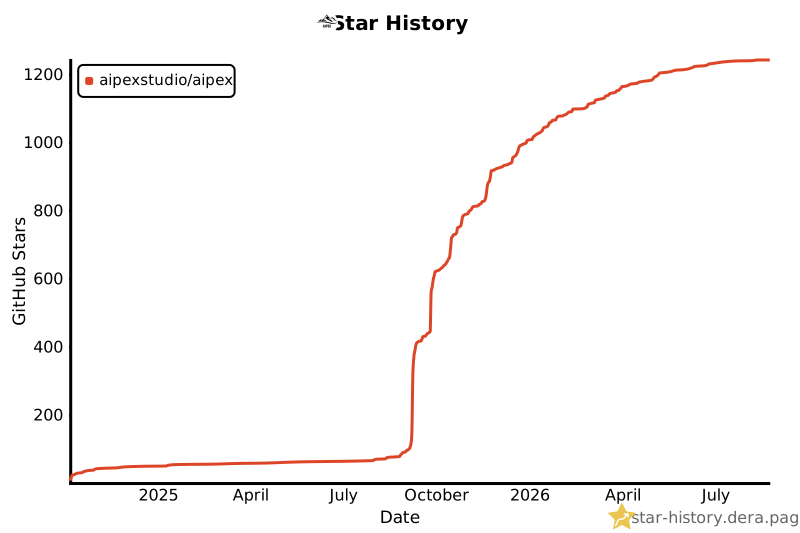](https://star-history.dera.page/#AIPexStudio/AIPex&type=Date)
---
Made with ❤️ by the AIPex Team