⏳ This skill is pending AI review.
Scores will appear once the review pipeline completes.
ticket-review
Review a ticket's branch, Claude's or your own, against the ticket: every acceptance criterion implemented and tested, gaps fixed, full local run green.
Choose how to use this skill
You do not need every option. Choose the path your AI client supports. The stable page stays the same; versioned files are immutable.
1. Native installer
This listing has no registered native installer command. Use the complete package or source fallback below, depending on what your client supports.
Do not guess an installer command or replace an existing version without reviewing the diff.
2. Complete package recommended
Download the ZIP when available. It includes SKILL.md plus the references, security notes and version metadata.
No complete ProSkills package is published for this listing yet.3. Prompt-only
Copy the prompt above when the agent can read the stable page or when you want to adopt the workflow without installing a skill.
Need only the instruction file?
Download SKILL.md only if your client requires a single file. The complete ZIP is safer for a full installation because it preserves the references and release context.
No path installs or executes anything by itself. Your agent still needs access to the project files. Before updating, compare the installed version and review the diff.
// RATINGS
Not yet listed on ClawHub or SkillsMP
// README
Peekaping
Open-source, self-hosted uptime monitoring. A modern, API-first Uptime Kuma alternative built with Go and React.
Website · Live demo · Docs · Discord



Peekaping checks your websites, APIs, databases and message queues, alerts your team where it already talks when something goes down, and publishes status pages for your users. It runs on your own server, with your data in SQLite or PostgreSQL.

[!WARNING] Peekaping is in beta. It's under active development and some features may change. Try it outside production first, and please report the issues you find: your feedback is what gets Peekaping to production-ready.
Quick start (Docker + SQLite)
docker run -d --restart=always \
  -p 8383:8383 \
  -e DB_NAME=/app/data/peekaping.db \
  -v $(pwd)/.data/sqlite:/app/data \
  --name peekaping \
  0xfurai/peekaping:latest
Then open http://localhost:8383. The image runs Peekaping in single mode: one process, as a non-root user, with no Redis. It serves the web app and the API on port 8383. For HTTPS, put a reverse proxy in front of it.
| Setup | Guide |
|---|---|
| Docker + SQLite | docs.peekaping.com/self-hosting/docker-with-sqlite |
| Docker + PostgreSQL | docs.peekaping.com/self-hosting/docker-with-postgres |
| Kubernetes (Helm) | docs.peekaping.com/self-hosting/kubernetes-helm |
These images run single mode, the default for new installs. Cluster mode (Kubernetes with Helm, or Docker Compose) is for installs that need to scale out. See Deployment modes to choose.
MongoDB storage was removed. If you ran Peekaping on MongoDB, move your data to SQLite or PostgreSQL before you upgrade.
Prefer a managed host? 
Features
Monitors
| Category | Monitors |
|---|---|
| Web & network | HTTP/HTTPS, TCP, Ping (ICMP), DNS, SMTP |
| Application & infrastructure | Push (incoming heartbeat), Docker container, gRPC, SNMP |
| Databases & caches | PostgreSQL, MySQL/MariaDB, Microsoft SQL Server, MongoDB, Redis |
| Messaging & streaming | MQTT broker, RabbitMQ, Kafka producer |
Alert channels
| Category | Channels |
|---|---|
| Chat & collaboration | Slack, Discord, Telegram, Microsoft Teams, Google Chat, Mattermost, Matrix, Signal, WhatsApp (WAHA), LINE Messenger, WeCom |
| On-call & incidents | PagerDuty, Opsgenie, Grafana OnCall, PagerTree |
| Email, SMS & webhooks | Email (SMTP), SendGrid, Twilio, Webhook |
| Push notifications | ntfy, Gotify, Pushover, Pushbullet |
Everything else
- Status pages, public or private, on your own domain
- SVG status badges for your READMEs and dashboards
- Maintenance windows, once or on a schedule, so planned work doesn't page anyone
- Two-factor authentication and brute-force login protection
- TLS certificate expiry notifications
- API keys and a REST API with an OpenAPI spec for everything in the app
- Proxies and tags to organize monitors
- A community Terraform provider
Why Peekaping
Peekaping started from our experience with Uptime Kuma. We respect the project and what it gave the community, and we wanted to fix the limits teams hit when they scale it and wire monitoring into their DevOps processes.
- API-first. Every function in the app is available through the REST API, so you can automate it from CI/CD and Infrastructure as Code tools.
- Fast and light. The server is written in Go, which keeps CPU and RAM use low even with many monitors.
- Typed end to end. A compiled Go server and a typed React + TypeScript client make it stable and predictable.
- Easy to extend. The modular server adds new monitor types and notification channels without touching the core.
- Your choice of storage. SQLite for an easy start, PostgreSQL for production.
Roadmap
General
- Incidents
- Migration tool from Uptime Kuma
- Multiple users, groups and access levels
- Group monitors
- Homepage widget support (in progress)
- Gatus-like conditions
Monitors
- HTTP(S) keyword and JSON query
- Steam
- GameDig
- Playwright
Notification channels
- WhatsApp (Whapi)
- CallMeBot (WhatsApp, Telegram Call, Facebook Messenger)
- AliyunSMS (阿里云短信服务)
- DingDing (钉钉)
- ClickSend SMS
- Rocket.Chat
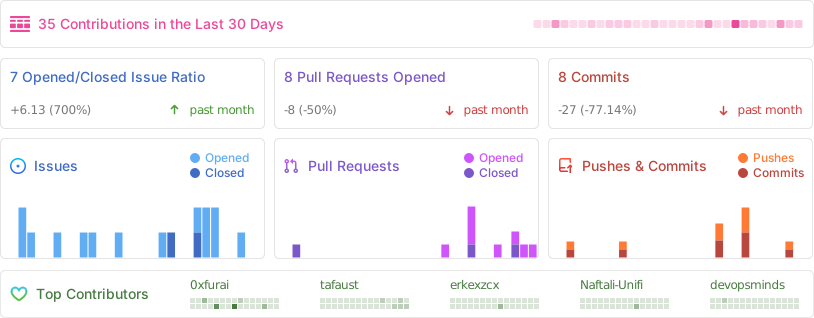
Contributing
We welcome contributions! Please:
- Fork the repository
- Set up your environment with the development guide. You need Go, Node.js and Bun, installed any way you like;
make setupchecks them. - Create a feature branch
- Make your changes
- Add tests if applicable
- Submit a pull request
Community and support
- Bugs and feature requests: GitHub Issues
- Chat: Discord
- Dev logs and tips: @0xfurai on X

License
This project is licensed under the MIT License. See the LICENSE file for details.
Acknowledgments
- Inspired by Uptime Kuma
- Built with amazing open-source technologies
- Thanks to all contributors and users
Choosing an Uptime Kuma alternative
What to look for
Look at the technology stack and architecture first. Tools built with compiled languages (Go, Rust) are faster and use fewer resources. An API-first design is critical for automation and for CI/CD integration.
Make sure the tool supports the protocols you need to monitor (HTTP/HTTPS, TCP, databases, Docker, gRPC) and the channels your team uses. Flexible storage (SQLite or PostgreSQL), security features (two-factor login, API keys), a modular architecture you can extend, and an active community with good documentation matter too.
How to choose
Decide how you'll deploy it. Self-hosted tools give you full control over your data and deep customization, but you run and maintain them. Cloud services set up quickly and update themselves, but limit customization and cost a monthly subscription.
Then test it in practice: deploy it, create real monitors of different types, simulate fail
// HOW IT'S BUILT
// FILES
2 files shipped with this skill. Inline text is the catalog copy. The upstream link is the source repository.
.agents/skills/ticket-review/SKILL.md2.6 KBupstream ↗
--- name: ticket-review description: "Review a ticket's branch, Claude's or your own, against the ticket: every acceptance criterion implemented and tested, gaps fixed, full local run green." disable-model-invocation: true argument-hint: "PP-<n> | <branch>" --- # Ticket: review Start with [setup](../ticket/SETUP.md). ## 1. Pin the criteria Use the acceptance criteria in the ticket's `## Agent plan`. Without a plan (the user implemented straight from the ticket), write them from the ticket the way [PLAN.md](../ticket-plan/PLAN.md) defines them: one observable behaviour per requirement, numbered AC1, AC2, and so on. With no ticket at all, take them from the PR description or ask the user. Also pin the branches: the plan's PR stack, or the ticket's branches as they are, bottom to top. Uncommitted changes in the checkout may be the user's unfinished work: ask whether they belong in it, and leave them untouched until they answer. Done when: you have a numbered list of criteria, the branch list, and a clean or explained working tree. ## 2. Check Brief an agent ([DELEGATE.md](../ticket/DELEGATE.md)) with only pointers: the ticket key, the criteria, the branch list, and `git diff origin/main...<top branch>`. Its task: > For each acceptance criterion, report: implemented (file:line), tested (test name), or missing. Then list: changes outside the criteria; likely bugs; GLOSSARY terms misused; UI strings missing from any of the 45 locale files; code that brings back MongoDB storage (ADR 0001: it was removed; the MongoDB monitor type and `bun db import-mongo` stay). Quote the criterion for each finding. Under 400 words. ## 3. Fix Sort the findings, then brief one agent ([DELEGATE.md](../ticket/DELEGATE.md)) with every real one: missing or weak tests (red first, as in [TESTING.md](../ticket/TESTING.md)), missing translations, bugs, code that brings back MongoDB storage. It commits each fix on the branch it belongs to and carries it up the stack ([STACK.md](../ticket/STACK.md)). When the branch is the user's own work, the brief says to fix it the way they built it. A finding whose fix would change their approach or scope goes to the user first, with the brief in [PLAN.md](../ticket-plan/PLAN.md). The same agent then runs the full local run in [TESTING.md](../ticket/TESTING.md) on each branch merged with `origin/main`. Repeat the check until it comes back clean. Done when: every criterion has code and test evidence in a table, no finding is open, and the full local run passes. Show the user the table. Run alone, end by telling them the next step: `/ticket <PP-n> from pr`.README.mdupstream ↗
Contents are not inlined in the catalog. Open the upstream file.
Plain-text copy, no login: /skill-bundles/0xfurai-peekaping-agents-skills-ticket-review.md