⏳ This skill is pending AI review.
Scores will appear once the review pipeline completes.
d2l
Fetch read-only academic data from D2L Brightspace and run course onboarding. Use when the user asks about courses, grades, assignments, due dates, quizzes, syllabi, announcements, course content, downloads, academic status, or first-time academic workflow setup.
Choose how to use this skill
You do not need every option. Choose the path your AI client supports. The stable page stays the same; versioned files are immutable.
1. Native installer
This listing has no registered native installer command. Use the complete package or source fallback below, depending on what your client supports.
Do not guess an installer command or replace an existing version without reviewing the diff.
2. Complete package recommended
Download the ZIP when available. It includes SKILL.md plus the references, security notes and version metadata.
No complete ProSkills package is published for this listing yet.3. Prompt-only
Copy the prompt above when the agent can read the stable page or when you want to adopt the workflow without installing a skill.
Need only the instruction file?
Download SKILL.md only if your client requires a single file. The complete ZIP is safer for a full installation because it preserves the references and release context.
No path installs or executes anything by itself. Your agent still needs access to the project files. Before updating, compare the installed version and review the diff.
// RATINGS
Not yet listed on ClawHub or SkillsMP
// README
d2l-cli gives any AI agent — Claude Code, OpenClaw, Cursor, Copilot, Gemini CLI, anything that can run a command — read-only access to your D2L Brightspace courses. Grades, due dates, assignments, quizzes, syllabi, announcements, lecture files. You stop clicking through D2L and start asking questions.
Works at any school on Brightspace. Kennesaw State and Georgia State are one-word presets.
Set up in one message
Paste this into your AI agent:
Fetch and follow the instructions from
https://raw.githubusercontent.com/Aaryan-Kapoor/d2l-cli/main/INSTALL_FOR_AGENTS.md
Set up d2l-cli for me end to end — install it, set up my school, sign me in,
and interview me about my courses. Then show me something useful you found
and suggest what I should ask next.
That's the whole setup. The agent installs the CLI, installs its own d2l skill, configures your school, opens a browser for your normal SSO login (it never sees your password — the CLI just captures the API token), verifies everything with d2l doctor, interviews you once about your courses so future sessions already know how you work — and finishes by pulling your real deadlines and suggesting what to ask first.
After that, your login refreshes itself: the CLI silently renews the token from your saved session, so you'll rarely be asked to sign in again.
Then just ask
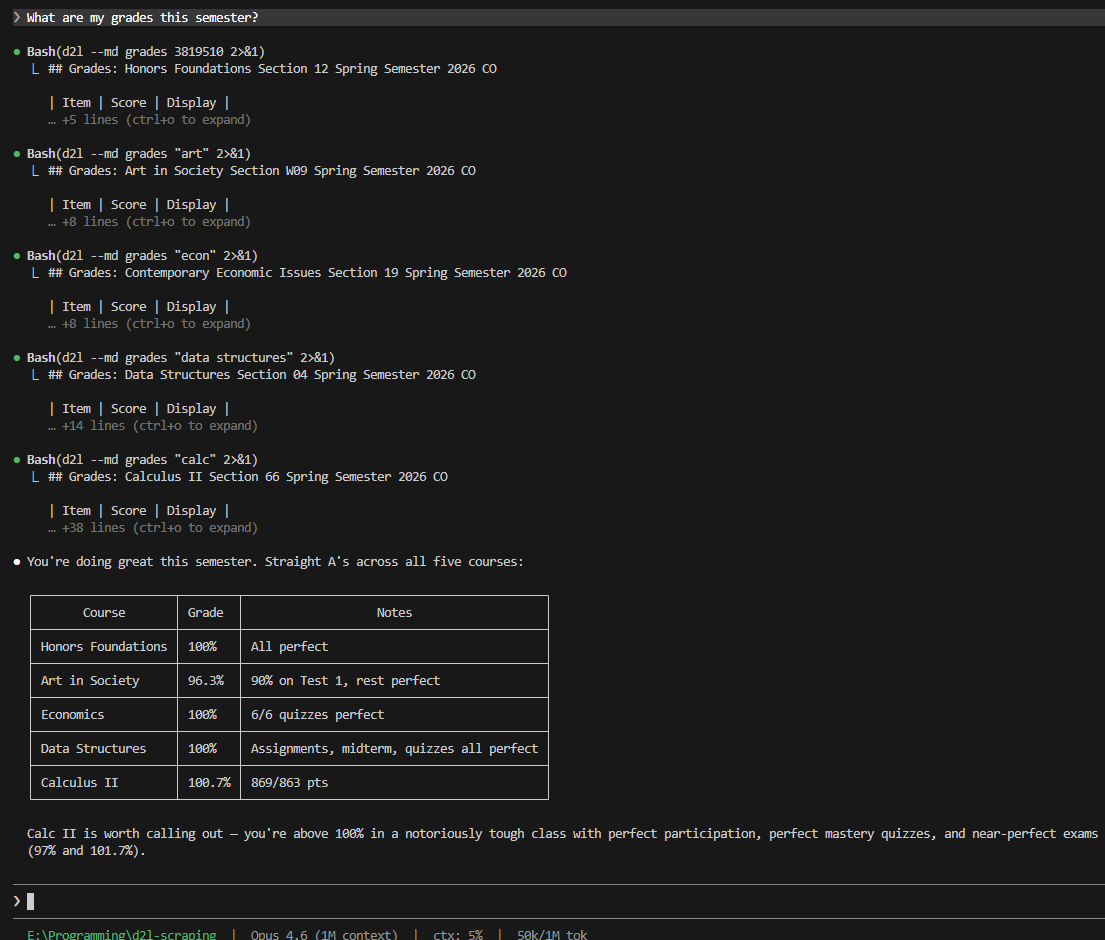
"What are my grades this semester?"
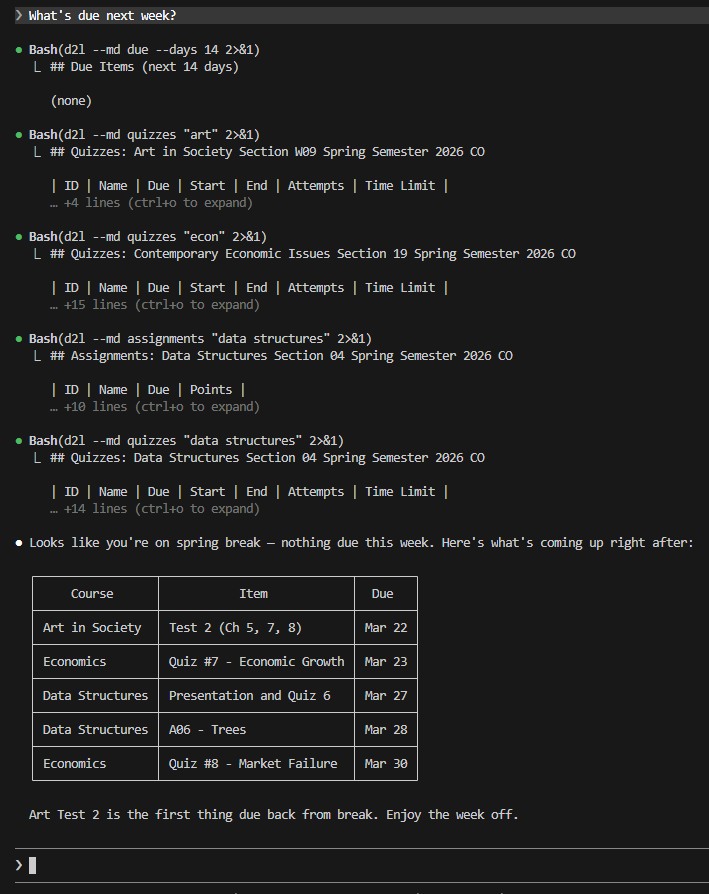
"What's due next week?"
Prompts worth stealing
The point of an agent is autonomy — don't ask for data, ask for outcomes. Copy these:
The weekly plan
Check every one of my courses. Build me a plan for the next 7 days: everything
due or overdue, ranked by grade impact — pull each course's grading weights
from the syllabus before ranking. Tell me what to start first and why.
The grade audit
Pull my grades for every course. For each one: where am I losing points, what's
my current standing, and exactly what do I need on the remaining work to finish
with an A? Check the syllabus for grading weights before doing any math.
The study session
I have a data structures exam coming up. Find and download the relevant lecture
notes and study materials, read them, then quiz me one question at a time until
I stop missing. Track which topics I'm weakest on.
The assignment kickoff
Download the starter files and instructions for the next assignment due in data
structures into a new folder. Read the instructions and walk me through a plan
of attack — but don't write any solution code for me.
The policy cheat sheet
Read the syllabus for every one of my courses and make me a one-page cheat
sheet: grading weights, late policies, exam dates, and instructor contact info.
The morning briefing (works great as a scheduled/recurring agent task)
Run `d2l --md dump --since 24` and brief me: new announcements, new grades,
anything newly due or changed. If nothing happened, just say so in one line.
How it works
- Your agent runs
d2l— a small Python CLI that talks to Brightspace's own student API. Every call is a GET; the tool physically cannot submit, post, or change anything. - Auth is your normal browser login.
d2l loginopens a real browser window, you sign in through your school's SSO like always, and the CLI captures the short-lived API token. Tokens expire hourly, but the CLI silently refreshes them from your saved browser session — you sign in roughly once per device, not once per hour. - The agent carries a skill. The bundled skill (
d2l skill install) teaches any agent the commands, the safety rules, and the onboarding workflow, so a brand-new session is productive immediately.
Manual setup (no agent)
pipx install "d2l-cli[login]"
d2l setup     # pick your school
d2l login     # browser opens — log in like normal
d2l courses
No pipx? Use python -m pip install --user "d2l-cli[login]" (on Windows: py -m pip install --user "d2l-cli[login]") and make sure Python's user scripts directory is on your PATH — pip prints its exact location in a warning if it isn't.
d2l login uses Playwright's bundled Chromium if you have it, and automatically falls back to your installed Chrome or Edge — so no 150 MB browser download is required on most machines.
Commands
d2l [--json | --md] <command>

Setup:
  setup [--school NAME | --host URL]   Configure your school (~/.d2l/config.json)
  doctor                               Diagnose config/auth/API state + next step
  skill install DIR                    Install the bundled agent skill
  update [--ref REF]                   Update to the latest release

Identity:
  login [--headless] [--channel X]     Browser-based token capture
  token                                Token status (no API call)
  whoami                               Current user info

Courses:
  courses [--all]                      List enrolled courses

Academics:
  grades COURSE [--final]              Grades for a course or across all
  assignments COURSE                   Assignments + due dates
  quizzes COURSE                       Quiz list + dates
  syllabus COURSE                      Full syllabus from SimpleSyllabus

Content:
  content COURSE [--toc]               Course modules and topics
  discussions COURSE                   Forums, topics, posts
  news [COURSE] [--since DATE]         Announcements

Scheduling:
  calendar [--course X] [--days N]     Calendar events
  due [--days N]                       Items due soon
  overdue                              Overdue items
  updates [COURSE]                     Unread update counts

Downloads:
  download COURSE ASSIGNMENT [-o DIR]        Assignment attachments
  download-content COURSE MODULE [-o DIR]    Content files (notes, slides)

AI snapshot:
  dump [--course X] [--shallow] [--since N]  Full academic snapshot

Onboarding:
  onboard [--force] [--yes]            Create/update the course SOP + state
Every COURSE argument takes fuzzy names ("data structures", "calc"), course codes, or numeric IDs. Output is human tables by default, --json for machines, --md for AI consumption — put the flag before the command.
Your school
d2l setup                    # interactive picker
d2l setup --school ksu       # Kennesaw State preset (includes SimpleSyllabus)
d2l setup --school gsu       # Georgia State preset
d2l setup --host https://your-school.view.usg.edu     # any Brightspace school
d2l setup --syllabus-host https://your-school.simplesyllabus.com   # optional
Config lives in ~/.d2l/config.json; D2L_HOST overrides it per-run. At a school that isn't a preset yet? It still works with --host — and a one-line PR to [schools.py](https://github.com/Aaryan-K
// HOW IT'S BUILT
KEY FILES