⏳ This skill is pending AI review.
Scores will appear once the review pipeline completes.
mcptoon
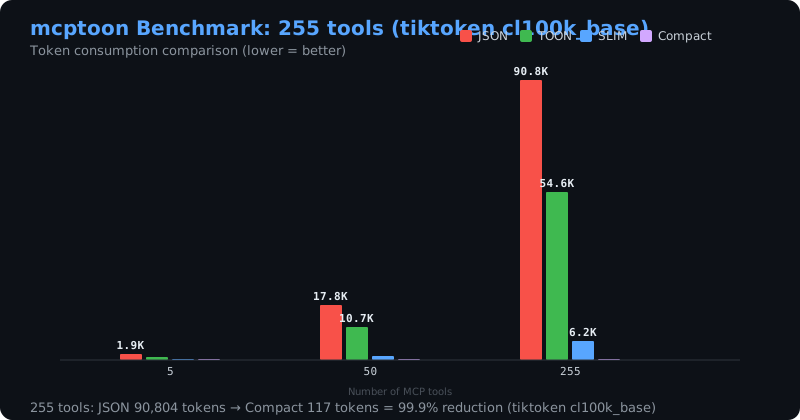
Compress MCP tool discovery with the mcptoon CLI. Trigger when a session has a large MCP tool catalog (many servers/tools), when the user mentions token cost, tool discovery, mcptoon, or asks to list/call MCP tools efficiently. Also route here when the user says the MCP tool list is too large, the agent context window is filling up with tool schemas, or they need the same MCP servers configured across Claude Code, Cursor, Codex, Cline, Windsurf and other agents. Also covers managing an agent's skill catalog with `mcptoon skills` (list / resolve / sync / add / remove, plus a version gate, derived Roo/OpenCode views, and tombstoned removals). Also route here when the user's MCP tools seem to have gone missing: a gateway is mounted in COMPACT exposure by default, so it withholds the upstream tool list from `tools/list` (they stay callable) — explain the preset and switch back with `mcptoon config set exposure full`. Also route here when a tool *result* looks truncated, compressed, or \"lost data\": result compression is on by default, originals come back via `mcptoon_retrieve handle=<id>`, and it turns off with `mcptoon config set compress off`. mcptoon compresses 71,929 tokens of tool schemas to 581 (-99.2%) and serves as an MCP 2026-07-28 stateless-first bridge.
Choose how to use this skill
You do not need every option. Choose the path your AI client supports. The stable page stays the same; versioned files are immutable.
1. Native installer
This listing has no registered native installer command. Use the complete package or source fallback below, depending on what your client supports.
Do not guess an installer command or replace an existing version without reviewing the diff.
2. Complete package recommended
Download the ZIP when available. It includes SKILL.md plus the references, security notes and version metadata.
No complete ProSkills package is published for this listing yet.3. Prompt-only
Copy the prompt above when the agent can read the stable page or when you want to adopt the workflow without installing a skill.
Need only the instruction file?
Download SKILL.md only if your client requires a single file. The complete ZIP is safer for a full installation because it preserves the references and release context.
No path installs or executes anything by itself. Your agent still needs access to the project files. Before updating, compare the installed version and review the diff.
// RATINGS
Not yet listed on ClawHub or SkillsMP
// README
Install 1,000 skills and 1,000 MCP tools locally — and don't worry about the token context. mcptoon manages it all.
Its own compact format cuts the tool context by ~90% (99.2% on a 255-tool sample; run mcptoon status for your own number); no line of config to write for any desktop or command-line agent.
Connects to a 17,000+ MCP tool registry and searches skills on demand — nothing pre-installed, you pick what goes in.
It's just a 308KB native CLI — delete it anytime; keep it, and you never have to configure tools or skills for any agent again.









👉 See it first: landing page · 30-second token calculator · 中文
👉 Or run it: pip install mcptoon && mcptoon bench — it measures what your own tools and skills cost, on your machine.
👉 Developer docs · Contributing · Issues
Why mcptoon
Every MCP agent (Claude Code, Cursor, Codex, …) loads the full description of every tool and every skill into its context window before it does any work — and re-sends it every turn. On 255 tools that is 71,929 tokens: more than half of a 128K window spent on descriptions, before the first question.
How the token saving works
mcptoon keeps those descriptions on disk, not in context, and hands the agent a compact view instead:
- A name index, not full schemas. Picking a tool only needs its name — 255 tools become 581 tokens (−99.2%). The full schema is fetched on demand with
mcptoon inspect, only when a tool is actually called. - Skills the same way. One resident pointer (39 tokens) plus one lookup (501 tokens) replaces loading every
SKILL.mdin full — 926,232 → 39 + 501 (−99.9%). - Results too.
--toonencodes a tool's result ~34% smaller than JSON.
Nothing is lost: the full schema and the full skill text stay one command away. Only the context window is spared.
mcptoon is a 308KB, zero-dependency native CLI that manages every MCP tool and agent skill on your computer — and shares them across all your agents with no config written by you.
This isn't just us talking
Those numbers are ours — but "loading every tool schema into context is expensive" is not a claim only we make:
- Anthropic's engineering write-up — tool schemas flooding the context window is a real cost; one example drops from 150,000 tokens to 2,000
- Firecrawl's benchmark — the same task cost 1,365 tokens via CLI vs 44,026 via MCP (32×)
- Scalekit's benchmark — CLI 10–32× cheaper, 100% reliable vs MCP's 72%
- MCP-Zero (arXiv:2506.01056) — on-demand tool retrieval, near-constant cost regardless of tool count
mcptoon is the one you can use today, covering every agent at once.
Two ways in
Install once, and every desktop AI you have — Claude Desktop, Claude Code, Codex, Cursor, Windsurf, Cline, VS Code Copilot and any other agent — shares all the tools and skills you already have. You write nothing in any agent's config.
Script it. mcptoon is a plain CLI with stable JSON output and an mcptoon serve MCP endpoint — wire it into your own agent, CI, or app.
Measure your numbers: pip install mcptoon && mcptoon bench — it reports your own
catalog, not the fixed 255-tool sample below (that sample's method is in
docs/tiktoken-benchmarks.md).
| Without mcptoon | With mcptoon | |
|---|---|---|
| Descriptions in context | full description of every tool + skill, re-sent every turn | a compact view — 581 tokens for 255 tools (−99.2%, lossless) |
| Adding a tool or skill | hand-write JSON in every agent | one command — no agent config touched |
| Which agents get it | only the ones you configured | every agent on the machine — they just run mcptoon |
| Finding tools & skills | hunt GitHub by hand | install --search (17,000+ MCP servers) + skills search |
| Starting from scratch | wire tools one by one | 4 built-in starter packs — one command to a working set |
Skills work the same way: 926,232 tokens of SKILL.md text → 39 resident + 501 per lookup (−99.9%). Call results shrink another ~34% with --toon.
Path 1 · I just use AI tools
You have a desktop AI — Claude, Codex, Cursor, Windsurf, Cline, VS Code Copilot. Today, adding a tool or a skill means hand-editing that agent's JSON. mcptoon removes that step:
-
Install once.
pip install mcptoon && mcptoon quickstartquickstartfinds your MCP servers, writes your config, and registers mcptoon in every agent it detects. (Skipquickstartand the first command you run still self-heals: it installs mcptoon's own skill into each agent and builds the skill index, once per machine.) -
Add tools and skills in one place — here, not in each agent.
mcptoon install --search github # find and install any MCP server mcptoon skills search "make a PDF" # find a skill by what it does -
Use them from any agent. Your agent runs
mcptoonlike any other command — no config, no restart. See Works with every AI agent.
Want a head start? Four built-in starter packs — essentials, web-research, code-review, docs — stand up a working t
// HOW IT'S BUILT
KEY FILES