⏳ This skill is pending AI review.
Scores will appear once the review pipeline completes.
ruanzhu-kit
使用自带或用户指定的软著 Word 模板填写软件资料、真实源代码和说明书,在 WPS 或 Word 中保留原排版并导出 PDF。适用于软著模板填充、源码文档和使用手册整理,不自动编写申请正文。
Choose how to use this skill
You do not need every option. Choose the path your AI client supports. The stable page stays the same; versioned files are immutable.
1. Native installer
This listing has no registered native installer command. Use the complete package or source fallback below, depending on what your client supports.
Do not guess an installer command or replace an existing version without reviewing the diff.
2. Complete package recommended
Download the ZIP when available. It includes SKILL.md plus the references, security notes and version metadata.
No complete ProSkills package is published for this listing yet.3. Prompt-only
Copy the prompt above when the agent can read the stable page or when you want to adopt the workflow without installing a skill.
Need only the instruction file?
Download SKILL.md only if your client requires a single file. The complete ZIP is safer for a full installation because it preserves the references and release context.
No path installs or executes anything by itself. Your agent still needs access to the project files. Before updating, compare the installed version and review the diff.
// RATINGS
// README
ruanzhu-kit
中国软著登记材料生成器 —— 源码进去,页数一页不差的 PDF 出来




一条命令出齐 程序鉴别材料 PDF + 说明书 PDF + 在线表单填写清单, 不装 Word、不拼页码、不怕页数漂移。
中文 · English
三分钟跑通 · 分页原理 · 当 AI 技能用 · 避坑清单 · 企业 FDE 合作
🤝 推荐搭配 OpenWorkBuddy 使用 —— 最好用的本地开源 AI 办公 Agent 🏢 企业 FDE 驻场 / Agent 落地 / 私有化部署合作 → [email protected]
[!IMPORTANT]
🤝 推荐搭配 OpenWorkBuddy 一起用
OpenWorkBuddy —— 最好用的本地开源 AI 办公 Agent。 跑在你自己电脑上,说一句话,它自己规划、动手、验收, 把 PPT / Word / Excel / 网页直接落到硬盘上;DeepSeek、通义千问、豆包、Claude、Ollama 都能接。
- 🏢 适合企业本地部署:数据不出本机 / 内网,支持 Docker 一键部署
- 🛠️ 支持商用二次开发:个人免费,企业商用与二次开发提供商业授权
- 🧩 本仓库就是它的技能:把 ruanzhu-kit 放进 OpenWorkBuddy 的
skills/,说一句「帮我准备这个项目的软著材料」,清点、分页、排版、核页数这些机械活自动做完

Generates a complete Chinese software-copyright (软著) registration package from a source tree: a page-exact source-code PDF, a manual PDF, and a copy-paste checklist for the online form. Plain Node, zero dependencies. Works as a Claude Code / Agent SDK skill.
[!WARNING]
✍️ 说明书和表单,建议人工填写
2026 年起软著对 AI 管得明显严了:申请材料里要手抄并签字一段声明——本软件确系人的独立开发, 未使用 AI 开发编写代码、撰写文档或生成登记申请材料。按申请表上的说法,声明失实会被记入失信名单,并承担相应法律责任。
另一方面,不同 AI 的水平差得很远,让 AI 代写的说明书和功能描述,常见的问题是写了软件里没有的功能、 截图和文字对不上、满篇套话,这些本身就是驳回的风险。所以我们的建议是:
- 说明书、表单里的「开发目的」「面向行业」「主要功能」「技术特点」,请本人照着软件亲手写
- 本工具的命令行不调用任何 AI 模型,只做机械活:清点源码、按规定分页排版、加页眉页码、数行数、核页数、算字数
- 用 AI 写出来的项目,别签这份声明;拿不准的,先问中国版权保护中心或专业律师
更多原因见下文。
[!TIP] ⭐ 求一个 Star! 如果它帮你省下了一次「页数不对、整份重做」,请给 ruanzhu-kit 和 OpenWorkBuddy 都点一下 Star—— 让下一个被软著和办公杂活折腾的人也能搜到它们。
$ ruanzhu source
已生成 ruanzhu/out/①程序鉴别材料_源程序前30页后30页_示例项目.pdf

核验
  ✓ 页数                 实际 62 页,期望 62 页
  ✓ 封面                 示例项目管理系统V1.0源程序软件名称:示例项目管理系统V1.0版本号:V1.0
  ✓ 说明页在第 32 页     说明本软件源程序共103145行,按每页50行排版,共2132页。依据《计算机软件著作权登记办法》第
  ✓ 末页非空             region.setCenter(cp); } } }
10 万行代码、2132 页排版,交上去的是 62 页:封面 + 前 30 页 + 说明页 + 后 30 页。
💡 为什么要有它
软著材料最麻烦的地方不是写,是页数。源程序超过 60 页只能交前连续 30 页 + 后连续 30 页, 而 Word 排版导出的 PDF 页数会随版本、字体、打印机驱动漂——同一份稿子在两台机器上能差出十几页, 一漂整份材料重做。这个工具在渲染之前就把每页装哪些行算死,出完再回读 PDF 数一遍页码。
| 手工 Word 排版 | ruanzhu-kit | |
|---|---|---|
| 页数 | 随字体、版本、打印驱动漂移 | 渲染前算死,出完回读 PDF 核验 |
| 超长代码行 | 折行把页面撑破,一页变两页 | 按折行后的行高单位计算 |
| 页眉页码 | 手动插,封面、说明页还得单独处理 | 每页页眉自动写软件名称和版本号,正文页码 1–60 连续 |
| 前 30 + 后 30 页 | 手动截取、手动插说明页 | 自动截取,自动写说明页(略去多少行) |
| 混进依赖/构建产物 | 常见,行数虚高被驳回 | count 一步把可疑文件列在最前面 |
| 表单「主要功能」字数 | 自己数 | 逐字段算字数,带校验 |
| 开发/运行环境六项 | 一项项自己想 | 按本机配置和项目依赖自动填好,核对即可 |
| 表单描述写成套话 | 「赋能」「一站式」审查员一眼看穿 | 你亲手写完,口吻检查帮你挑出套话和 Markdown 符号 |
| 依赖 | Word / WPS | Node 18+ 和一个 Chrome,零 npm 依赖 |
| 命令行代劳 | — | 自带 SKILL.md,agent 可以替你敲命令;说明书和表单描述仍由你写 |
🚀 三分钟跑通
需要 Node 18+ 和 Chrome / Chromium / Edge 任一,版本 131 以上(页眉页码要用);CHROME_PATH 可指定路径。
cd 你的项目
npx github:CatCatUncle/ruanzhu-kit init   # 生成 ruanzhu.config.json 和说明书骨架
嫌 npx 长就 clone 下来,后面用 node 路径/bin/ruanzhu.mjs,或者 npm link 之后直接叫 ruanzhu:
git clone https://github.com/CatCatUncle/ruanzhu-kit.git && cd ruanzhu-kit && npm link
打开 ruanzhu.config.json,把软件全称、著作权人、开发完成日期填准,然后:
ruanzhu count # 先看清点到哪些文件、多少行、排版几页
接着自己动手写两样东西(工具只给骨架和写法,不替你写):
ruanzhu/说明书.md:照着软件实际界面,一章章补完骨架里的……,截图用真实运行界面ruanzhu.config.json的form:开发/运行环境六项已按你的电脑和依赖预填,核对一下; 开发目的、面向行业、主要功能、技术特点四项自己写,写法见docs/form-fields.md
写完一起出:
ruanzhu all --doc # 两份 PDF + 表单清单 + 可编辑的 .doc 留存件
count 这一步别跳。它会把收进材料的文件按行数列出来,node_modules 之外的脏东西
(构建产物、评测数据、运行期生成的文件)基本都在前十行里现形——行数虚高是驳回的高频原因。
看到不该进的,加进配置的 exclude / excludeFiles 再跑一次。
📦 它出的东西
| 文件 | 传到哪 |
|---|---|
①程序鉴别材料_源程序前30页后30页_<软件名>.pdf | 「程序鉴别材料」栏 |
②文档鉴别材料_说明书_<软件名>.pdf | 「文档鉴别材料」栏 |
表单填写清单.md | 在线表单十项逐字段复制,带字数校验和口吻检查 |
<软件名>源程序.doc / <软件名>说明书.doc | --doc 产出,留存和改字用 |
营业执照、权属证明这些「其他证明文件」得你自己准备。
⌨️ 命令
| 命令 | 作用 |
|---|---|
ruanzhu init | 生成配置和说明书骨架(11 章固定结构) |
ruanzhu count | 只统计,不出文件。核对文件清单用 |
ruanzhu source | 出程序鉴别材料 PDF,并回读核验页数 |
ruanzhu manual | 把 说明书.md 渲成文档鉴别材料 PDF |
ruanzhu form | 出表单填写清单:环境类字段自动补,逐项算字数,挑套话 |
ruanzhu all | 以上三样一起出,最后打一份自检清单 |
选项:--doc 同时出 Word 留存件,--lines-per-page 60 排密一点(默认 50,上限 66),
--out <dir> 换输出目录。
🧮 分页是怎么算的
一行 300 字符的代码在 A4 上会折成 4 行。按「行数」切页,超长行必然把页面撑破; 所以这里算的是折行之后占几个行高单位:
A4 纵向 210mm,左右各 2cm 边距  → 正文宽 481pt
Courier New 9pt,字符宽 0.6em   → 每行 89 个字符(中文算 2 个)
正文高 728pt ÷ 行高 11pt        → 每页最多 66 行,默认排 50 行
每一行先算出占几个单位,累加到 50 就换页,分页点用 page-break-after 钉死,
再交给 Chrome 无头模式渲染。页数在生成之前就是确定的。
页眉(软件名称 + 版本号)和右上角页码放在 CSS @page 的页边距里,不占正文高度,
所以加了页眉也不影响每页行数。封面和说明页不出页眉、不计页码,正文页码是连续的 1–60。
超过 60 页的项目取整份源程序的前 30 页和最后 30 页,中间插一页说明页写清略去多少行—— 注意不是「把源码对半分再各凑 30 页」,那样代码量一大每页会被撑到几百行。 成品是 62 页:封面 1 + 前 30 + 说明页 1 + 后 30。
核心实现在 lib/paginate.mjs,七十来行,可以单独拿走用。
🤖 当 AI 技能用
上传到只支持两级目录的 Skill 平台
在仓库目录运行:
npm run pack:skill
上传仓库旁生成的 ruanzhu-kit.skill.zip。ZIP 根目录直接包含 SKILL.md,
其余文件最多是 templates/文件、docs/文件 这样的两级结构。
也可以用 npm run pack:skill -- /目标路径/ruanzhu-kit.skill.zip 指定输出位置。
Skill 默认流程是填 Word 模板,再通过 WPS/Word 导出 PDF。
包内自带用户提供的源程序和使用说明书两份 .doc 原模板,以及模板位置说明和工作副本脚本。
只填已有的实际资料,不自动代写正文;保留模板排版,替换示例源码与截图后检查并导出。
原有命令行 HTML 渲染器仍可单独使用,不包含在这份模板 Skill 包中。
不要上传 GitHub 的源码 ZIP,或在严格限制层级的平台直接导入仓库根链接:
仓库中的 .github/workflows/ 和 .github/ISSUE_TEMPLATE/ 是 GitHub 管理配置,
会触发目录层级限制。打包命令只收集模板工作流所需文件,并检查资源层级。
本地安装
仓库根目录的 SKILL.md 是给 AI agent 读的版本,用的是通用技能包格式
(Claude Code / Claude Agent SDK 都认)。clone 到技能目录即可:
git clone https://github.com/CatCatUncle/ruanzhu-kit.git ~/.claude/skills/ruanzhu-kit
推荐放进 OpenWorkBuddy(最好用的本地开源 AI 办公 Agent,跑在自己电脑上的
AI 办公助理)的 skills/ 目录,让它来跑:
git clone https://github.com/CatCatUncle/ruanzhu-kit.git <OpenWorkBuddy 目录>/skills/ruanzhu-kit
装完直接说「用这套模板填写我的软著材料,再导出 PDF」,并提供软件资料、源码、正文和截图。 技能会打开 Word 工作副本填写,替换旧项目示例并核对排版,再从 WPS/Word 导出 PDF; 没有提供的正文先留给你补充,不自动代写。命令行生成器是另一种独立使用方式。
⚠️ 别踩的坑
| 坑 | 后果 |
|---|---|
| 用 Word 排版导 PDF | 页数漂移,整份重做 |
| 统计行数时混入依赖和构建产物 | 行数虚高,驳回 |
| 著作权人写简称 | 驳回。必须与营业执照/身份证一字不差 |
| 「开发该软件的操作系统」填成运行平台 | 逻辑矛盾。前者是你写代码用的系统 |
| 「软件的主要功能」少于 500 字 | 驳回。工具会替你数 |
| 公司申请缺权属证明 | 驳回。备《职务开发声明》或《著作权转让合同》 |
| 让 AI 代写说明书或表单描述 | 和手抄的「未使用 AI」声明冲突;AI 编出软件里没有的功能,也会被驳回 |
| 用 AI 写的代码去申请 | 同上,声明失实的后果落在申请人自己身上 |
字段逐项怎么措辞见 docs/form-fields.md,
大型项目的配置怎么写见 examples/large-project.md。
📌 说明
这是个排版和清点工具,不是法律意见。材料能不能过审取决于你项目本身和审查员, 提交前请自己核对一遍著作权人、源程序量和证明文件。
// HOW IT'S BUILT
// FILES
32 files shipped with this skill. Inline text is the catalog copy. The upstream link is the source repository.
SKILL.md5.0 KB18aec37dd704upstream ↗
--- name: ruanzhu-kit version: "1.2.1" display_name: "软著模板填写与导出" display_name_en: "Software Copyright Template Filler" description_zh: "使用软著 Word 模板填入实际软件资料、源码、说明书和截图,保留原排版,经核对后通过 WPS 或 Word 导出 PDF,不自动代写正文。" description_en: "Fill software copyright Word templates with supplied project details, source code, manual text and screenshots, preserve formatting, and export PDF through WPS or Word after review. Does not draft missing content." description: 使用自带或用户指定的软著 Word 模板填写软件资料、真实源代码和说明书,在 WPS 或 Word 中保留原排版并导出 PDF。适用于软著模板填充、源码文档和使用手册整理,不自动编写申请正文。 --- # 软著模板填写与导出 默认使用用户提供的两份 Word 底稿,完成「复制模板 → 填入资料 → 核对排版 → 导出 PDF」。 交付可编辑文档和对应 PDF。原模板保留不动。 ## 自带模板 - [templates/source-template.doc](templates/source-template.doc):源程序模板。 - [templates/manual-template.doc](templates/manual-template.doc):使用说明书模板。 这两份是实际的旧版 Word `.doc`,不是 HTML,也不是空白占位表。 模板内带有示例源码、截图、软件介绍及旧版本信息。先阅读 [docs/template-workflow.md](docs/template-workflow.md),再动手填写。 用户另指定模板时,以用户当次提供的模板为准。 ## 填写范围 - 使用用户提供、确认过的资料和实际项目文件。只做字段替换、原文搬填、代码整理、真实截图插入和必要的格式调整。 - 不自动起草、扩写或润色软件功能、技术特点、说明书正文,不添加模板之外的宣传句、前言或工具署名。 - 正文保持模板语气,不加「AI 生成」「由本工具制作」等说明。原文中的作者、权属或开发情况声明不得擅自改动。 - 缺少的软件名称、版本、源代码、操作说明或截图,应集中列给用户补充;不拿模板中的示例当作实际资料。 - 用户只要求填模板时先交可编辑文档;用户要求导出 PDF 时,填写和检查完成后再导出。 ## 开始工作 先查用户已给的资料,确定:软件全称、版本、真实项目目录或源码清单、说明书正文、截图及输出目录。 模板中的姓名、日期、环境配置等也必须有实际对应值。不相关的章节让用户确认如何调整。 已知信息不重复询问;缺项一次说明。 可以直接复制两份模板,也可以运行自带脚本建立工作副本: ```bash node <技能目录>/scripts/prepare-templates.mjs \ --name '用户的软件全称' --version 'V1.0' --out '/绝对路径/软著材料' ``` 脚本只复制模板和设置输出文件名,不填正文、不生成 PDF、不覆盖已有文件。 不要把这个步骤称为「已填写完成」。 ## 在文档软件中填写 1. 使用可用的 WPS/Word 文档编辑能力打开工作副本。没有文档编辑接口时,使用桌面界面操作。 2. 先检查封面、页眉、页脚、修订记录、目录和正文,再逐项替换名称、版本、日期、作者及环境参数。 3. 源程序模板中,清除原来的示例代码,再放入用户项目的真实源码。只替换内容区域,保留页眉页脚和模板段落格式;不能把模板示例算成用户代码。 4. 使用手册中,把示例游戏介绍、操作步骤、数据库说明和截图替换为用户提供的对应内容。保留原有标题、编号、表格与分页设置。 5. 如需换成 `.docx`,通过 WPS/Word「另存为」转换,检查版式后继续。不能只改扩展名。 6. 更新目录和页码,检查章节衔接、表格、截图尺寸、页眉与末页。每次替换大量正文后重新检查排版。 不要调用 `ruanzhu all`、`ruanzhu source`、`ruanzhu manual` 或重建 HTML 来替代这套模板流程。 不要根据模板原有的页数硬凑材料页数;按实际内容和用户确认的提交范围整理。 ## 导出与交付 填写、核对完成后,使用 WPS/Word 的「导出 PDF」或「另存为 PDF」。 导出对象是当前填写完成的文档,不能另写一套内容直接渲染 PDF。 若当前环境无法编辑或导出,说明缺少的能力,保留工作副本,不冒充已经完成。 打开导出的 PDF,核对封面、页眉、页码、正文、截图和最后一页;逐页查看有无缺字、遮挡或异常空白页。 检查「游戏名称」「王某」「2018-12-10」等模板残留,版本与用户给定值保持一致。 尚缺内容时保留可编辑草稿并说明缺项,不把它交成已完成材料。 交付: - `<软件名><版本>_源程序.doc` 或 `.docx` - `<软件名><版本>_使用说明书.doc` 或 `.docx` - 用户要求导出时,对应的两份 `.pdf` 回复只说明填写结果、文件位置和待补项;检查过程不插入正式文档。README.md16 KBadb4062edb24upstream ↗
<div align="center"> # ruanzhu-kit **中国软著登记材料生成器 —— 源码进去,页数一页不差的 PDF 出来** [](https://github.com/CatCatUncle/ruanzhu-kit/stargazers) [](https://github.com/CatCatUncle/ruanzhu-kit/actions/workflows/test.yml) [](LICENSE) [](package.json) [](package.json) [](SKILL.md) 一条命令出齐 **程序鉴别材料 PDF + 说明书 PDF + 在线表单填写清单**,<br> 不装 Word、不拼页码、不怕页数漂移。 **中文** · [English](README_EN.md) [三分钟跑通](#-三分钟跑通) · [分页原理](#-分页是怎么算的) · [当 AI 技能用](#-当-ai-技能用) · [避坑清单](#️-别踩的坑) · [**企业 FDE 合作**](#-关于作者--合作) <b>🤝 推荐搭配 <a href="https://github.com/CatCatUncle/openworkbuddy">OpenWorkBuddy</a> 使用 —— 最好用的本地开源 AI 办公 Agent</b><br> <sub>🏢 企业 FDE 驻场 / Agent 落地 / 私有化部署合作 → <a href="mailto:[email protected]"><b>[email protected]</b></a></sub> </div> > [!IMPORTANT] > ### 🤝 推荐搭配 [OpenWorkBuddy](https://github.com/CatCatUncle/openworkbuddy) 一起用 > > **[OpenWorkBuddy](https://github.com/CatCatUncle/openworkbuddy) —— 最好用的本地开源 AI 办公 Agent。** 跑在你自己电脑上,说一句话,它自己规划、动手、验收, > 把 PPT / Word / Excel / 网页直接落到硬盘上;DeepSeek、通义千问、豆包、Claude、Ollama 都能接。 > > - 🏢 **适合企业本地部署**:数据不出本机 / 内网,支持 Docker 一键部署 > - 🛠️ **支持商用二次开发**:个人免费,企业商用与二次开发提供商业授权 > - 🧩 **本仓库就是它的技能**:把 ruanzhu-kit 放进 OpenWorkBuddy 的 `skills/`,说一句「帮我准备这个项目的软著材料」,清点、分页、排版、核页数这些机械活自动做完 > > 👉 **[github.com/CatCatUncle/openworkbuddy](https://github.com/CatCatUncle/openworkbuddy)** [](https://github.com/CatCatUncle/openworkbuddy/stargazers) > Generates a complete Chinese software-copyright (软著) registration package from a > source tree: a page-exact source-code PDF, a manual PDF, and a copy-paste checklist > for the online form. Plain Node, zero dependencies. Works as a Claude Code / Agent SDK skill. > [!WARNING] > ### ✍️ 说明书和表单,建议人工填写 > > 2026 年起软著对 AI 管得明显严了:申请材料里要**手抄并签字**一段声明——本软件确系人的独立开发, > **未使用 AI 开发编写代码、撰写文档或生成登记申请材料**。按申请表上的说法,声明失实会被记入失信名单,并承担相应法律责任。 > > 另一方面,不同 AI 的水平差得很远,让 AI 代写的说明书和功能描述,常见的问题是写了软件里没有的功能、 > 截图和文字对不上、满篇套话,这些本身就是驳回的风险。所以我们的建议是: > > - **说明书、表单里的「开发目的」「面向行业」「主要功能」「技术特点」,请本人照着软件亲手写** > - 本工具的命令行**不调用任何 AI 模型**,只做机械活:清点源码、按规定分页排版、加页眉页码、数行数、核页数、算字数 > - 用 AI 写出来的项目,别签这份声明;拿不准的,先问中国版权保护中心或专业律师 > > 更多原因见[下文](#️-别踩的坑)。 > [!TIP] > **⭐ 求一个 Star!** 如果它帮你省下了一次「页数不对、整份重做」,请给 > **[ruanzhu-kit](https://github.com/CatCatUncle/ruanzhu-kit)** 和 **[OpenWorkBuddy](https://github.com/CatCatUncle/openworkbuddy)** 都点一下 Star—— > 让下一个被软著和办公杂活折腾的人也能搜到它们。 ```console $ ruanzhu source 已生成 ruanzhu/out/①程序鉴别材料_源程序前30页后30页_示例项目.pdf 核验 ✓ 页数 实际 62 页,期望 62 页 ✓ 封面 示例项目管理系统V1.0源程序软件名称:示例项目管理系统V1.0版本号:V1.0 ✓ 说明页在第 32 页 说明本软件源程序共103145行,按每页50行排版,共2132页。依据《计算机软件著作权登记办法》第 ✓ 末页非空 region.setCenter(cp); } } } ``` 10 万行代码、2132 页排版,交上去的是 62 页:封面 + 前 30 页 + 说明页 + 后 30 页。 <p align="center"> <img src="docs/preview.png" alt="生成的程序鉴别材料:封面、带页眉页码的正文页、自动写的说明页、末页" width="100%"> <br><sub>真实产出(拿 npm CLI 的公开源码跑的):封面 → 正文页眉带软件名称和版本号、右上角页码 1–60 连续 → 自动写的说明页 → 末页</sub> </p> ## 💡 为什么要有它 软著材料最麻烦的地方不是写,是**页数**。源程序超过 60 页只能交前连续 30 页 + 后连续 30 页, 而 Word 排版导出的 PDF 页数会随版本、字体、打印机驱动漂——同一份稿子在两台机器上能差出十几页, 一漂整份材料重做。这个工具在渲染之前就把每页装哪些行算死,出完再回读 PDF 数一遍页码。 | | 手工 Word 排版 | ruanzhu-kit | |---|---|---| | 页数 | 随字体、版本、打印驱动漂移 | 渲染前算死,出完回读 PDF 核验 | | 超长代码行 | 折行把页面撑破,一页变两页 | 按折行后的行高单位计算 | | 页眉页码 | 手动插,封面、说明页还得单独处理 | 每页页眉自动写软件名称和版本号,正文页码 1–60 连续 | | 前 30 + 后 30 页 | 手动截取、手动插说明页 | 自动截取,自动写说明页(略去多少行) | | 混进依赖/构建产物 | 常见,行数虚高被驳回 | `count` 一步把可疑文件列在最前面 | | 表单「主要功能」字数 | 自己数 | 逐字段算字数,带校验 | | 开发/运行环境六项 | 一项项自己想 | 按本机配置和项目依赖自动填好,核对即可 | | 表单描述写成套话 | 「赋能」「一站式」审查员一眼看穿 | 你亲手写完,口吻检查帮你挑出套话和 Markdown 符号 | | 依赖 | Word / WPS | Node 18+ 和一个 Chrome,**零 npm 依赖** | | 命令行代劳 | — | 自带 `SKILL.md`,agent 可以替你敲命令;说明书和表单描述仍由你写 | ## 🚀 三分钟跑通 需要 Node 18+ 和 Chrome / Chromium / Edge 任一,版本 131 以上(页眉页码要用);`CHROME_PATH` 可指定路径。 ```bash cd 你的项目 npx github:CatCatUncle/ruanzhu-kit init # 生成 ruanzhu.config.json 和说明书骨架 ``` 嫌 `npx` 长就 clone 下来,后面用 `node 路径/bin/ruanzhu.mjs`,或者 `npm link` 之后直接叫 `ruanzhu`: ```bash git clone https://github.com/CatCatUncle/ruanzhu-kit.git && cd ruanzhu-kit && npm link ``` 打开 `ruanzhu.config.json`,把软件全称、著作权人、开发完成日期填准,然后: ```bash ruanzhu count # 先看清点到哪些文件、多少行、排版几页 ``` 接着**自己动手写两样东西**(工具只给骨架和写法,不替你写): 1. `ruanzhu/说明书.md`:照着软件实际界面,一章章补完骨架里的 `……`,截图用真实运行界面 2. `ruanzhu.config.json` 的 `form`:开发/运行环境六项已按你的电脑和依赖预填,核对一下; 开发目的、面向行业、主要功能、技术特点四项自己写,写法见 [`docs/form-fields.md`](docs/form-fields.md) 写完一起出: ```bash ruanzhu all --doc # 两份 PDF + 表单清单 + 可编辑的 .doc 留存件 ``` `count` 这一步别跳。它会把收进材料的文件按行数列出来,`node_modules` 之外的脏东西 (构建产物、评测数据、运行期生成的文件)基本都在前十行里现形——行数虚高是驳回的高频原因。 看到不该进的,加进配置的 `exclude` / `excludeFiles` 再跑一次。 ## 📦 它出的东西 | 文件 | 传到哪 | |---|---| | `①程序鉴别材料_源程序前30页后30页_<软件名>.pdf` | 「程序鉴别材料」栏 | | `②文档鉴别材料_说明书_<软件名>.pdf` | 「文档鉴别材料」栏 | | `表单填写清单.md` | 在线表单十项逐字段复制,带字数校验和口吻检查 | | `<软件名>源程序.doc` / `<软件名>说明书.doc` | `--doc` 产出,留存和改字用 | 营业执照、权属证明这些「其他证明文件」得你自己准备。 ## ⌨️ 命令 | 命令 | 作用 | |---|---| | `ruanzhu init` | 生成配置和说明书骨架(11 章固定结构) | | `ruanzhu count` | 只统计,不出文件。核对文件清单用 | | `ruanzhu source` | 出程序鉴别材料 PDF,并回读核验页数 | | `ruanzhu manual` | 把 `说明书.md` 渲成文档鉴别材料 PDF | | `ruanzhu form` | 出表单填写清单:环境类字段自动补,逐项算字数,挑套话 | | `ruanzhu all` | 以上三样一起出,最后打一份自检清单 | 选项:`--doc` 同时出 Word 留存件,`--lines-per-page 60` 排密一点(默认 50,上限 66), `--out <dir>` 换输出目录。 ## 🧮 分页是怎么算的 一行 300 字符的代码在 A4 上会折成 4 行。按「行数」切页,超长行必然把页面撑破; 所以这里算的是**折行之后占几个行高单位**: ``` A4 纵向 210mm,左右各 2cm 边距 → 正文宽 481pt Courier New 9pt,字符宽 0.6em → 每行 89 个字符(中文算 2 个) 正文高 728pt ÷ 行高 11pt → 每页最多 66 行,默认排 50 行 ``` 每一行先算出占几个单位,累加到 50 就换页,分页点用 `page-break-after` 钉死, 再交给 Chrome 无头模式渲染。页数在生成之前就是确定的。 页眉(软件名称 + 版本号)和右上角页码放在 CSS `@page` 的页边距里,不占正文高度, 所以加了页眉也不影响每页行数。封面和说明页不出页眉、不计页码,正文页码是连续的 1–60。 超过 60 页的项目取**整份源程序的前 30 页和最后 30 页**,中间插一页说明页写清略去多少行—— 注意不是「把源码对半分再各凑 30 页」,那样代码量一大每页会被撑到几百行。 成品是 62 页:封面 1 + 前 30 + 说明页 1 + 后 30。 核心实现在 [`lib/paginate.mjs`](lib/paginate.mjs),七十来行,可以单独拿走用。 ## 🤖 当 AI 技能用 ### 上传到只支持两级目录的 Skill 平台 在仓库目录运行: ```bash npm run pack:skill ``` 上传仓库旁生成的 `ruanzhu-kit.skill.zip`。ZIP 根目录直接包含 `SKILL.md`, 其余文件最多是 `templates/文件`、`docs/文件` 这样的两级结构。 也可以用 `npm run pack:skill -- /目标路径/ruanzhu-kit.skill.zip` 指定输出位置。 **Skill 默认流程是填 Word 模板,再通过 WPS/Word 导出 PDF。** 包内自带用户提供的源程序和使用说明书两份 `.doc` 原模板,以及模板位置说明和工作副本脚本。 只填已有的实际资料,不自动代写正文;保留模板排版,替换示例源码与截图后检查并导出。 原有命令行 HTML 渲染器仍可单独使用,不包含在这份模板 Skill 包中。 不要上传 GitHub 的源码 ZIP,或在严格限制层级的平台直接导入仓库根链接: 仓库中的 `.github/workflows/` 和 `.github/ISSUE_TEMPLATE/` 是 GitHub 管理配置, 会触发目录层级限制。打包命令只收集模板工作流所需文件,并检查资源层级。 ### 本地安装 仓库根目录的 [`SKILL.md`](SKILL.md) 是给 AI agent 读的版本,用的是通用技能包格式 (Claude Code / Claude Agent SDK 都认)。clone 到技能目录即可: ```bash git clone https://github.com/CatCatUncle/ruanzhu-kit.git ~/.claude/skills/ruanzhu-kit ``` **推荐**放进 [OpenWorkBuddy](https://github.com/CatCatUncle/openworkbuddy)(最好用的本地开源 AI 办公 Agent,跑在自己电脑上的 AI 办公助理)的 `skills/` 目录,让它来跑: ```bash git clone https://github.com/CatCatUncle/ruanzhu-kit.git <OpenWorkBuddy 目录>/skills/ruanzhu-kit ``` 装完直接说「用这套模板填写我的软著材料,再导出 PDF」,并提供软件资料、源码、正文和截图。 技能会打开 Word 工作副本填写,替换旧项目示例并核对排版,再从 WPS/Word 导出 PDF; 没有提供的正文先留给你补充,不自动代写。命令行生成器是另一种独立使用方式。 ## ⚠️ 别踩的坑 | 坑 | 后果 | |---|---| | 用 Word 排版导 PDF | 页数漂移,整份重做 | | 统计行数时混入依赖和构建产物 | 行数虚高,驳回 | | 著作权人写简称 | 驳回。必须与营业执照/身份证一字不差 | | 「开发该软件的操作系统」填成运行平台 | 逻辑矛盾。前者是你写代码用的系统 | | 「软件的主要功能」少于 500 字 | 驳回。工具会替你数 | | 公司申请缺权属证明 | 驳回。备《职务开发声明》或《著作权转让合同》 | | 让 AI 代写说明书或表单描述 | 和手抄的「未使用 AI」声明冲突;AI 编出软件里没有的功能,也会被驳回 | | 用 AI 写的代码去申请 | 同上,声明失实的后果落在申请人自己身上 | 字段逐项怎么措辞见 [`docs/form-fields.md`](docs/form-fields.md), 大型项目的配置怎么写见 [`examples/large-project.md`](examples/large-project.md)。 ## 📌 说明 这是个排版和清点工具,不是法律意见。材料能不能过审取决于你项目本身和审查员, 提交前请自己核对一遍著作权人、源程序量和证明文件。规则以 [中国版权保护中心](https://register.ccopyright.com.cn/)公布的为准。 ## 🛠️ 开发 ```bash node test/run.mjs # 24 项自测,最后两项会真的出一份 PDF,回读页数、页眉和页码 ``` 欢迎提 Issue 和 PR。**材料被驳回或要求补正了**,请用[「被驳回 / 补正了」模板](https://github.com/CatCatUncle/ruanzhu-kit/issues/new?template=rejected.yml)把原因贴上来——每一条都会变成下一版的自检项。表单字段有变化、某种语言的源码统计不准,也直接开 Issue。 ## ⭐ Star History 如果这个项目对你有用,**请给 [ruanzhu-kit](https://github.com/CatCatUncle/ruanzhu-kit) 和 [OpenWorkBuddy](https://github.com/CatCatUncle/openworkbuddy) 一起点个 Star**,这是对开源作者最好的支持。 [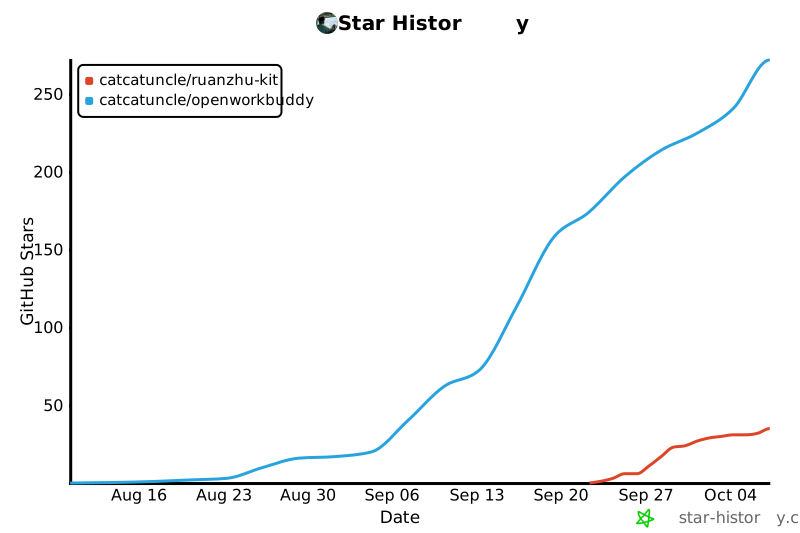](https://star-history.com/#CatCatUncle/ruanzhu-kit&CatCatUncle/openworkbuddy&Date) ## 👋 关于作者 · 合作 前大厂 Agent 工程师,有丰富的 Agent 落地实践经验。 - ✔️ 服务过跨境电商、制造业、AI 初创、私募金融机构、消费品巨头、国央企等客户的 AI 解决方案 - ✔️ 企业 AI 内训 | 企业私有化部署 | 行业智能体 | AI 数字化全案 | AI 搜索优化 | Agent 项目落地 常驻深圳,欢迎前来交流和考察。 > [!IMPORTANT] > ## 🚀 我们承接企业 FDE(驻场工程)与 AI 落地项目 > > - **FDE 驻场工程**:工程师进驻企业,把 Agent 从 Demo 做到真正上线、真正有人用 > - **企业私有化部署**:OpenWorkBuddy 等 Agent 在企业内网落地,数据不出域 > - **行业智能体 / Agent 项目定制开发**、**企业 AI 内训**、**AI 数字化全案**、**AI 搜索优化(GEO)** > > ### 📮 直接发邮件:**[[email protected]](mailto:[email protected])** ## 📄 License [MIT](LICENSE)scripts/pack-skill.mjs3.9 KBdcd4c8974dfeupstream ↗
#!/usr/bin/env node // Package the Word template workflow; keep the legacy PDF renderer and GitHub metadata out. import fs from 'node:fs'; import path from 'node:path'; import { fileURLToPath } from 'node:url'; const root = fileURLToPath(new URL('../', import.meta.url)); const output = path.resolve(process.argv[2] || path.join(root, '../ruanzhu-kit.skill.zip')); const resources = [ 'SKILL.md', 'LICENSE', 'templates/source-template.doc', 'templates/manual-template.doc', 'docs/template-workflow.md', 'scripts/prepare-templates.mjs', ]; const files = []; function collect(relative) { const full = path.join(root, relative); const stat = fs.lstatSync(full); if (stat.isSymbolicLink()) throw new Error(`技能包不支持符号链接:${relative}`); if (stat.isDirectory()) { if (relative.split('/').length > 1) throw new Error(`目录层级超限:${relative}`); for (const name of fs.readdirSync(full).sort()) collect(`${relative}/${name}`); } else if (stat.isFile()) { if (relative.split('/').length > 2) throw new Error(`目录层级超限:${relative}`); if (path.resolve(full) === output) throw new Error('输出 ZIP 不能放进技能资源目录'); files.push({ name: relative, data: fs.readFileSync(full) }); } else { throw new Error(`技能包不支持此文件类型:${relative}`); } } for (const resource of resources) collect(resource); // This importer requires bilingual metadata in addition to name/description. const skill = files.find((file) => file.name === 'SKILL.md').data.toString('utf8'); const frontmatter = skill.match(/^---\r?\n([\s\S]*?)\r?\n---(?:\r?\n|$)/)?.[1]; if (!frontmatter) throw new Error('SKILL.md 缺少 YAML frontmatter'); const required = ['name', 'description', 'version', 'display_name', 'display_name_en', 'description_zh', 'description_en']; for (const field of required) { const raw = frontmatter.match(new RegExp(`^${field}:[ \\t]*(.*)$`, 'm'))?.[1].trim(); if (!raw || /^(?:""|''|null|~|\[\]|\{\}|#.*)$/i.test(raw)) { throw new Error(`SKILL.md frontmatter 缺少非空字段:${field}`); } } // Standard ZIP, stored without compression. No npm or system ZIP dependency. function crc32(data) { let crc = 0xffffffff; for (const byte of data) { crc ^= byte; for (let bit = 0; bit < 8; bit++) crc = (crc >>> 1) ^ ((crc & 1) ? 0xedb88320 : 0); } return (crc ^ 0xffffffff) >>> 0; } const local = [], central = []; let offset = 0; for (const file of files) { const name = Buffer.from(file.name, 'utf8'); const checksum = crc32(file.data); const header = Buffer.alloc(30); header.writeUInt32LE(0x04034b50, 0); header.writeUInt16LE(20, 4); header.writeUInt16LE(0x800, 6); // UTF-8 filenames header.writeUInt16LE(0x21, 12); // 1980-01-01; reproducible archive header.writeUInt32LE(checksum, 14); header.writeUInt32LE(file.data.length, 18); header.writeUInt32LE(file.data.length, 22); header.writeUInt16LE(name.length, 26); local.push(header, name, file.data); const entry = Buffer.alloc(46); entry.writeUInt32LE(0x02014b50, 0); entry.writeUInt16LE(20, 4); entry.writeUInt16LE(20, 6); entry.writeUInt16LE(0x800, 8); entry.writeUInt16LE(0x21, 14); entry.writeUInt32LE(checksum, 16); entry.writeUInt32LE(file.data.length, 20); entry.writeUInt32LE(file.data.length, 24); entry.writeUInt16LE(name.length, 28); entry.writeUInt32LE(offset, 42); central.push(entry, name); offset += header.length + name.length + file.data.length; } const directory = Buffer.concat(central); const end = Buffer.alloc(22); end.writeUInt32LE(0x06054b50, 0); end.writeUInt16LE(files.length, 8); end.writeUInt16LE(files.length, 10); end.writeUInt32LE(directory.length, 12); end.writeUInt32LE(offset, 16); fs.mkdirSync(path.dirname(output), { recursive: true }); fs.writeFileSync(output, Buffer.concat([...local, directory, end])); console.log(`已生成 ${output}(${files.length} 个文件,最多两级目录,SKILL.md 位于 ZIP 根目录)`);scripts/prepare-templates.mjs2.3 KBa93fd3ae2694upstream ↗
#!/usr/bin/env node // Create editable working copies. Filling and PDF export happen in WPS/Word. import fs from 'node:fs'; import path from 'node:path'; import { fileURLToPath } from 'node:url'; const args = process.argv.slice(2); const opts = {}; try { for (let i = 0; i < args.length; i++) { if (args[i] === '--help' || args[i] === '-h') { console.log('用法:node prepare-templates.mjs --name 软件全称 --version V1.0 --out /输出目录\n仅复制 Word 模板,不填写正文、不生成 PDF,不覆盖已有文件。'); process.exit(0); } const key = args[i]; if (!['--name', '--version', '--out'].includes(key) || !args[i + 1] || args[i + 1].startsWith('--')) { throw new Error(`无效或缺少值的选项:${key}`); } opts[key.slice(2)] = args[++i].trim(); } if (!opts.name || !opts.version || !opts.out) throw new Error('必须提供 --name、--version 和 --out'); for (const key of ['name', 'version']) { if (/[<>:"/\\|?*\x00-\x1f]/.test(opts[key]) || /[. ]$/.test(opts[key])) { throw new Error(`${key} 含有文件名不支持的字符,请使用正常的软件名称或版本号`); } } const templates = fileURLToPath(new URL('../templates/', import.meta.url)); const output = path.resolve(opts.out); if (output === path.resolve(templates)) throw new Error('输出目录不能是原模板目录'); const label = opts.name.endsWith(opts.version) ? opts.name : opts.name + opts.version; const jobs = [ ['source-template.doc', `${label}_源程序.doc`], ['manual-template.doc', `${label}_使用说明书.doc`], ].map(([input, name]) => ({ input: path.join(templates, input), output: path.join(output, name) })); for (const job of jobs) { if (!fs.statSync(job.input).isFile()) throw new Error(`缺少模板:${job.input}`); if (fs.existsSync(job.output)) throw new Error(`文件已存在,不会覆盖:${job.output}`); } fs.mkdirSync(output, { recursive: true }); for (const job of jobs) { fs.copyFileSync(job.input, job.output, fs.constants.COPYFILE_EXCL); console.log(`已复制模板:${job.output}`); } console.log('当前仅为模板工作副本。请在 WPS/Word 中填写真实资料、替换示例代码与截图,核对后再导出 PDF。'); } catch (error) { console.error(`出错:${error.message}`); process.exitCode = 1; }.github/ISSUE_TEMPLATE/bug.yml595 B3b6086b87cf8upstream ↗
name: 报错 / 页数不对 description: 命令报错、核验不通过、PDF 页数或页眉不对 labels: [bug] body: - type: textarea id: what attributes: label: 跑了什么命令,看到了什么 description: 把终端输出整段贴上来(核验那几行最有用) render: console validations: required: true - type: input id: env attributes: label: 环境 placeholder: macOS 15 / Node 22 / Chrome 140 validations: required: true - type: textarea id: expected attributes: label: 你期望的结果.github/ISSUE_TEMPLATE/config.yml193 B52af334e7d8aupstream ↗
blank_issues_enabled: true contact_links: - name: 企业 AI 落地 / FDE / Agent 项目合作 url: mailto:[email protected] about: 商务合作请直接发邮件,不要开 Issue.github/ISSUE_TEMPLATE/rejected.yml973 Bf73f1a31b183upstream ↗
name: 被驳回 / 补正了 description: 用这个工具出的材料被版权中心驳回或要求补正,把原因告诉我们,帮下一个人避坑 labels: [驳回反馈] body: - type: textarea id: reason attributes: label: 补正通知书上的原话 description: 照抄驳回或补正的理由,涉及公司名、软件名的地方可以打码 validations: required: true - type: dropdown id: part attributes: label: 问题出在哪份材料 options: [程序鉴别材料(源程序 PDF), 文档鉴别材料(说明书 PDF), 在线表单字段, 证明文件, 不确定] validations: required: true - type: input id: when attributes: label: 提交时间(年月) placeholder: 2026年09月 - type: textarea id: config attributes: label: 当时的 ruanzhu.config.json(可选) description: 删掉著作权人等敏感字段再贴 render: json.github/workflows/test.yml614 Bdb9d169fa532upstream ↗
name: test on: push: branches: [main] pull_request: jobs: test: runs-on: ubuntu-latest strategy: matrix: node: [18, 20, 22] steps: - uses: actions/checkout@v7 - uses: actions/setup-node@v7 with: node-version: ${{ matrix.node }} # 端到端测试要回读 PDF 的逐页文字(页眉、页码、说明页位置),靠 poppler 的 pdftotext - run: sudo apt-get update -qq && sudo apt-get install -y -qq poppler-utils fonts-noto-cjk - run: npm test - run: npm run pack:skill - run: unzip -t ../ruanzhu-kit.skill.zip.gitignore129 B1fc69064d54cupstream ↗
node_modules/ .DS_Store ruanzhu/out/ out/ *.pdf *.doc *.skill.zip !templates/source-template.doc !templates/manual-template.docbin/ruanzhu.mjs17 KB15d089bef7c2upstream ↗
#!/usr/bin/env node // ruanzhu-kit —— 中国软件著作权登记材料生成器 // 用法:ruanzhu <init|count|source|manual|form|all> [项目目录] [选项] import fs from 'node:fs'; import path from 'node:path'; import { fileURLToPath } from 'node:url'; import { collect } from '../lib/collect.mjs'; import { splitForSubmission, findOverlongLines, paginate } from '../lib/paginate.mjs'; import { pageMetrics, headerLabel, renderSourceHtml, renderManualHtml, htmlToPdf, htmlToDoc } from '../lib/render.mjs'; import { markdownToHtml } from '../lib/markdown.mjs'; import { verifySourcePdf, pdfPageCount } from '../lib/verify.mjs'; import { inferForm, INFERRED_FIELDS } from '../lib/form-infer.mjs'; import { toneIssues } from '../lib/tone.mjs'; import { loadConfig, saveConfig, DEFAULTS, CONFIG_NAME, SHORT_FIELDS, LONG_FIELDS, charCount } from '../lib/config.mjs'; const ROOT = path.resolve(path.dirname(fileURLToPath(import.meta.url)), '..'); const pad = (s, width) => s + ' '.repeat(Math.max(0, width - [...s].reduce((a, ch) => a + (/[⺀-鿿-⦆]/.test(ch) ? 2 : 1), 0))); const c = { dim: (s) => `\x1b[2m${s}\x1b[0m`, ok: (s) => `\x1b[32m${s}\x1b[0m`, bad: (s) => `\x1b[31m${s}\x1b[0m`, warn: (s) => `\x1b[33m${s}\x1b[0m`, b: (s) => `\x1b[1m${s}\x1b[0m` }; const LANGUAGES = { js: 'JavaScript', mjs: 'JavaScript', cjs: 'JavaScript', jsx: 'JavaScript', ts: 'TypeScript', tsx: 'TypeScript', vue: 'JavaScript', svelte: 'JavaScript', py: 'Python', java: 'Java', kt: 'Kotlin', go: 'Go', rs: 'Rust', rb: 'Ruby', php: 'PHP', cs: 'C#', swift: 'Swift', c: 'C', h: 'C', cc: 'C++', cpp: 'C++', hpp: 'C++', m: 'Objective-C', mm: 'Objective-C', sh: 'Shell', sql: 'SQL', css: 'CSS', scss: 'CSS', less: 'CSS', html: 'HTML', }; function parseArgs(argv) { const opts = { doc: false }; const rest = []; for (let i = 0; i < argv.length; i++) { const a = argv[i]; if (a === '--doc') opts.doc = true; else if (a === '--lines-per-page') opts.linesPerPage = Number(argv[++i]); else if (a === '--out') opts.outDir = argv[++i]; else if (a === '-h' || a === '--help') opts.help = true; else rest.push(a); } return { opts, rest }; } function usage() { console.log(`ruanzhu-kit —— 中国软件著作权登记材料生成器 用法: ruanzhu init [项目目录] 在项目里生成 ${CONFIG_NAME} 和说明书骨架 ruanzhu count [项目目录] 只统计源码行数与预估页数,不出文件 ruanzhu source [项目目录] 生成 ①程序鉴别材料 PDF 并核验页数 ruanzhu manual [项目目录] 生成 ②文档鉴别材料(说明书)PDF ruanzhu form [项目目录] 生成表单填写清单(含字数校验) ruanzhu all [项目目录] 以上三样一起出,最后打一份自检清单 选项: --doc 同时导出可编辑的 .doc 留存件 --lines-per-page <n> 每页行数,默认 50(登记要求不少于 50) --out <dir> 输出目录,默认 ruanzhu/out 项目目录省略时用当前目录。`); } // ---------- init ---------- function cmdInit(dir) { const target = path.resolve(dir); const configPath = path.join(target, CONFIG_NAME); if (fs.existsSync(configPath)) { console.log(c.warn(`${CONFIG_NAME} 已存在,没有覆盖:${configPath}`)); } else { const now = new Date(); const tpl = { ...DEFAULTS, softwareName: path.basename(target) + '软件V1.0', shortName: path.basename(target), copyrightOwner: '(写营业执照全称或身份证姓名,一字不差)', completedAt: `${now.getFullYear()}年${String(now.getMonth() + 1).padStart(2, '0')}月`, form: { ...Object.fromEntries([...SHORT_FIELDS, ...LONG_FIELDS].map(([k]) => [k, ''])), ...inferForm(target) }, }; delete tpl.projectDir; fs.writeFileSync(configPath, JSON.stringify(tpl, null, 2) + '\n', 'utf8'); console.log(c.ok('已生成 ') + configPath); } const manualPath = path.join(target, DEFAULTS.manual); if (fs.existsSync(manualPath)) { console.log(c.warn('说明书骨架已存在,没有覆盖:') + manualPath); } else { const raw = fs.readFileSync(path.join(ROOT, 'templates', 'manual.md'), 'utf8'); fs.mkdirSync(path.dirname(manualPath), { recursive: true }); fs.writeFileSync(manualPath, raw, 'utf8'); console.log(c.ok('已生成 ') + manualPath); } console.log(` 下一步: 1. 把 ${CONFIG_NAME} 里的软件名称、著作权人、开发完成日期填准; form 里开发/运行环境六项已按这台机器和项目依赖填了初值,核对一下, 开发目的、面向行业、主要功能、技术特点四项请本人照着软件亲手写 2. 跑 ${c.b('ruanzhu count')} 看看收进来的文件对不对,把不该收的加进 exclude 3. 写 ${DEFAULTS.manual},然后 ${c.b('ruanzhu all')}`); } // ---------- 公共:清点 + 分页 ---------- function prepare(config, opts) { const linesPerPage = opts.linesPerPage || config.linesPerPage; const metrics = pageMetrics(); if (linesPerPage > metrics.maxUnitsPerPage) { throw new Error(`每页 ${linesPerPage} 行排不下,A4 在当前字号下最多 ${metrics.maxUnitsPerPage} 行。`); } if (linesPerPage < 50) { console.log(c.warn(`每页 ${linesPerPage} 行低于登记要求的 50 行,确认你知道自己在做什么。`)); } const srcRoot = path.resolve(config.projectDir, config.sourceDir); const collected = collect(srcRoot, config); if (!collected.lines.length) throw new Error(`在 ${srcRoot} 里没收到任何源码,检查 extensions 和 exclude。`); const opt = { unitsPerPage: linesPerPage, charsPerLine: metrics.charsPerLine }; const overlong = findOverlongLines(collected.lines, opt); const split = splitForSubmission(collected.lines, opt); split.totalLines = collected.docLines; return { ...collected, split, metrics, linesPerPage, overlong, srcRoot }; } // ---------- count ---------- function cmdCount(config, opts) { const p = prepare(config, opts); const top = [...p.files].sort((a, b) => b.lines - a.lines).slice(0, 12); console.log(c.b(`\n${config.softwareName} ${config.version}`)); console.log(c.dim(`源码目录 ${p.srcRoot}`)); console.log(`\n收进材料的文件:${c.b(String(p.files.length))} 个`); console.log(`纯源代码行数: ${c.b(String(p.codeLines))}`); console.log(`提交文档行数: ${c.b(String(p.docLines))} ${c.dim('← 表单「源程序量」填这个')}`); console.log(`排版页数: ${c.b(String(p.split.sourcePages))} 页(每页 ${p.linesPerPage} 行,每行 ${p.metrics.charsPerLine} 字符)`); console.log(p.split.mode === 'excerpt' ? `提交范围: 前 30 页 + 后 30 页,中间 ${p.split.omittedPages} 页(${p.split.omittedLines} 行)略 → PDF 共 ${c.b('62')} 页` : `提交范围: 不足 60 页,${c.b('全本提交')} → PDF 共 ${c.b(String(p.split.totalPages))} 页`); console.log(c.b('\n行数最多的文件')); for (const f of top) console.log(` ${String(f.lines).padStart(6)} ${f.path}`); if (p.files.length > top.length) console.log(c.dim(` …… 另有 ${p.files.length - top.length} 个文件`)); if (p.overlong.length) { console.log(c.warn(`\n有 ${p.overlong.length} 行折行后超过一整页,基本是压缩/生成产物,建议加进 excludeFiles。`)); } console.log(c.dim('\n文件清单不对就改 ruanzhu.config.json 的 exclude / excludeFiles / extensions,再跑一次。\n')); } // ---------- source ---------- function cmdSource(config, opts) { const p = prepare(config, opts); const outDir = path.resolve(config.projectDir, opts.outDir || config.outDir); const label = p.split.mode === 'excerpt' ? '源程序前30页后30页' : '源程序全本'; const pdfPath = path.join(outDir, `①程序鉴别材料_${label}_${config.shortName}.pdf`); const html = renderSourceHtml(p.split, { ...config, linesPerPage: p.linesPerPage }, p.metrics); htmlToPdf(html, pdfPath); console.log(c.ok('已生成 ') + pdfPath); if (opts.doc) console.log(c.ok('已生成 ') + htmlToDoc(html, path.join(outDir, `${config.shortName}源程序.doc`))); const result = verifySourcePdf(pdfPath, { ...p.split, header: headerLabel(config) }); console.log(c.b('\n核验')); for (const chk of result.checks) { console.log(` ${chk.ok ? c.ok('✓') : c.bad('✗')} ${pad(chk.name, 20)} ${c.dim(chk.detail)}`); } if (!result.ok) { console.log(c.bad('\n页数或内容不对,不要提交。先用 ruanzhu count 看排版参数。')); process.exitCode = 1; } return { ...p, pdfPath, verified: result.ok }; } // ---------- manual ---------- function cmdManual(config, opts) { const mdPath = path.resolve(config.projectDir, config.manual); if (!fs.existsSync(mdPath)) throw new Error(`没找到说明书 ${mdPath}。跑 \`ruanzhu init\` 会生成骨架。`); const md = fs.readFileSync(mdPath, 'utf8') .replace(/\{\{softwareName\}\}/g, config.softwareName) .replace(/\{\{version\}\}/g, config.version) .replace(/\{\{copyrightOwner\}\}/g, config.copyrightOwner) .replace(/\{\{completedAt\}\}/g, config.completedAt); if (md.includes('……')) console.log(c.warn('说明书里还留着「……」占位符,先补完再交。')); const outDir = path.resolve(config.projectDir, opts.outDir || config.outDir); const pdfPath = path.join(outDir, `②文档鉴别材料_说明书_${config.shortName}.pdf`); const html = renderManualHtml(markdownToHtml(md), config); htmlToPdf(html, pdfPath); if (opts.doc) htmlToDoc(html, path.join(outDir, `${config.shortName}说明书.doc`)); const pages = pdfPageCount(pdfPath); console.log(c.ok('已生成 ') + pdfPath + c.dim(`(${pages ?? '?'} 页)`)); if (pages && pages > 60) { console.log(c.warn('说明书超过 60 页,登记时同样只交前 30 页 + 后 30 页,先精简到 60 页以内更省事。')); } return { pdfPath, pages }; } // ---------- form ---------- function cmdForm(config, opts) { const p = prepare(config, opts); const outDir = path.resolve(config.projectDir, opts.outDir || config.outDir); const outPath = path.join(outDir, '表单填写清单.md'); const langs = [...new Set(p.files.map((f) => LANGUAGES[path.extname(f.path).slice(1).toLowerCase()]).filter(Boolean))]; // 配置里空着的环境类字段用推断值补上,清单里标出来让人核对 const inferred = inferForm(config.projectDir); const guessed = new Set(INFERRED_FIELDS.filter((k) => !(config.form || {})[k] && inferred[k])); const f = { ...config.form }; for (const k of guessed) f[k] = inferred[k]; const tone = Object.fromEntries([...SHORT_FIELDS, ...LONG_FIELDS].map(([k]) => [k, toneIssues(f[k])])); const cell = (v) => (v || '**没填**').replace(/\|/g, '\\|').replace(/\n+/g, ' '); const row = ([key, label, limit]) => { const v = f[key] || ''; const n = charCount(v); const status = !v ? '❌ 没填' : n > limit ? `❌ 超 ${n - limit} 字` : `✅ ${n}/${limit}${guessed.has(key) ? ' · 自动推断,核对一下' : ''}`; return `| ${label} | ${cell(v)} | ${status} |`; }; const toneLines = [...SHORT_FIELDS, ...LONG_FIELDS] .filter(([k]) => tone[k].length) .map(([k, label]) => `- ${label}:${tone[k].map((t) => `「${t.word}」${t.hint}`).join(';')}`); const lines = [ `# ${config.softwareName} 软著在线表单填写清单`, '', `> 由 ruanzhu-kit 生成。复制到中国版权保护中心在线登记系统逐项粘贴。`, '', '## 一、基本信息', '', '| 字段 | 填写内容 |', '|---|---|', `| 软件全称 | ${config.softwareName} |`, `| 版本号 | ${config.version} |`, `| 著作权人 | ${config.copyrightOwner} |`, `| 办理身份 | ${config.applicantType === 'company' ? '法人或其他组织' : '自然人'} |`, `| 开发完成日期 | ${config.completedAt} |`, `| 发表日期 | ${config.publishedAt || '未发表'} |`, `| 开发方式 | 独立开发 |`, `| 权利取得方式 | 原始取得 |`, '', '## 二、源程序量(三处必须一致)', '', '| 位置 | 数值 |', '|---|---|', `| 在线表单「源程序量」 | **${p.docLines}** 行 |`, `| 程序鉴别材料说明页 | ${p.docLines} 行 |`, `| 代码统计(${p.files.length} 个文件) | ${p.docLines} 行 |`, '', `编程语言:${langs.join('、') || '(按实际勾选)'}`, '', '## 三、50 字上限字段', '', '注意:「开发该软件的操作系统」填的是写代码用的系统,不是软件能跑的平台;', '开发环境的配置要不低于运行环境,填反了逻辑上说不通。', '', '| 字段 | 填写内容(直接复制) | 字数 |', '|---|---|---|', ...SHORT_FIELDS.map(row), '', '## 四、长文本字段', '', ...LONG_FIELDS.map(([key, label, min, max]) => { const v = f[key] || ''; const n = charCount(v); const status = !v ? '❌ 没填' : n < min ? `❌ 少 ${min - n} 字` : n > max ? `❌ 超 ${n - max} 字` : '✅'; return `### ${label}(${min ? `${min}–${max}` : `≤${max}`} 字,当前 ${n} 字 ${status})\n\n${v || (min ? '> **没填。** 照着软件的菜单一个个写:用户能做什么、点了之后发生什么。写法见 docs/form-fields.md。少于 500 字会被驳回。' : '> **没填。** 一两句话写这个软件在做法上和别人不一样的地方,别重复主要功能。')}\n`; }), '## 五、口吻检查', '', toneLines.length ? '下面这些词句读着像套话或提纲,不影响受理,但换成大白话更像开发者自己填的:\n\n' + toneLines.join('\n') : '没挑出套话和 Markdown 符号。', '', '## 六、上传材料', '', '| 上传栏位 | 文件 |', '|---|---|', `| 程序鉴别材料 | ①程序鉴别材料_${p.split.mode === 'excerpt' ? '源程序前30页后30页' : '源程序全本'}_${config.shortName}.pdf |`, `| 文档鉴别材料 | ②文档鉴别材料_说明书_${config.shortName}.pdf |`, config.applicantType === 'company' ? '| 其他证明文件 | 营业执照 + 权属证明(职务开发声明或著作权转让合同) |' : '| 其他证明文件 | 一般不需要 |', '', ]; if (config.applicantType === 'company') { lines.push( '> 个人开发、公司申请的,必须准备《软件著作权转让合同》,写明转让**全部财产权利**', '> 且**含对外再许可**的权利,否则公司后续对外授权存在效力瑕疵。', '' ); } fs.mkdirSync(outDir, { recursive: true }); fs.writeFileSync(outPath, lines.join('\n'), 'utf8'); console.log(c.ok('已生成 ') + outPath); const problems = [ ...SHORT_FIELDS.filter(([k, , limit]) => f[k] && charCount(f[k]) > limit).map(([, label]) => `${label} 超字数`), ...LONG_FIELDS.filter(([k, , min, max]) => f[k] && (charCount(f[k]) < min || charCount(f[k]) > max)).map(([, label]) => `${label} 字数不合格`), ...[...SHORT_FIELDS, ...LONG_FIELDS].filter(([k]) => !f[k]).map(([, label]) => `${label} 未填`), ]; if (problems.length) console.log(c.warn('待办:') + problems.join('、')); if (guessed.size) console.log(c.dim(`自动推断了 ${guessed.size} 项开发/运行环境,清单里标了「核对一下」。`)); if (toneLines.length) console.log(c.warn('口吻:') + `${toneLines.length} 个字段有套话或 Markdown 符号,见清单第五节。`); return { outPath, problems, toneCount: toneLines.length, docLines: p.docLines }; } // ---------- all ---------- function cmdAll(config, opts) { const source = cmdSource(config, opts); const manual = cmdManual(config, opts); const form = cmdForm(config, opts); console.log(c.b('\n交付自检')); const checks = [ [`程序鉴别材料 ${source.split.mode === 'excerpt' ? '62' : source.split.totalPages} 页`, source.verified], ['说明书页数真实非空壳', (manual.pages || 0) >= 8], [`源程序量三处一致(${form.docLines} 行)`, true], ['表单字段全部填完、字数合格', form.problems.length === 0], ['表单文字没有套话和 Markdown 符号', form.toneCount === 0], [`著作权人与证照一字不差:${config.copyrightOwner}`, null], ['材料里没有混入依赖、构建产物、运行期数据', null], ]; for (const [label, ok] of checks) { console.log(` ${ok === null ? c.warn('?') : ok ? c.ok('✓') : c.bad('✗')} ${label}`); } console.log(c.dim('\n带 ? 的两项脚本判不了,自己对一遍再提交。\n')); } // ---------- main ---------- function main() { const { opts, rest } = parseArgs(process.argv.slice(2)); const cmd = rest[0]; const dir = rest[1] || '.'; if (!cmd || opts.help || cmd === 'help') return usage(); try { if (cmd === 'init') return cmdInit(dir); const config = loadConfig(dir); if (cmd === 'count') return cmdCount(config, opts); if (cmd === 'source') return void cmdSource(config, opts); if (cmd === 'manual') return void cmdManual(config, opts); if (cmd === 'form') return void cmdForm(config, opts); if (cmd === 'all') return cmdAll(config, opts); console.error(c.bad(`未知命令 ${cmd}`)); usage(); process.exitCode = 1; } catch (err) { console.error(c.bad('出错:') + err.message); process.exitCode = 1; } } main();docs/form-fields.md5.6 KBa67bf0d4be29upstream ↗
# 在线表单逐字段怎么填 中国版权保护中心在线登记系统的字段说明。括号里是 `ruanzhu.config.json` 里 `form` 的键名。 ## 基本信息 这几项工具会从配置里自动填进 `表单填写清单.md`,不用手写: | 字段 | 来源 | 注意 | |---|---|---| | 软件全称 | `softwareName` | 末尾带版本号,如「XX管理系统V1.0」;别用简称、别带英文商标 | | 版本号 | `version` | 与软件全称里的版本号一致 | | 著作权人 | `copyrightOwner` | 与营业执照/身份证**一字不差**,含行政区划和「有限公司」 | | 开发完成日期 | `completedAt` | 早于或等于申请日;与说明书封面一致 | | 发表日期 | `publishedAt` | 没对外发布就填「未发表」,别乱填 | | 源程序量 | `ruanzhu count` 算出 | 与说明页、代码统计三处同一个数 | ## 先说谁来写 说明书和下面「开发目的」「面向行业」「主要功能」「技术特点」四项,**请本人照着软件亲手写**。 2026 年起申请材料要手抄声明「未使用 AI 开发编写代码、撰写文档或生成登记申请材料」; AI 代写的描述也常编出软件里没有的功能,本身就是驳回风险。工具只帮你算字数、挑套话。 ## 口吻 表单是给审查员看的,不是给投资人看的。照着自己写的软件平平实实地写, 像开发者本人坐下来填表那样: - **写具体的东西**:菜单名、按钮名、文件格式、数据库名,别写「智能化」「一站式」「赋能」「全方位」 - **写用户能做什么**:「用户上传 Excel 后,软件按客户名称汇总」,别写「实现数据的高效处理」 - **长短不齐是正常的**:真人写的每条功能长短不一,没必要每条都是三句话 - **编号用「1、2、3、」**,别用「一、xx。二、xx。」小标题提纲,更别带 `**` `#` `-` 这些 Markdown 符号——网页表单不认,会原样显示 - **别每句都是「支持……」「实现……」开头** `ruanzhu form` 会把上面这些毛病挑出来放在清单「口吻检查」一节,改不改自己定。 ## 50 字上限字段 超一个字提交不了。工具会给每项算字数。 开发/运行环境六项,`ruanzhu init` 和 `ruanzhu form` 会按跑命令的这台电脑和项目依赖 (package.json / go.mod / pom.xml / requirements.txt 等)自动填初值,清单里标「自动推断」,核对一下就行。 ### 开发的硬件环境(`devHardware`) 写开发机配置,CPU / 内存 / 磁盘。 > Intel Core i7-12700 处理器,16GB 内存,512GB 固态硬盘 ### 运行的硬件环境(`runHardware`) 写运行机的**最低**配置。**必须低于开发环境**,否则逻辑上说不通。 > 双核处理器,4GB 内存,1GB 以上可用硬盘空间 ### 开发该软件的操作系统(`devOS`) **写代码时用的系统**,不是软件能跑的系统。这里是最高频的填反点。 > Windows 11 ### 软件开发环境/开发工具(`devTools`) IDE、运行时、构建工具、版本控制。 > Node.js 22、Visual Studio Code、Git ### 该软件的运行平台/操作系统(`runPlatform`) 软件能跑在哪些系统上,可以比开发系统宽。 > Windows 10 及以上、macOS 12 及以上、Linux ### 软件运行支撑环境/支持软件(`runtimeSupport`) 运行期依赖:解释器、浏览器、数据库、中间件。 > Node.js 18 及以上,Chrome 或 Chromium 浏览器 ### 开发目的(`purpose`) 一句话:谁用、拿它干什么、省了什么事。 > 帮开发者把源代码和说明书排成软著要求的格式,页数一次算准,不用反复改 Word ### 面向领域/行业(`industries`) 列 3–5 个行业,别只写一个。 > 软件开发、知识产权服务、企业信息化、科技服务、教育 ## 长文本字段 ### 软件的主要功能(`mainFunctions`) **500–1300 字,低于 500 会被驳回。** 最省事的写法:先一两句话说这是个什么软件,然后打开软件,**照着菜单或页面一个个写**, 每个功能写「用户在哪里点了什么 → 软件做了什么 → 得到什么」。菜单写完一般就够 500 字了, 不用硬凑「扩展机制」「容错机制」这种标题。 > 本软件是一款门店会员管理软件,店员在收银电脑上使用。主要功能如下:1、会员登记。 > 顾客报手机号即可开卡,店员可以补录姓名、生日,老会员再来时输入手机号后四位就能查到。 > 2、积分。每消费一元记一分,积分可以抵现金,抵扣比例在「设置」里改。…… 对照反面例子(能过,但一看就是套话): > 一、智能会员管理。系统支持会员全生命周期管理,实现会员信息的高效录入与精准检索, > 全面提升门店运营效率。二、积分体系。…… ### 软件的技术特点(`techFeatures`) 100 字以内,写**做法上和别人不一样的地方**,不要重复「主要功能」。 > 分页在生成 PDF 之前就算好,超长的代码行按折行后的实际高度算,所以换字体、换电脑页数都不变。 ## 编程语言 勾选项,可多选。工具会按收进材料的文件后缀自动推断并写进清单,核对一下即可。 ## 上传材料 | 上传栏位 | 传什么 | |---|---| | 程序鉴别材料 | `①程序鉴别材料_…pdf` | | 文档鉴别材料 | `②文档鉴别材料_说明书_…pdf` | | 其他证明文件 | 公司申请:营业执照 + 权属证明;个人申请:一般不需要 | 文件名带 `①②③` 前缀是为了对应上传栏位,传错位置是很常见的低级失误。docs/preview.png166 KB4383f15ff265upstream ↗
Contents are not inlined in the catalog. Open the upstream file.
docs/template-workflow.md3.7 KBe9149fa80909upstream ↗
# 这套 Word 模板的填写位置 底稿来源:用户提供的「【批量下载】游戏名称游戏软件源程序v2.1等.zip」。 两份原文件已直接放在 `templates/`,没有额外的「我的资源」父目录。 ## 打开前要知道 原文件都是二进制 Word `.doc`。压缩包文件名中的 v2.1 不代表软件版本, 正文页眉里存在「游戏名称游戏软件V1.0」。以用户提供的版本为准,检查每个节的页眉, 不要把源码中的字符串或第三方依赖版本一并全局替换。 这些文件包含一套游戏的示例材料,不能直接改个名称交付。未提供对应内容时先列缺项。 ## 源程序模板 - 开头有大量留白,页眉和页脚有软件名称及页码域。先在文档软件中确认第一页与正文起点。 - 示例源码从 `window.__require = function e(t, n, r)` 开始,包含游戏相关模块。 - 替换正文范围内的示例源码,使用用户指定的真实项目文件;清点并排除依赖、构建产物、密钥和运行数据。 - 保留模板的代码段落格式、纸张设置、页眉页脚。大段粘贴时选择匹配目标格式或纯文本,不带入编辑器的配色与行号侧栏。 - 用户没有给出项目或源码清单时,不复制、改写或生成示例代码来填满文档。 - 页数根据真实源码与确认的提交范围检查,不承诺沿用模板原页数。 ## 使用说明书模板 | 位置 | 模板现有内容 | 填写方式 | |---|---|---| | 封面、页眉 | 游戏名称游戏软件、V1.0 | 换为用户确认的软件名称、版本;检查不同节和首页 | | 文件修订记录 | V1.0、2018-12-10、王某、初始版本 | 填真实版本、日期、作者和用户提供的修订说明 | | 总体功能描述 | Java 三层结构、游戏总分、排行榜、分享 | 填入用户给定的软件介绍原文 | | 运行环境 | CPU 2G、内存2G、Windows2008、MySQL5.6、Android、微信 | 用实际配置填写原表格,不能直接沿用这些示例值 | | 软件编译环境 | Idea、编译成功画面 | 填真实开发工具及实际截图 | | 软件安装说明 | 发布至微信小游戏、加载界面 | 填用户提供的安装步骤和真实界面 | | 游戏启动/游戏玩法/游戏结束 | 游戏关卡、图片选项、积分、分享 | 按实际操作填写;非游戏软件需让用户确认对应章节名 | | 排行榜功能 | 好友战绩示例与截图 | 填实际功能或由用户确认替换章节,不凭空添加排行榜 | | 数据库软件/数据库脚本文件 | MySQL5.6 和示例界面 | 填真实数据库资料;不使用数据库时请用户确认如何填写 | | 规范文件 | 示例内容区域 | 填用户提供的格式、协议或规范说明 | | 目录 | TOC 和页码引用域 | 在文档软件中更新整个目录,不能手写猜测页码 | | 插图 | 原游戏截图和示例图片 | 替换为用户实际软件截图,核对图片文字,不能只改正文 | ## 操作与核对 先复制,再编辑工作副本。系统有可用的 WPS/Word 文档接口时优先使用接口;否则用桌面界面。 查找和替换要覆盖正文、页眉、页脚、表格、文本框;每种位置核对结果,不假设一次「全部替换」涵盖所有位置。 保存后通过同一文档软件导出 PDF。逐页检查源文档和 PDF,尤其是分节页眉、目录、 修订记录、表格、图片和末页,确保导出确实来自填写后的工作副本。 文档软件缺失或导出失败时不要切换成 HTML 重排。 正式文档中不加额外生成说明、工具水印、处理日志或待办清单;需要补充的事项在回复里说明。 原模板内已有的元数据、作者或声明保留其原义,不能通过改动这些信息冒充其他作者。examples/large-project.config.json3.6 KB7e2091c105cdupstream ↗
{ "softwareName": "示例桌面办公助手软件V1.0", "shortName": "示例助手", "version": "V1.0", "copyrightOwner": "(此处填营业执照全称或身份证姓名,一字不差)", "applicantType": "company", "completedAt": "2026年09月", "publishedAt": "", "sourceDir": ".", "extensions": [ "js", "mjs", "cjs", "ts", "css", "html" ], "exclude": [ "projects", "eval", "public", "deploy", "skills/*/examples", "skills/*/assets" ], "excludeFiles": [ "*.bundle.js", "*.vendor.js" ], "order": [ "main.js", "server.js", "engines", "src", "lib", "scripts", "skills" ], "fileHeaders": true, "linesPerPage": 50, "manual": "ruanzhu/说明书.md", "outDir": "ruanzhu/out", "form": { "devHardware": "Intel Core i7-12700 处理器,16GB 内存,512GB 固态硬盘", "runHardware": "双核处理器,8GB 内存,2GB 以上可用硬盘空间", "devOS": "Windows 11", "devTools": "Node.js 22、Electron、Visual Studio Code、Git", "runPlatform": "Windows 10 及以上、macOS 12 及以上", "runtimeSupport": "无需另装软件,安装包自带运行环境", "purpose": "让员工在自己电脑上用一句话交代办公任务,由软件生成文档、表格和演示文稿,数据不出本机", "industries": "企业办公、教育培训、咨询服务、电商运营、内容制作", "mainFunctions": "本软件是一款装在电脑上的办公助手,用户在对话框里用中文说要做什么,软件把任务拆成几步依次执行,最后交出能直接打开的文件。主要功能如下:1、任务拆解。用户输入一句需求,比如“把上个月的销售表整理成汇报PPT”,软件会先列出要做的几步给用户看,确认后再开始执行,执行中发现数据不对会回头改计划。2、生成办公文件。可以生成Word文档、Excel表格、PPT演示文稿和网页四种文件,生成后保存在用户指定的文件夹里,用WPS或Office可以继续编辑。3、技能包。常用的做法可以存成技能包放在技能目录里,比如“周报格式”“合同审阅要点”,下次遇到同类任务自动套用,新增技能包不用改程序。4、读写文件和联网取数。软件可以读取本机的文件、执行命令、打开网页抓取公开数据,也可以接入企业已有的系统接口拉取数据或发消息。5、结果检查。每个任务做完后按事先定好的标准检查一遍,比如页数够不够、表格有没有空列,不合格就重做,并把原因记到日志里。6、定时任务。可以设定每天或每周固定时间自动执行某项任务,比如每周一早上生成上周数据周报,结果推送到飞书或企业微信;电脑关机错过的任务,开机后会补做。7、记忆。软件会记住用户的习惯,比如常用的公司名称、报告格式,下次不用再交代;用户可以在设置里查看和删除这些记忆。8、权限控制。读写哪些文件夹、能不能执行命令都可以在设置里分档配置,超出范围的操作会先弹窗问用户。9、多任务同时进行。几个互不相关的任务可以同时跑,各自用单独的工作文件夹,互不影响。10、数据留在本机。所有文件和聊天记录都保存在用户自己的电脑上,支持Windows和macOS,既可以用桌面窗口操作,也可以在命令行里调用。", "techFeatures": "功能以技能包目录的形式挂载,加功能不动主程序;每个任务做完按预设标准自动检查,不合格自动重做;数据全部存本机。" } }examples/large-project.md1.7 KBfd6f3aa5b3d3upstream ↗
# 示例:十万行以上的项目怎么配 代码量一大,`exclude` 写不写、怎么写,直接决定材料是「一翻就露馅」还是「一条主线读下来」。 同目录的 [`large-project.config.json`](large-project.config.json) 是一份填完整的配置,照着改自己的。 ```bash cp examples/large-project.config.json 你的项目/ruanzhu.config.json cd 你的项目 npx github:CatCatUncle/ruanzhu-kit count # 先看清点对不对 npx github:CatCatUncle/ruanzhu-kit all --doc # 出全套 ``` 几处值得抄的写法: | 配置项 | 为什么这么写 | |---|---| | `exclude` | 排掉用户工作产物、评测数据、示例页——示例页常常一个文件就上万行 | | `excludeFiles` | 排掉打包产物,这类文件折行后能撑破整页 | | `order` | `入口 → 服务端 → 引擎 → src → 扩展`,让审查员翻到的是一条从入口往下的主线 | | `applicantType` | `company`,表单清单会额外提醒补营业执照和权属证明 | | `mainFunctions` | 10 条、579 字,稳在 500–1300 字的区间里 | `count` 跑出来大概长这样: ``` 收进材料的文件:572 个 纯源代码行数: 102002 提交文档行数: 103145 ← 表单「源程序量」填这个 排版页数: 2132 页(每页 50 行,每行 89 字符) 提交范围: 前 30 页 + 后 30 页,中间 2072 页(100267 行)略 → PDF 共 62 页 ``` 同一个项目不加 `exclude` 能多出一倍文件数,多出来的全是依赖、构建产物和数据文件。 行数虚高是驳回的高频原因,`count` 的文件清单按行数倒序,脏东西基本都在前十行现形。 > 配置里的著作权人是占位符。用的时候换成营业执照全称或身份证姓名,一字不差。lib/collect.mjs4.8 KB5b5b41889bf3upstream ↗
Contents are not inlined in the catalog. Open the upstream file.
lib/config.mjs2.6 KB99811b2b0c53upstream ↗
// 配置加载与校验。 // // 一份 ruanzhu.config.json 同时喂给三处产物(源程序 PDF、说明书 PDF、表单清单), // 软件名称、著作权人、版本号、源程序量在三处保持一致,靠的就是这里只有一个来源。 import fs from 'node:fs'; import path from 'node:path'; export const CONFIG_NAME = 'ruanzhu.config.json'; export const DEFAULTS = { softwareName: '', shortName: '', version: 'V1.0', copyrightOwner: '', applicantType: 'company', // company | individual completedAt: '', publishedAt: '', sourceDir: '.', extensions: null, // null = 用内置的常见源码后缀 exclude: [], excludeFiles: [], order: [], fileHeaders: true, linesPerPage: 50, manual: 'ruanzhu/说明书.md', outDir: 'ruanzhu/out', form: {}, }; /** 50 字上限的表单项,超一个字就提交不了。 */ export const SHORT_FIELDS = [ ['devHardware', '开发的硬件环境', 50], ['runHardware', '运行的硬件环境', 50], ['devOS', '开发该软件的操作系统', 50], ['devTools', '软件开发环境/开发工具', 50], ['runPlatform', '该软件的运行平台/操作系统', 50], ['runtimeSupport', '软件运行支撑环境/支持软件', 50], ['purpose', '开发目的', 50], ['industries', '面向领域/行业', 50], ]; export const LONG_FIELDS = [ ['mainFunctions', '软件的主要功能', 500, 1300], ['techFeatures', '软件的技术特点', 0, 100], ]; export function charCount(s) { return Array.from((s || '').replace(/\s+/g, ' ').trim()).length; } export function loadConfig(dir) { const file = path.resolve(dir, CONFIG_NAME); if (!fs.existsSync(file)) { throw new Error(`没找到 ${CONFIG_NAME}(在 ${dir})。先跑一次 \`ruanzhu init\` 生成模板。`); } const raw = JSON.parse(fs.readFileSync(file, 'utf8')); const config = { ...DEFAULTS, ...raw, form: { ...DEFAULTS.form, ...(raw.form || {}) } }; config.projectDir = path.resolve(dir); config.shortName = config.shortName || config.softwareName; const missing = ['softwareName', 'copyrightOwner', 'completedAt'].filter((k) => !config[k]); if (missing.length) throw new Error(`${CONFIG_NAME} 缺少必填项:${missing.join('、')}`); if (config.applicantType === 'company' && /^(公司|集团)$/.test(config.copyrightOwner)) { throw new Error('著作权人要写营业执照上的全称,含行政区划和「有限公司」后缀。'); } return config; } export function saveConfig(dir, config) { const file = path.resolve(dir, CONFIG_NAME); const { projectDir, ...rest } = config; fs.writeFileSync(file, JSON.stringify(rest, null, 2) + '\n', 'utf8'); return file; }lib/form-infer.mjs7.8 KBcad9ef098f7eupstream ↗
// 表单里能从机器和项目文件读出来的六项,自动给一个初值。 // // 开发环境看的是跑这条命令的这台机器(也就是写代码的机器), // 运行环境看项目的依赖清单。推断不准的地方宁可写得保守,让人核对一眼就行。 import fs from 'node:fs'; import os from 'node:os'; import path from 'node:path'; const read = (dir, name) => { try { return fs.readFileSync(path.join(dir, name), 'utf8'); } catch { return ''; } }; const has = (dir, name) => fs.existsSync(path.join(dir, name)); /** Darwin 内核主版本号 → macOS 版本(20→11 … 24→15,25 起跳到 26)。 */ export function macosVersion(darwinRelease) { const major = parseInt(darwinRelease, 10); if (!major) return ''; if (major >= 25) return String(major + 1); if (major >= 20) return String(major - 9); return `10.${major - 4}`; } export function osName(platform = os.platform(), release = os.release()) { if (platform === 'darwin') return `macOS ${macosVersion(release)}`.trim(); if (platform === 'win32') { const build = parseInt(release.split('.')[2] || '0', 10); return build >= 22000 ? 'Windows 11' : 'Windows 10'; } if (platform === 'linux') { const m = read('/etc', 'os-release').match(/^PRETTY_NAME="?([^"\n]+)"?/m); return m ? m[1] : 'Linux'; } return platform; } const gb = (bytes) => { const n = bytes / 1024 ** 3; // 内存条和硬盘都是 2 的幂或常见档位,就近取整成人会写的数字 const steps = [4, 8, 16, 18, 24, 32, 36, 48, 64, 96, 128, 256, 512, 1024, 2048, 4096]; return steps.reduce((a, b) => (Math.abs(b - n) < Math.abs(a - n) ? b : a)); }; const diskText = (g) => (g >= 1024 ? `${g / 1024}TB` : `${g}GB`); export function cpuText(model = os.cpus()[0]?.model || '', cores = os.cpus().length) { const name = model .replace(/\(R\)|\(TM\)|\bCPU\b|\bProcessor\b|\b\d+-Core\b|with Radeon.*$|@.*$/gi, '') .replace(/\s+/g, ' ').trim(); // 服务器型号动辄三四十个字符,塞不进 50 字的格子,就只写核数 return name && name.length <= 28 ? `${name} 处理器` : `${cores} 核处理器`; } function diskSize(dir) { try { const s = fs.statfsSync(dir); return gb(s.blocks * s.bsize); } catch { return 0; } } /** 从项目文件看出用了什么语言、框架、数据库。 */ export function detectStack(dir) { const pkg = (() => { try { return JSON.parse(read(dir, 'package.json')); } catch { return null; } })(); const deps = pkg ? Object.keys({ ...pkg.dependencies, ...pkg.devDependencies }) : []; const dep = (re) => deps.some((d) => re.test(d)); const gomod = read(dir, 'go.mod'); const py = read(dir, 'requirements.txt') + read(dir, 'pyproject.toml'); const java = read(dir, 'pom.xml') + read(dir, 'build.gradle') + read(dir, 'build.gradle.kts'); const all = [deps.join(' '), gomod, py, java].join('\n'); const s = { langs: [], web: false, desktop: false, mobile: false, db: [], tools: [] }; if (pkg) s.langs.push('node'); if (gomod) s.langs.push('go'); if (py) s.langs.push('python'); if (java) s.langs.push('java'); if (has(dir, 'Cargo.toml')) s.langs.push('rust'); if (has(dir, 'pubspec.yaml')) { s.langs.push('flutter'); s.mobile = true; } if (has(dir, 'project.yml') || fs.readdirSync(dir).some((f) => f.endsWith('.xcodeproj'))) { s.langs.push('swift'); s.mobile = true; } if (pkg) { s.nodeMajor = (pkg.engines?.node || '').match(/\d+/)?.[0]; s.ts = dep(/^typescript$/) || has(dir, 'tsconfig.json'); s.web = dep(/^(next|react|react-dom|vue|nuxt|svelte|@sveltejs\/kit|vite|@angular\/core)$/); s.desktop = dep(/^(electron|@tauri-apps\/api)$/); s.mobile = s.mobile || dep(/^(react-native|expo|@dcloudio\/uni-app)$/); s.framework = ['next', 'nuxt', 'vue', 'react', 'svelte', 'electron', 'express', 'koa', 'nestjs'] .find((f) => dep(new RegExp(`^(@nestjs/core|${f})$`))); s.server = ['express', 'koa', 'nestjs'].includes(s.framework); } if (/gin-gonic|labstack\/echo|gofiber|django|flask|fastapi|spring-boot/.test(all)) s.server = true; if (/\b(pg|postgres|pgx|psycopg|prisma|postgresql)\b/i.test(all)) s.db.push('PostgreSQL'); if (/\b(mysql2?|go-sql-driver\/mysql|pymysql|mysql-connector)\b/i.test(all)) s.db.push('MySQL'); if (/sqlite/i.test(all)) s.db.push('SQLite'); if (/\b(mongodb|mongoose|pymongo)\b/i.test(all)) s.db.push('MongoDB'); if (/\b(redis|ioredis|go-redis)\b/i.test(all)) s.db.push('Redis'); s.db = [...new Set(s.db)]; if (has(dir, '.git')) s.tools.push('Git'); s.goVersion = gomod.match(/^go (\d+\.\d+)/m)?.[1]; s.javaVersion = java.match(/<(?:java\.version|maven\.compiler\.source)>(\d+)</)?.[1]; s.pyVersion = py.match(/requires-python\s*=\s*"[^\d]*(\d+\.\d+)/)?.[1]; return s; } function ide(dir, s) { if (has(dir, '.vscode')) return 'Visual Studio Code'; if (s.langs.includes('swift')) return 'Xcode'; if (s.langs.includes('go')) return 'GoLand'; if (s.langs.includes('java')) return 'IntelliJ IDEA'; if (s.langs.includes('python') && !s.langs.includes('node')) return 'PyCharm'; if (s.langs.includes('flutter')) return 'Android Studio'; if (has(dir, '.idea')) return 'WebStorm'; return 'Visual Studio Code'; } /** * 给能推断的字段一个初值。只填这六项;开发目的、面向行业、主要功能、技术特点 * 得读懂软件本身才写得出来,留给人(或调这个工具的 Agent)写。 */ export function inferForm(dir) { const s = detectStack(dir); const mem = gb(os.totalmem()); const disk = diskSize(dir); const out = {}; out.devHardware = [cpuText(), `${mem}GB 内存`, disk ? `${diskText(disk)} 硬盘` : ''].filter(Boolean).join(','); if (Array.from(out.devHardware).length > 50) out.devHardware = `${os.cpus().length} 核处理器,${mem}GB 内存`; out.devOS = osName(); const toolchain = []; if (s.langs.includes('node')) toolchain.push(`Node.js ${process.versions.node.split('.')[0]}`); if (s.ts) toolchain.push('TypeScript'); if (s.langs.includes('go')) toolchain.push(`Go ${s.goVersion || ''}`.trim()); if (s.langs.includes('java')) toolchain.push(`JDK ${s.javaVersion || ''}`.trim()); if (s.langs.includes('python')) toolchain.push(`Python ${s.pyVersion || '3'}`); if (s.langs.includes('rust')) toolchain.push('Rust'); if (s.langs.includes('flutter')) toolchain.push('Flutter'); out.devTools = [...toolchain, ide(dir, s), ...s.tools].join('、'); // 运行环境要比开发机低一档,写最低配置 const runMem = Math.max(2, Math.min(8, mem / 4)); if (s.mobile) out.runHardware = `手机内存 ${Math.min(runMem, 4)}GB 及以上,可用存储空间 500MB 以上`; else if ((s.web || s.server) && !s.desktop) out.runHardware = `服务器 2 核 CPU、${runMem}GB 内存、20GB 硬盘;客户端普通电脑或手机`; else out.runHardware = `双核处理器,${runMem}GB 内存,1GB 以上可用硬盘空间`; if (s.mobile) out.runPlatform = s.langs.includes('swift') ? 'iOS 16 及以上' : 'Android 8.0 及以上、iOS 14 及以上'; else if (s.desktop) out.runPlatform = 'Windows 10 及以上、macOS 12 及以上'; else if (s.web || s.server) out.runPlatform = '服务端 Linux;客户端用浏览器访问,电脑和手机均可'; else out.runPlatform = 'Windows 10 及以上、macOS 12 及以上、Linux'; const support = []; if (s.langs.includes('node') && !s.desktop) support.push(`Node.js ${s.nodeMajor || 18} 及以上`); if (s.langs.includes('python')) support.push(`Python ${s.pyVersion || '3.9'} 及以上`); if (s.langs.includes('java')) support.push(`JRE ${s.javaVersion || 11} 及以上`); support.push(...s.db); if (s.web || s.server) support.push('Chrome、Edge 等浏览器'); out.runtimeSupport = support.length ? support.join(',') : '无需额外支撑软件'; return out; } export const INFERRED_FIELDS = ['devHardware', 'runHardware', 'devOS', 'devTools', 'runPlatform', 'runtimeSupport'];lib/index.mjs273 Bcb9675b0de61upstream ↗
// 作为库使用时的入口,方便把某一段单独接到自己的流水线上。 export * from './paginate.mjs'; export * from './collect.mjs'; export * from './render.mjs'; export * from './markdown.mjs'; export * from './verify.mjs'; export * from './config.mjs';lib/markdown.mjs2.7 KB9f059231f31bupstream ↗
// 说明书用 Markdown 写,这里转成打印用的 HTML。 // // 只实现软著说明书用得到的那一小撮语法:标题、段落、有序/无序列表、表格、 // 代码块、行内 code 和加粗。不引第三方 Markdown 库,仓库保持零依赖。 import { escapeHtml } from './render.mjs'; function inline(text) { let s = escapeHtml(text); s = s.replace(/`([^`]+)`/g, '<code>$1</code>'); s = s.replace(/\*\*([^*]+)\*\*/g, '<strong>$1</strong>'); s = s.replace(/(?<!\*)\*([^*\n]+)\*(?!\*)/g, '<em>$1</em>'); return s; } const isTableRow = (l) => /^\s*\|.*\|\s*$/.test(l); const isTableDivider = (l) => /^\s*\|[\s:|-]+\|\s*$/.test(l) && l.includes('-'); const cells = (l) => l.trim().replace(/^\|/, '').replace(/\|$/, '').split('|').map((c) => c.trim()); export function markdownToHtml(md) { const lines = md.replace(/\r\n?/g, '\n').split('\n'); const out = []; let i = 0; let para = []; const flushPara = () => { if (para.length) { out.push(`<p>${inline(para.join(' '))}</p>`); para = []; } }; while (i < lines.length) { const line = lines[i]; if (!line.trim()) { flushPara(); i++; continue; } const heading = /^(#{1,3})\s+(.*)$/.exec(line); if (heading) { flushPara(); const level = heading[1].length; out.push(`<h${level}>${inline(heading[2].trim())}</h${level}>`); i++; continue; } if (line.startsWith('```')) { flushPara(); const buf = []; i++; while (i < lines.length && !lines[i].startsWith('```')) buf.push(lines[i++]); i++; // 收尾的 ``` out.push(`<pre>${escapeHtml(buf.join('\n'))}</pre>`); continue; } if (isTableRow(line) && isTableDivider(lines[i + 1] || '')) { flushPara(); const head = cells(line); i += 2; const body = []; while (i < lines.length && isTableRow(lines[i])) body.push(cells(lines[i++])); out.push( '<table><thead><tr>' + head.map((c) => `<th>${inline(c)}</th>`).join('') + '</tr></thead><tbody>' + body.map((r) => '<tr>' + r.map((c) => `<td>${inline(c)}</td>`).join('') + '</tr>').join('') + '</tbody></table>' ); continue; } const bullet = /^\s*[-*+]\s+(.*)$/.exec(line); const ordered = /^\s*\d+[.)]\s+(.*)$/.exec(line); if (bullet || ordered) { flushPara(); const tag = bullet ? 'ul' : 'ol'; const items = []; const re = bullet ? /^\s*[-*+]\s+(.*)$/ : /^\s*\d+[.)]\s+(.*)$/; while (i < lines.length && re.test(lines[i])) items.push(re.exec(lines[i++])[1]); out.push(`<${tag}>` + items.map((t) => `<li>${inline(t)}</li>`).join('') + `</${tag}>`); continue; } para.push(line.trim()); i++; } flushPara(); return out.join('\n'); }lib/paginate.mjs3.1 KB1e5e542b8414upstream ↗
// 折行感知分页。 // // 源程序 PDF 的页数必须在生成之前就算死,不能交给排版引擎去漂。核心难点是 // 超长代码行:一行 300 字符在 A4 上会折成 4 行,按「行数」切页必然撑破页面, // 所以这里一律按「折行之后占几个行高单位」来累加。 // 东亚宽字符(中文/日文/韩文/全角标点)在等宽字体里占两个字符宽。 const WIDE = /[ᄀ-ᅟ⺀-〾ぁ-㏿㐀-䶿一-鿿ꀀ-가-힣豈-︰--⦆¢-₩]/; /** 一行代码在等宽字体里实际占多少字符宽(制表符按 tabWidth 对齐展开)。 */ export function displayWidth(line, tabWidth = 4) { let w = 0; for (const ch of line) { if (ch === '\t') { w += tabWidth - (w % tabWidth); continue; } w += WIDE.test(ch) ? 2 : 1; } return w; } /** 一行折行之后占几个行高单位。空行也占 1。 */ export function wrapUnits(line, charsPerLine, tabWidth = 4) { return Math.max(1, Math.ceil(displayWidth(line, tabWidth) / charsPerLine)); } /** * 按折行高度切页。 * @returns {string[][]} 每个元素是一页的行 */ export function paginate(lines, { unitsPerPage, charsPerLine, tabWidth = 4 }) { const pages = []; let cur = []; let used = 0; for (const line of lines) { // 单行折行后超过一整页的,给它单独一页,避免死循环 const u = Math.min(wrapUnits(line, charsPerLine, tabWidth), unitsPerPage); if (used + u > unitsPerPage && cur.length) { pages.push(cur); cur = []; used = 0; } cur.push(line); used += u; } if (cur.length) pages.push(cur); return pages; } /** * 按《计算机软件著作权登记办法》第十二条切分提交范围。 * * 超过 60 页的,交前连续 30 页 + 后连续 30 页,中间略;不足 60 页全交。 * 注意是「整份源程序的前 30 页和最后 30 页」,不是「把源程序对半分再各凑 30 页」—— * 后者在代码量大的项目上会把每页撑到几百行,出来的 PDF 远不止 62 页。 */ export function splitForSubmission(lines, opts) { const pages = paginate(lines, opts); if (pages.length <= 60) { return { mode: 'full', front: pages, back: [], omittedPages: 0, omittedLines: 0, sourcePages: pages.length, totalPages: pages.length + 1, // 封面 }; } const front = pages.slice(0, 30); const back = pages.slice(-30); const kept = front.reduce((a, p) => a + p.length, 0) + back.reduce((a, p) => a + p.length, 0); return { mode: 'excerpt', front, back, omittedPages: pages.length - 60, omittedLines: lines.length - kept, sourcePages: pages.length, totalPages: 62, // 封面 + 30 + 说明页 + 30 }; } /** 找出折行后会超过一整页的行,这种基本是压缩产物,应该从源码清单里排掉。 */ export function findOverlongLines(lines, { unitsPerPage, charsPerLine, tabWidth = 4 }) { const out = []; lines.forEach((line, i) => { if (wrapUnits(line, charsPerLine, tabWidth) > unitsPerPage) out.push({ index: i, width: displayWidth(line, tabWidth) }); }); return out; }lib/render.mjs9.9 KB36dde44c9072upstream ↗
// HTML → PDF。 // // 不走 Word 导出:Word 的分页随版本、字体、打印机驱动漂,同一份稿子在两台机器上 // 能差出十几页。这里自己算好每页装哪些行,用 <div class=page> 把分页点钉死, // 再交给 Chrome 无头模式出 PDF,页数是确定的。 import fs from 'node:fs'; import os from 'node:os'; import path from 'node:path'; import { execFileSync } from 'node:child_process'; const MM_TO_PT = 72 / 25.4; const COURIER_ADVANCE = 0.6; // Courier New 的字符前进宽度,单位 em /** 从页面几何算出每行能排多少字符、每页能排多少行。写死这两个数,页数才稳。 */ export function pageMetrics({ pageWidthMm = 210, pageHeightMm = 297, marginMm = 20, fontSizePt = 9, lineHeightPt = 11 } = {}) { const contentWidthPt = (pageWidthMm - marginMm * 2) * MM_TO_PT; const contentHeightPt = (pageHeightMm - marginMm * 2) * MM_TO_PT; return { charsPerLine: Math.floor(contentWidthPt / (fontSizePt * COURIER_ADVANCE)), maxUnitsPerPage: Math.floor(contentHeightPt / lineHeightPt), fontSizePt, lineHeightPt, marginMm, }; } export function escapeHtml(s) { return s.replace(/&/g, '&').replace(/</g, '<').replace(/>/g, '>'); } /** 页眉写什么:软件名称 + 版本号。软件名称里已经带了版本号(「XX系统V1.0」)就不再重复。 */ export function headerLabel(config) { const name = String(config.softwareName || '').trim(); const version = String(config.version || '').trim(); return !version || name.endsWith(version) ? name : `${name} ${version}`; } const cssString = (s) => `"${String(s).replace(/\\/g, '\\\\').replace(/"/g, '\\"').replace(/[\r\n]+/g, ' ')}"`; // 版权中心要求每页页眉标注软件名称和版本号、右上角标注页码。页眉放进 @page 的边距盒, // 不占正文高度,前面算好的每页行数不受影响。封面和说明页用 bare 页:不出页眉、不计页码, // 所以源程序正文页码是连续的 1–60。 const pageHeader = (config) => ` @page { @top-left { content: ${cssString(headerLabel(config))}; font-family: SimSun, 'Songti SC', serif; font-size: 9pt; color: #000; } @top-right { content: "第 " counter(page) " 页"; font-family: SimSun, 'Songti SC', serif; font-size: 9pt; color: #000; } } @page bare { counter-increment: page 0; @top-left { content: none; } @top-right { content: none; } } .bare { page: bare; } `; const sourceStyle = (m, config) => ` @page { size: A4 portrait; margin: ${m.marginMm / 10}cm; } ${pageHeader(config)} html, body { margin: 0; padding: 0; } body { font-family: 'Courier New', Consolas, SimSun, monospace; font-size: ${m.fontSizePt}pt; color: #000; } div.page { page-break-after: always; break-after: page; } div.page:last-child { page-break-after: auto; break-after: auto; } p { margin: 0; padding: 0; border: 0; text-indent: 0; text-align: left; font-family: 'Courier New', Consolas, SimSun, monospace; font-size: ${m.fontSizePt}pt; line-height: ${m.lineHeightPt}pt; white-space: pre-wrap; word-break: break-all; } p.blank { height: ${m.lineHeightPt}pt; } p.t1 { text-align: center; font-family: SimHei, 'Heiti SC', sans-serif; font-size: 28pt; font-weight: bold; line-height: 44pt; margin-top: 150pt; white-space: normal; } p.t2 { text-align: center; font-family: SimHei, 'Heiti SC', sans-serif; font-size: 24pt; font-weight: bold; line-height: 38pt; margin-top: 24pt; white-space: normal; } p.meta { text-align: center; font-family: SimSun, serif; font-size: 14pt; line-height: 32pt; white-space: normal; } p.note-title { text-align: center; font-family: SimHei, 'Heiti SC', sans-serif; font-size: 18pt; font-weight: bold; line-height: 40pt; margin-top: 120pt; white-space: normal; } p.note-body { text-align: center; font-family: SimSun, serif; font-size: 13pt; line-height: 30pt; white-space: normal; } `; const codePage = (lines) => `<div class=page>\n${lines.map((l) => (l.length ? `<p>${escapeHtml(l)}</p>` : '<p class=blank> </p>')).join('\n')}\n</div>`; /** 源程序鉴别材料:封面 + 前 30 页 + 说明页 + 后 30 页。 */ export function renderSourceHtml(split, config, metrics) { const cover = `<div class="page bare"> <p class=t1>${escapeHtml(config.softwareName)}</p> <p class=t2>源 程 序</p> <p class=meta> </p><p class=meta> </p><p class=meta> </p> <p class=meta>软件名称:${escapeHtml(config.softwareName)}</p> <p class=meta>版 本 号:${escapeHtml(config.version)}</p> <p class=meta>著作权人:${escapeHtml(config.copyrightOwner)}</p> <p class=meta>开发完成日期:${escapeHtml(config.completedAt)}</p> </div>`; const notePage = split.mode === 'excerpt' ? `<div class="page bare"> <p class=note-title>说 明</p> <p class=note-body>本软件源程序共 ${split.totalLines} 行,按每页 ${config.linesPerPage} 行排版,共 ${split.sourcePages} 页。</p> <p class=note-body>依据《计算机软件著作权登记办法》第十二条,</p> <p class=note-body>源程序超过 60 页的,只提交前连续 30 页与后连续 30 页,</p> <p class=note-body>中间 ${split.omittedPages} 页(${split.omittedLines} 行)连续源程序略。</p> </div>` : ''; const body = [cover, ...split.front.map(codePage), notePage, ...split.back.map(codePage)].filter(Boolean).join('\n'); return `<!DOCTYPE html><html lang="zh-CN"><head><meta charset="utf-8"> <title>${escapeHtml(config.softwareName)} 源程序</title> <style>${sourceStyle(metrics, config)}</style></head><body> ${body} </body></html>`; } /** 文档鉴别材料(说明书)的样式,正文宋体、标题黑体。 */ export const manualStyle = ` @page { size: A4 portrait; margin: 2.2cm 2cm; } html, body { margin: 0; padding: 0; } body { font-family: SimSun, 'Songti SC', serif; font-size: 12pt; color: #000; } h1 { font-family: SimHei, 'Heiti SC', sans-serif; font-size: 16pt; line-height: 28pt; margin: 0 0 14pt; page-break-before: always; break-before: page; } h1:first-of-type { page-break-before: auto; break-before: auto; } h2 { font-family: SimHei, 'Heiti SC', sans-serif; font-size: 13.5pt; line-height: 24pt; margin: 16pt 0 8pt; } h3 { font-family: SimHei, 'Heiti SC', sans-serif; font-size: 12pt; line-height: 22pt; margin: 12pt 0 6pt; } p { font-size: 11pt; line-height: 20pt; text-align: justify; text-indent: 22pt; margin: 0 0 8pt; } ul, ol { margin: 0 0 10pt; padding-left: 26pt; } li { font-size: 11pt; line-height: 20pt; margin-bottom: 3pt; } pre { font-family: 'Courier New', monospace; font-size: 9.5pt; line-height: 14pt; background: #f4f4f4; border: 0.75pt solid #bbb; padding: 6pt 8pt; margin: 0 0 10pt; white-space: pre-wrap; word-break: break-all; } code { font-family: 'Courier New', monospace; font-size: 10pt; } table { border-collapse: collapse; width: 100%; margin: 0 0 12pt; page-break-inside: avoid; } th { border: 0.75pt solid #333; background: #e8e8e8; font-family: SimHei, sans-serif; font-size: 10.5pt; padding: 5pt; text-align: left; } td { border: 0.75pt solid #333; font-size: 10pt; padding: 5pt; line-height: 16pt; vertical-align: top; } div.cover { page-break-after: always; break-after: page; text-align: center; } div.cover p.t1 { font-family: SimHei, sans-serif; font-size: 28pt; font-weight: bold; line-height: 44pt; margin-top: 150pt; text-indent: 0; } div.cover p.t2 { font-family: SimHei, sans-serif; font-size: 24pt; font-weight: bold; line-height: 38pt; margin-top: 24pt; text-indent: 0; } div.cover p.meta { font-size: 14pt; line-height: 32pt; text-indent: 0; text-align: center; } `; export function renderManualHtml(bodyHtml, config) { const cover = `<div class="cover bare"> <p class=t1>${escapeHtml(config.softwareName)}</p> <p class=t2>软件说明书</p> <p class=meta> </p><p class=meta> </p><p class=meta> </p> <p class=meta>软件名称:${escapeHtml(config.softwareName)}</p> <p class=meta>版 本 号:${escapeHtml(config.version)}</p> <p class=meta>著作权人:${escapeHtml(config.copyrightOwner)}</p> <p class=meta>开发完成日期:${escapeHtml(config.completedAt)}</p> </div>`; return `<!DOCTYPE html><html lang="zh-CN"><head><meta charset="utf-8"> <title>${escapeHtml(config.softwareName)} 说明书</title> <style>${manualStyle}${pageHeader(config)}</style></head><body> ${cover} ${bodyHtml} </body></html>`; } const CHROME_CANDIDATES = [ process.env.CHROME_PATH, '/Applications/Google Chrome.app/Contents/MacOS/Google Chrome', '/Applications/Chromium.app/Contents/MacOS/Chromium', '/Applications/Microsoft Edge.app/Contents/MacOS/Microsoft Edge', '/usr/bin/google-chrome', '/usr/bin/google-chrome-stable', '/usr/bin/chromium', '/usr/bin/chromium-browser', 'C:\\Program Files\\Google\\Chrome\\Application\\chrome.exe', 'C:\\Program Files (x86)\\Google\\Chrome\\Application\\chrome.exe', ].filter(Boolean); export function findChrome() { for (const p of CHROME_CANDIDATES) if (fs.existsSync(p)) return p; throw new Error('找不到 Chrome。装一个 Chrome/Chromium/Edge,或用环境变量 CHROME_PATH 指定可执行文件路径。'); } /** 用 Chrome 无头模式把 HTML 打成 PDF。中间 HTML 落在临时目录,不污染项目。 */ export function htmlToPdf(html, outPdf) { const chrome = findChrome(); const tmp = fs.mkdtempSync(path.join(os.tmpdir(), 'ruanzhu-')); const htmlPath = path.join(tmp, 'render.html'); fs.writeFileSync(htmlPath, html, 'utf8'); fs.mkdirSync(path.dirname(outPdf), { recursive: true }); try { execFileSync(chrome, [ '--headless=new', '--disable-gpu', '--no-sandbox', '--no-pdf-header-footer', `--print-to-pdf=${outPdf}`, htmlPath, ], { stdio: 'pipe', timeout: 180000 }); } finally { fs.rmSync(tmp, { recursive: true, force: true }); } if (!fs.existsSync(outPdf)) throw new Error(`Chrome 没有产出 PDF:${outPdf}`); return outPdf; } /** 同一份 HTML 存成 .doc,Word 能直接打开改字,用于留存。 */ export function htmlToDoc(html, outDoc) { fs.mkdirSync(path.dirname(outDoc), { recursive: true }); fs.writeFileSync(outDoc, '' + html, 'utf8'); return outDoc; }lib/tone.mjs2.3 KB9c2859a6d90eupstream ↗
// 表单文字的「口吻」检查。 // // 审查员一天看几百份表,一眼能认出套话:一堆「赋能」「一站式」「全方位」, // 每条都是「小标题:三个排比」,还夹着 Markdown 符号。这些不影响受理, // 但读起来空,也不像开发者自己写的。这里只挑出来,改不改由人定。 const BUZZWORDS = [ '赋能', '一站式', '全方位', '全链路', '多维度', '深度融合', '无缝', '闭环', '极致', '革命性', '颠覆', '助力', '打造', '智能化', '高效便捷', '强大的', '领先的', '行业领先', '旨在', '致力于', '全面提升', '显著提升', '有效提升', '极大地', '一键式', '沉浸式', '卓越', '无与伦比', '重塑', '引领', '抓手', '底层逻辑', '范式', '心智', '痛点', '降本增效', ]; const PATTERNS = [ [/\*\*|__|^#{1,6}\s|`/m, 'Markdown 符号(** # `),粘进网页表单会原样显示'], [/^\s*[-*•]\s/m, '行首列表符号,表单里不会变成列表'], [/[一二三四五六七八九十]+、[^。]{2,12}[。::]/, '「一、xx。二、xx。」汉字编号小标题,读着像提纲;用「1、」或直接成段写'], [/不仅[^。]{0,30}(?:更|还|而且)/, '「不仅……更……」句式'], [/——/, '破折号,表单里少用'], [/[!!]/, '感叹号'], [/[A-Za-z]{2,}[一-龥]{0,2}(?:能力|赋能)/, '中英混搭的概念词,写成具体动作'], ]; /** 返回 [{ word, hint }];空数组表示没挑出毛病。 */ export function toneIssues(text) { const s = String(text || ''); if (!s.trim()) return []; const out = []; for (const w of BUZZWORDS) if (s.includes(w)) out.push({ word: w, hint: '套话,换成具体做了什么' }); for (const [re, hint] of PATTERNS) { const m = s.match(re); if (m) out.push({ word: m[0].trim().slice(0, 12), hint }); } // 同一个句式开头连用三次以上,比如每句都是「支持……」「实现……」 const starts = s.split(/[。;;\n]/).map((x) => x.replace(/[*_#`]/g, '').trim().replace(/^[\d一二三四五六七八九十]+[、..))]\s*/, '').slice(0, 2)).filter((x) => x.length === 2); const counts = starts.reduce((m, k) => m.set(k, (m.get(k) || 0) + 1), new Map()); for (const [k, n] of counts) if (n >= 4) out.push({ word: `${k}……×${n}`, hint: '好几句同一个开头,换着说' }); return out; }lib/verify.mjs3.5 KB01e45dabff70upstream ↗
// 核验产出的 PDF。 // // 页数是软著材料唯一一个「错了整份重做」的硬指标,所以生成完必须回读真实 PDF // 去数,不许拿脚本里的预期值当结论。poppler(pdfinfo)在就用它,不在就退回 // 解析 PDF 页树,保证没装 poppler 的机器也能自检。 import fs from 'node:fs'; import { execFileSync } from 'node:child_process'; function tryPdfinfo(pdfPath) { try { const out = execFileSync('pdfinfo', [pdfPath], { encoding: 'utf8', stdio: ['ignore', 'pipe', 'ignore'] }); const m = /^Pages:\s+(\d+)/m.exec(out); return m ? Number(m[1]) : null; } catch { return null; } } function parsePageTree(pdfPath) { const raw = fs.readFileSync(pdfPath).toString('latin1'); const counts = [...raw.matchAll(/\/Type\s*\/Pages\b[^>]*?\/Count\s+(\d+)/g)].map((m) => Number(m[1])); if (counts.length) return Math.max(...counts); const pages = raw.match(/\/Type\s*\/Page[^s]/g); return pages ? pages.length : null; } /** 返回 PDF 的真实页数,拿不到就返回 null。 */ export function pdfPageCount(pdfPath) { return tryPdfinfo(pdfPath) ?? parsePageTree(pdfPath); } /** 抽取每页文本,用来肉眼确认封面、说明页、末页没串位。没装 poppler 时返回 null。 */ export function pdfPages(pdfPath) { try { const out = execFileSync('pdftotext', ['-layout', pdfPath, '-'], { encoding: 'utf8', stdio: ['ignore', 'pipe', 'ignore'] }); return out.split('\f').slice(0, -1); } catch { return null; } } /** 对源程序 PDF 做整体体检,返回 {ok, checks[]}。 */ export function verifySourcePdf(pdfPath, expected) { const checks = []; const actual = pdfPageCount(pdfPath); checks.push({ name: '页数', ok: actual === expected.totalPages, detail: `实际 ${actual ?? '未知'} 页,期望 ${expected.totalPages} 页`, }); const pages = pdfPages(pdfPath); if (pages) { const cover = (pages[0] || '').replace(/\s+/g, ''); checks.push({ name: '封面', ok: cover.includes('源程序'), detail: cover.slice(0, 40) || '(空)' }); if (expected.mode === 'excerpt') { const note = (pages[31] || '').replace(/\s+/g, ''); checks.push({ name: '说明页在第 32 页', ok: note.includes('说明') && note.includes('第十二条'), detail: note.slice(0, 50) || '(空)' }); } if (expected.header) { // 页码只数正文页:封面和说明页不出页眉,末页页码应当正好是正文页数(超 60 页时是 60) const codePages = expected.front.length + expected.back.length; const first = (pages[1] || '').replace(/\s+/g, ''); const tail = (pages[pages.length - 1] || '').replace(/\s+/g, ''); const label = expected.header.replace(/\s+/g, ''); checks.push({ name: '页眉与页码', ok: first.includes(label) && first.includes('第1页') && tail.includes(`第${codePages}页`), detail: `首页「${expected.header}」第 1 页,末页第 ${codePages} 页`, }); } // 页眉也是文字,判「末页非空」要先把页眉那一行去掉,只看正文 const lastLines = (pages[pages.length - 1] || '').split('\n'); const last = (expected.header ? lastLines.filter((l) => !/第\s*\d+\s*页\s*$/.test(l)) : lastLines).join('\n').trim(); checks.push({ name: '末页非空', ok: last.length > 0, detail: last.slice(-40).replace(/\s+/g, ' ') || '(空)' }); } else { checks.push({ name: '逐页内容', ok: true, detail: '未装 poppler,跳过(brew install poppler 可开启)' }); } return { ok: checks.every((c) => c.ok), checks }; }LICENSE1.0 KB851c740d5eb2upstream ↗
MIT License Copyright (c) 2026 CatCatUncle Permission is hereby granted, free of charge, to any person obtaining a copy of this software and associated documentation files (the "Software"), to deal in the Software without restriction, including without limitation the rights to use, copy, modify, merge, publish, distribute, sublicense, and/or sell copies of the Software, and to permit persons to whom the Software is furnished to do so, subject to the following conditions: The above copyright notice and this permission notice shall be included in all copies or substantial portions of the Software. THE SOFTWARE IS PROVIDED "AS IS", WITHOUT WARRANTY OF ANY KIND, EXPRESS OR IMPLIED, INCLUDING BUT NOT LIMITED TO THE WARRANTIES OF MERCHANTABILITY, FITNESS FOR A PARTICULAR PURPOSE AND NONINFRINGEMENT. IN NO EVENT SHALL THE AUTHORS OR COPYRIGHT HOLDERS BE LIABLE FOR ANY CLAIM, DAMAGES OR OTHER LIABILITY, WHETHER IN AN ACTION OF CONTRACT, TORT OR OTHERWISE, ARISING FROM, OUT OF OR IN CONNECTION WITH THE SOFTWARE OR THE USE OR OTHER DEALINGS IN THE SOFTWARE.package.json993 B50bdb7f32cabupstream ↗
{ "name": "ruanzhu-kit", "version": "1.2.1", "description": "中国软件著作权登记材料生成器:源码 → 页数写死的程序鉴别材料 PDF、说明书 PDF、在线表单填写清单。零依赖。", "type": "module", "bin": { "ruanzhu": "bin/ruanzhu.mjs" }, "exports": { ".": "./lib/index.mjs", "./paginate": "./lib/paginate.mjs", "./collect": "./lib/collect.mjs", "./render": "./lib/render.mjs" }, "files": ["bin", "lib", "templates", "docs", "examples", "scripts", "SKILL.md"], "keywords": ["软著", "软件著作权", "copyright", "china", "pdf", "claude-skill", "agent-skill"], "license": "MIT", "engines": { "node": ">=18" }, "repository": { "type": "git", "url": "git+https://github.com/CatCatUncle/ruanzhu-kit.git" }, "homepage": "https://github.com/CatCatUncle/ruanzhu-kit#readme", "scripts": { "test": "node test/run.mjs && node --test test/prepare-templates.mjs", "pack:skill": "node scripts/pack-skill.mjs" } }README_EN.md6.0 KBb802b972b698upstream ↗
<div align="center"> # ruanzhu-kit **Generate China software-copyright (软著) registration materials from your source tree — with page counts that never drift.** [](https://github.com/CatCatUncle/ruanzhu-kit/actions/workflows/test.yml) [](LICENSE) [](package.json) [](package.json) [](SKILL.md) [中文](README.md) · **English** </div> > [!IMPORTANT] > ### 🤝 Best used with [OpenWorkBuddy](https://github.com/CatCatUncle/openworkbuddy) > > **[OpenWorkBuddy](https://github.com/CatCatUncle/openworkbuddy) — the best local, open-source AI office agent.** It runs on your own machine, plans and does the work, > and hands you real PPTX / DOCX / XLSX / HTML files. Works with DeepSeek, Qwen, Doubao, Claude or Ollama. > > - 🏢 **Built for on-prem enterprise deployment** — data stays on your machine / intranet; Docker one-command deploy > - 🛠️ **Commercial use & custom development** — free for personal use; commercial licenses available for companies > - 🧩 **ruanzhu-kit is an OpenWorkBuddy skill** — drop it into `skills/` and just ask for the 软著 materials > > ⭐ **If this helps, please star both [ruanzhu-kit](https://github.com/CatCatUncle/ruanzhu-kit) and [OpenWorkBuddy](https://github.com/CatCatUncle/openworkbuddy).** Registering software copyright in China (with the Copyright Protection Center of China, CPCC) requires a source-code PDF: if your code runs longer than 60 pages you submit **the first 30 and the last 30 pages**, at no fewer than 50 lines per page, with the software name and version in every page header. Laying this out in Word is fragile — page counts shift with fonts, versions and printer drivers, and one drifted page means redoing the whole package. `ruanzhu-kit` computes every page break **before** rendering (accounting for wrapped long lines and double-width CJK characters), renders with headless Chrome, then reads the PDF back to verify page count, cover, the omission-note page, headers and page numbers.  > [!WARNING] > **Write the manual and form descriptions yourself.** Since 2026 the application requires a handwritten, signed > declaration that the software was developed by people and that **no AI was used to write the code, the documents, > or the application materials**; a false declaration carries credit-blacklist and legal consequences. AI-written > manuals also tend to describe features the software does not have, which gets applications rejected. > The ruanzhu-kit CLI calls **no AI model**: it only collects sources, paginates, adds headers and page numbers, > counts lines and pages, and checks field lengths. Do not file projects that were written with AI. ## Quick start Requires Node 18+ and Chrome / Chromium / Edge 131+ (`CHROME_PATH` to override). ```bash cd your-project npx github:CatCatUncle/ruanzhu-kit init # writes ruanzhu.config.json + a manual skeleton npx github:CatCatUncle/ruanzhu-kit count # which files, how many lines, how many pages npx github:CatCatUncle/ruanzhu-kit all # both PDFs + a form checklist, then self-checks ``` ## What you get | File | Purpose | |---|---| | `①程序鉴别材料_…pdf` | Source-code material: cover + first 30 pages + omission note + last 30 pages (62 pages) | | `②文档鉴别材料_…pdf` | User manual rendered from `说明书.md` | | `表单填写清单.md` | Copy-paste values for all ten online form fields: environment fields auto-filled from your machine and dependencies, length checks, and a plain-language check that flags boilerplate phrasing | ## Use it as an AI agent skill For platforms limited to two directory levels, run `npm run pack:skill` and upload `../ruanzhu-kit.skill.zip`. It contains `SKILL.md` at the ZIP root, the two original Word templates, and helpers for filling them in WPS/Word before exporting PDF, with at most one directory below the root. Use `npm run pack:skill -- /path/to/ruanzhu-kit.skill.zip` to choose an output path. The GitHub source ZIP and repository-root URL also include nested GitHub workflow and issue-template directories; use the skill ZIP on strict importers. [`SKILL.md`](SKILL.md) follows the common agent-skill format (Claude Code, Claude Agent SDK): ```bash git clone https://github.com/CatCatUncle/ruanzhu-kit.git ~/.claude/skills/ruanzhu-kit ``` Then ask your agent to fill the Word templates using your project details, source code, manual text and screenshots, and export PDF through WPS/Word. Missing content is requested from you rather than drafted automatically. ## Disclaimer This is a layout and counting tool, not legal advice. Check the copyright owner, code volume and supporting documents yourself before submitting; [CPCC](https://register.ccopyright.com.cn/) rules prevail. ## About the author Former big-tech Agent engineer. AI solutions delivered for cross-border e-commerce, manufacturing, AI startups, private-equity funds, consumer-goods leaders and state-owned enterprises — corporate AI training, private deployment, industry agents, AI search optimization (GEO) and Agent project delivery. Based in Shenzhen. > [!IMPORTANT] > ## 🚀 We take on enterprise FDE (Forward Deployed Engineering) and AI delivery projects > > - **FDE on-site engineering** — take agents from demo to production that people actually use > - **Private / on-prem deployment** of OpenWorkBuddy and other agents > - **Industry agents**, **custom Agent development**, **corporate AI training**, **AI search optimization (GEO)** > > ### 📮 Email: **[[email protected]](mailto:[email protected])** If this saved you a redo, please ⭐ **[ruanzhu-kit](https://github.com/CatCatUncle/ruanzhu-kit)** and **[OpenWorkBuddy](https://github.com/CatCatUncle/openworkbuddy)** — it helps others find them. MIT License.templates/manual-template.doc1.6 MB671c61a1be0cupstream ↗
Contents are not inlined in the catalog. Open the upstream file.
templates/manual.md2.4 KB70644463430fupstream ↗
# 一、总体功能描述 {{softwareName}}(以下简称本软件)是……(一段话说清它解决什么问题、给谁用、 核心做法是什么。审查员先看这一段建立印象,别写空话。) 本软件当前版本为 {{version}},著作权人为 {{copyrightOwner}},开发完成日期为 {{completedAt}}。 主要解决以下问题: - 问题一:…… - 问题二:…… - 问题三:…… # 二、运行环境 ## 2.1 硬件环境 | 项目 | 最低配置 | 推荐配置 | |---|---|---| | 处理器 | …… | …… | | 内存 | …… | …… | | 硬盘 | …… | …… | ## 2.2 操作系统 本软件可运行于 ……。 ## 2.3 支撑软件 | 名称 | 版本 | 用途 | |---|---|---| | …… | …… | …… | # 三、软件编译环境 ## 3.1 开发环境 开发环境的配置不低于运行环境。…… ## 3.2 工具链 | 工具 | 版本 | 用途 | |---|---|---| | …… | …… | …… | ## 3.3 依赖 …… # 四、软件安装 安装步骤如下: 1. …… 2. …… 3. …… ```bash # 安装命令 ``` # 五、软件启动 ```bash # 启动命令 ``` 启动后……(说明启动之后看到什么、如何确认启动成功) # 六、主要功能说明 ## 6.1 …… (每个功能模块一小节:做什么、怎么用、输入输出是什么。这一章是说明书的主体, 建议写够 6 个以上小节,和表单里的「软件的主要功能」互相对得上。) ## 6.2 …… ## 6.3 …… # 七、软件架构 本软件采用……分层架构: ``` ┌──────────────┐ │ 表现层 │ ├──────────────┤ │ 业务层 │ ├──────────────┤ │ 数据层 │ └──────────────┘ ``` 各层职责如下: | 层次 | 职责 | 主要模块 | |---|---|---| | …… | …… | …… | # 八、文件清单 | 文件/目录 | 作用 | |---|---| | …… | …… | # 九、配置文件说明 | 配置项 | 类型 | 默认值 | 说明 | |---|---|---|---| | …… | …… | …… | …… | # 十、规范文件说明 (如果软件带有约定的数据格式、协议、模板文件,在这里说明其结构;没有的话 写明「本软件不涉及独立的规范文件,配置约定见第九章」。) # 十一、常见问题 | 问题 | 原因 | 处理方式 | |---|---|---| | …… | …… | …… |templates/source-template.doc478 KB556a55c2d988upstream ↗
Contents are not inlined in the catalog. Open the upstream file.
test/prepare-templates.mjs2.5 KB158728748440upstream ↗
import test from 'node:test'; import assert from 'node:assert/strict'; import fs from 'node:fs'; import os from 'node:os'; import path from 'node:path'; import { fileURLToPath } from 'node:url'; import { spawnSync } from 'node:child_process'; const root = fileURLToPath(new URL('../', import.meta.url)); const script = path.join(root, 'scripts/prepare-templates.mjs'); const run = (...args) => spawnSync(process.execPath, [script, ...args], { encoding: 'utf8' }); test('工作副本逐字节保留两份原模板,且不导出 PDF', () => { const out = fs.mkdtempSync(path.join(os.tmpdir(), 'ruanzhu-template-')); try { const result = run('--name', '门店管理软件', '--version', 'V2.1', '--out', out); assert.equal(result.status, 0, result.stderr); assert.deepEqual(fs.readdirSync(out).sort(), ['门店管理软件V2.1_使用说明书.doc', '门店管理软件V2.1_源程序.doc']); for (const [template, suffix] of [['source-template.doc', '源程序'], ['manual-template.doc', '使用说明书']]) { assert.deepEqual(fs.readFileSync(path.join(out, `门店管理软件V2.1_${suffix}.doc`)), fs.readFileSync(path.join(root, 'templates', template))); } } finally { fs.rmSync(out, { recursive: true, force: true }); } }); test('重跑不覆盖已填写文件,也不创建另一份半成品', () => { const out = fs.mkdtempSync(path.join(os.tmpdir(), 'ruanzhu-template-')); try { const existing = path.join(out, '测试V1.0_使用说明书.doc'); fs.writeFileSync(existing, '用户已经填写的内容'); const result = run('--name', '测试', '--version', 'V1.0', '--out', out); assert.notEqual(result.status, 0); assert.equal(fs.readFileSync(existing, 'utf8'), '用户已经填写的内容'); assert.equal(fs.readdirSync(out).length, 1); } finally { fs.rmSync(out, { recursive: true, force: true }); } }); test('名称已带版本时不重复添加版本', () => { const out = fs.mkdtempSync(path.join(os.tmpdir(), 'ruanzhu-template-')); try { assert.equal(run('--name', '测试V1.0', '--version', 'V1.0', '--out', out).status, 0); assert.ok(fs.existsSync(path.join(out, '测试V1.0_源程序.doc'))); } finally { fs.rmSync(out, { recursive: true, force: true }); } }); test('缺少必要信息或名称含路径时拒绝写入', () => { assert.notEqual(run('--name', '测试').status, 0); const out = path.join(os.tmpdir(), `ruanzhu-rejected-${process.pid}`); assert.notEqual(run('--name', '../错误名称', '--version', 'V1.0', '--out', out).status, 0); assert.ok(!fs.existsSync(out)); });test/run.mjs11 KBc74fc081288eupstream ↗
// 零依赖自测。`npm test` 或 `node test/run.mjs`。 // 最后一项会真的调 Chrome 出一份 PDF 再回读页数——页数是这个工具唯一不能错的东西。 import assert from 'node:assert/strict'; import fs from 'node:fs'; import os from 'node:os'; import path from 'node:path'; import { displayWidth, wrapUnits, paginate, splitForSubmission, findOverlongLines } from '../lib/paginate.mjs'; import { collect, orderFiles } from '../lib/collect.mjs'; import { pageMetrics, headerLabel, renderSourceHtml, renderManualHtml, htmlToPdf, findChrome } from '../lib/render.mjs'; import { markdownToHtml } from '../lib/markdown.mjs'; import { pdfPageCount, pdfPages, verifySourcePdf } from '../lib/verify.mjs'; import { charCount } from '../lib/config.mjs'; import { macosVersion, osName, cpuText, inferForm } from '../lib/form-infer.mjs'; import { toneIssues } from '../lib/tone.mjs'; let passed = 0, failed = 0; const test = (name, fn) => { try { fn(); console.log(` \x1b[32m✓\x1b[0m ${name}`); passed++; } catch (err) { console.log(` \x1b[31m✗\x1b[0m ${name}\n ${err.message}`); failed++; } }; console.log('\n折行与分页'); test('中文按两个字符宽算', () => { assert.equal(displayWidth('abc'), 3); assert.equal(displayWidth('中文'), 4); assert.equal(displayWidth('中文abc'), 7); }); test('制表符按 4 列对齐展开', () => { assert.equal(displayWidth('\tx'), 5); assert.equal(displayWidth('ab\tx'), 5); }); test('空行也占一个行高单位', () => { assert.equal(wrapUnits('', 89), 1); }); test('超长行按折行数累加', () => { assert.equal(wrapUnits('x'.repeat(89), 89), 1); assert.equal(wrapUnits('x'.repeat(90), 89), 2); assert.equal(wrapUnits('x'.repeat(267), 89), 3); }); test('分页不超出每页上限', () => { const lines = Array.from({ length: 500 }, (_, i) => (i % 7 === 0 ? 'z'.repeat(200) : `line ${i}`)); const pages = paginate(lines, { unitsPerPage: 50, charsPerLine: 89 }); for (const page of pages) { const used = page.reduce((a, l) => a + wrapUnits(l, 89), 0); assert.ok(used <= 50, `一页用了 ${used} 个行高单位,超过 50`); } }); test('不足 60 页全本提交', () => { const r = splitForSubmission(Array.from({ length: 300 }, (_, i) => `a${i}`), { unitsPerPage: 50, charsPerLine: 89 }); assert.equal(r.mode, 'full'); assert.equal(r.omittedLines, 0); assert.equal(r.totalPages, r.front.length + 1); }); test('超过 60 页切成前 30 + 后 30,总计 62 页', () => { const r = splitForSubmission(Array.from({ length: 50000 }, (_, i) => `a${i}`), { unitsPerPage: 50, charsPerLine: 89 }); assert.equal(r.mode, 'excerpt'); assert.equal(r.front.length, 30); assert.equal(r.back.length, 30); assert.equal(r.totalPages, 62); assert.equal(r.omittedLines, 50000 - 3000); }); test('后 30 页取的是文件末尾,不是中段', () => { const lines = Array.from({ length: 50000 }, (_, i) => `a${i}`); const r = splitForSubmission(lines, { unitsPerPage: 50, charsPerLine: 89 }); assert.equal(r.back.at(-1).at(-1), 'a49999'); assert.equal(r.front[0][0], 'a0'); }); test('揪得出撑破整页的超长行', () => { const lines = ['ok', 'y'.repeat(50 * 89 + 1)]; assert.equal(findOverlongLines(lines, { unitsPerPage: 50, charsPerLine: 89 }).length, 1); }); console.log('\n页面几何'); test('A4 + 2cm 边距 + 9pt Courier = 每行 89 字符、每页最多 66 行', () => { const m = pageMetrics(); assert.equal(m.charsPerLine, 89); assert.equal(m.maxUnitsPerPage, 66); }); console.log('\n源码清点'); test('排除依赖目录与构建产物', () => { const dir = fs.mkdtempSync(path.join(os.tmpdir(), 'ruanzhu-test-')); fs.mkdirSync(path.join(dir, 'node_modules'), { recursive: true }); fs.mkdirSync(path.join(dir, 'src'), { recursive: true }); fs.writeFileSync(path.join(dir, 'node_modules', 'dep.js'), 'x\n'.repeat(100)); fs.writeFileSync(path.join(dir, 'src', 'a.js'), 'let a = 1;\nlet b = 2;\n'); fs.writeFileSync(path.join(dir, 'app.min.js'), 'var a=1;\n'); const r = collect(dir, { extensions: ['js'] }); assert.deepEqual(r.files.map((f) => f.path), ['src/a.js']); assert.equal(r.codeLines, 2); fs.rmSync(dir, { recursive: true, force: true }); }); test('order 决定拼接顺序', () => { const files = ['lib/util.js', 'bin/cli.js', 'src/core.js']; assert.deepEqual(orderFiles(files, ['bin', 'src']), ['bin/cli.js', 'src/core.js', 'lib/util.js']); }); console.log('\n说明书 Markdown'); test('标题、表格、代码块、列表都转得出来', () => { const html = markdownToHtml('# 一、标题\n\n正文 **粗** 和 `code`。\n\n- 甲\n- 乙\n\n| a | b |\n|---|---|\n| 1 | 2 |\n\n```js\nlet x = 1;\n```\n'); assert.match(html, /<h1>一、标题<\/h1>/); assert.match(html, /<strong>粗<\/strong>/); assert.match(html, /<ul><li>甲<\/li><li>乙<\/li><\/ul>/); assert.match(html, /<th>a<\/th>/); assert.match(html, /<pre>let x = 1;<\/pre>/); }); test('HTML 特殊字符被转义', () => { assert.match(markdownToHtml('a < b & c'), /a < b & c/); }); console.log('\n表单字数'); test('中文按字符数算,连续空白折成一个', () => { assert.equal(charCount(' 中文 abc '), 6); // 中 文 空格 a b c }); console.log('\n页眉'); test('页眉是软件名称 + 版本号,名称里带了版本号就不重复', () => { assert.equal(headerLabel({ softwareName: '测试软件V1.0', version: 'V1.0' }), '测试软件V1.0'); assert.equal(headerLabel({ softwareName: '测试软件', version: 'V1.0' }), '测试软件 V1.0'); }); test('软件名里的引号和反斜杠不会弄坏页眉样式', () => { const html = renderSourceHtml({ mode: 'full', front: [['x']], back: [] }, { softwareName: '测"试\\软件', version: 'V1.0', copyrightOwner: '甲', completedAt: '2026年09月', linesPerPage: 50 }, pageMetrics()); assert.ok(html.includes('content: "测\\"试\\\\软件 V1.0"')); }); console.log('\n表单'); test('Darwin 内核号换算成 macOS 版本,Windows 按构建号分 10 / 11', () => { assert.equal(macosVersion('20.1.0'), '11'); assert.equal(macosVersion('24.3.0'), '15'); assert.equal(macosVersion('25.2.0'), '26'); assert.equal(osName('win32', '10.0.19045'), 'Windows 10'); assert.equal(osName('win32', '10.0.22631'), 'Windows 11'); }); test('CPU 型号去掉营销后缀,太长就只写核数', () => { assert.equal(cpuText('Intel(R) Core(TM) i7-12700 CPU @ 2.10GHz', 20), 'Intel Core i7-12700 处理器'); assert.equal(cpuText('AMD EPYC 7763 64-Core Processor', 4), 'AMD EPYC 7763 处理器'); assert.equal(cpuText('Some Vendor Extremely Long Server Processor Model Name 9000', 8), '8 核处理器'); }); test('按依赖清单推断运行环境,六项都有值且不超 50 字', () => { const dir = fs.mkdtempSync(path.join(os.tmpdir(), 'ruanzhu-infer-')); fs.writeFileSync(path.join(dir, 'go.mod'), 'module x\n\ngo 1.22\n\nrequire (\n\tgithub.com/gin-gonic/gin v1.9.1\n\tgithub.com/jackc/pgx/v5 v5.5.0\n)\n'); const f = inferForm(dir); assert.match(f.devTools, /Go 1\.22/); assert.match(f.devTools, /GoLand/); assert.match(f.runtimeSupport, /PostgreSQL/); assert.match(f.runPlatform, /Linux/); for (const k of ['devHardware', 'runHardware', 'devOS', 'devTools', 'runPlatform', 'runtimeSupport']) { assert.ok(f[k] && charCount(f[k]) <= 50, `${k} = ${f[k]}`); } fs.rmSync(dir, { recursive: true, force: true }); }); test('口吻检查挑得出套话、提纲编号、Markdown 和同一开头', () => { const words = toneIssues('一、智能管理。本软件旨在一站式赋能门店。**支持**会员。支持积分。支持导出。支持打印。').map((t) => t.word); for (const w of ['赋能', '一站式', '旨在', '**']) assert.ok(words.includes(w), `没挑出 ${w}`); assert.ok(words.some((w) => w.startsWith('一、'))); assert.ok(words.some((w) => w.startsWith('支持'))); }); test('平实的写法不被误报,示例配置本身是干净的', () => { assert.deepEqual(toneIssues('本软件是一款门店会员管理软件。1、会员登记。顾客报手机号即可开卡。2、积分。每消费一元记一分。'), []); const example = JSON.parse(fs.readFileSync(new URL('../examples/large-project.config.json', import.meta.url), 'utf8')); for (const [k, v] of Object.entries(example.form)) assert.deepEqual(toneIssues(v), [], k); const n = charCount(example.form.mainFunctions); assert.ok(n >= 500 && n <= 1300, `示例主要功能 ${n} 字`); }); console.log('\n端到端出 PDF'); let chrome = null; try { chrome = findChrome(); } catch { /* 没装 Chrome 就跳过 */ } if (!chrome) { console.log(' \x1b[33m-\x1b[0m 跳过:没找到 Chrome(设 CHROME_PATH 可指定)'); } else { test('源程序 PDF 的真实页数正好是 62', () => { const lines = Array.from({ length: 60000 }, (_, i) => (i % 11 === 0 ? `// ${'长'.repeat(60)}` : `const v${i} = ${i};`)); const split = splitForSubmission(lines, { unitsPerPage: 50, charsPerLine: 89 }); split.totalLines = lines.length; const config = { softwareName: '测试软件V1.0', version: 'V1.0', copyrightOwner: '测试著作权人', completedAt: '2026年09月', linesPerPage: 50 }; const out = path.join(fs.mkdtempSync(path.join(os.tmpdir(), 'ruanzhu-pdf-')), 'src.pdf'); htmlToPdf(renderSourceHtml(split, config, pageMetrics()), out); assert.equal(pdfPageCount(out), 62); if (pdfPages(out)) { // 封面、说明页不出页眉;正文页眉带软件名,页码 1–60 连续 const pages = pdfPages(out).map((t) => t.replace(/\s+/g, '')); assert.ok(!pages[0].includes('第1页')); assert.ok(pages[1].includes('测试软件V1.0') && pages[1].includes('第1页')); assert.ok(pages[30].includes('第30页') && !/第\d+页/.test(pages[31])); assert.ok(pages[32].includes('第31页') && pages[61].includes('第60页')); const v = verifySourcePdf(out, { ...split, header: '测试软件V1.0' }); assert.ok(v.ok, JSON.stringify(v.checks)); } fs.rmSync(path.dirname(out), { recursive: true, force: true }); }); test('说明书 PDF 出得来且不是空壳', () => { const config = { softwareName: '测试软件V1.0', version: 'V1.0', copyrightOwner: '测试著作权人', completedAt: '2026年09月' }; const md = Array.from({ length: 11 }, (_, i) => `# 第 ${i + 1} 章\n\n${'这是正文。'.repeat(40)}\n`).join('\n'); const out = path.join(fs.mkdtempSync(path.join(os.tmpdir(), 'ruanzhu-pdf-')), 'manual.pdf'); htmlToPdf(renderManualHtml(markdownToHtml(md), config), out); assert.ok(pdfPageCount(out) >= 11); if (pdfPages(out)) { const pages = pdfPages(out).map((t) => t.replace(/\s+/g, '')); assert.ok(!pages[0].includes('第1页') && pages[1].includes('测试软件V1.0') && pages[1].includes('第1页')); } fs.rmSync(path.dirname(out), { recursive: true, force: true }); }); } console.log(`\n${failed ? '\x1b[31m' : '\x1b[32m'}${passed} 通过,${failed} 失败\x1b[0m\n`); process.exit(failed ? 1 : 0);
Plain-text copy, no login: /skill-bundles/catcatuncle-ruanzhu-kit.md