⏳ This skill is pending AI review.
Scores will appear once the review pipeline completes.
cpersona-memory
>-
Choose how to use this skill
You do not need every option. Choose the path your AI client supports. The stable page stays the same; versioned files are immutable.
1. Native installer
This listing has no registered native installer command. Use the complete package or source fallback below, depending on what your client supports.
Do not guess an installer command or replace an existing version without reviewing the diff.
2. Complete package recommended
Download the ZIP when available. It includes SKILL.md plus the references, security notes and version metadata.
No complete ProSkills package is published for this listing yet.3. Prompt-only
Copy the prompt above when the agent can read the stable page or when you want to adopt the workflow without installing a skill.
Need only the instruction file?
Download SKILL.md only if your client requires a single file. The complete ZIP is safer for a full installation because it preserves the references and release context.
No path installs or executes anything by itself. Your agent still needs access to the project files. Before updating, compare the installed version and review the diff.
// RATINGS
Not yet listed on ClawHub or SkillsMP
// README
CPersona
Long-term memory for AI agents, in one SQLite file you own.
CPersona is an MCP server that lets Claude Code, Codex, Claude Desktop, Cursor, VS Code or any other MCP client remember what you decided, why, and what happened last time — across sessions.


Documentation · Getting Started · Tools · Discussions
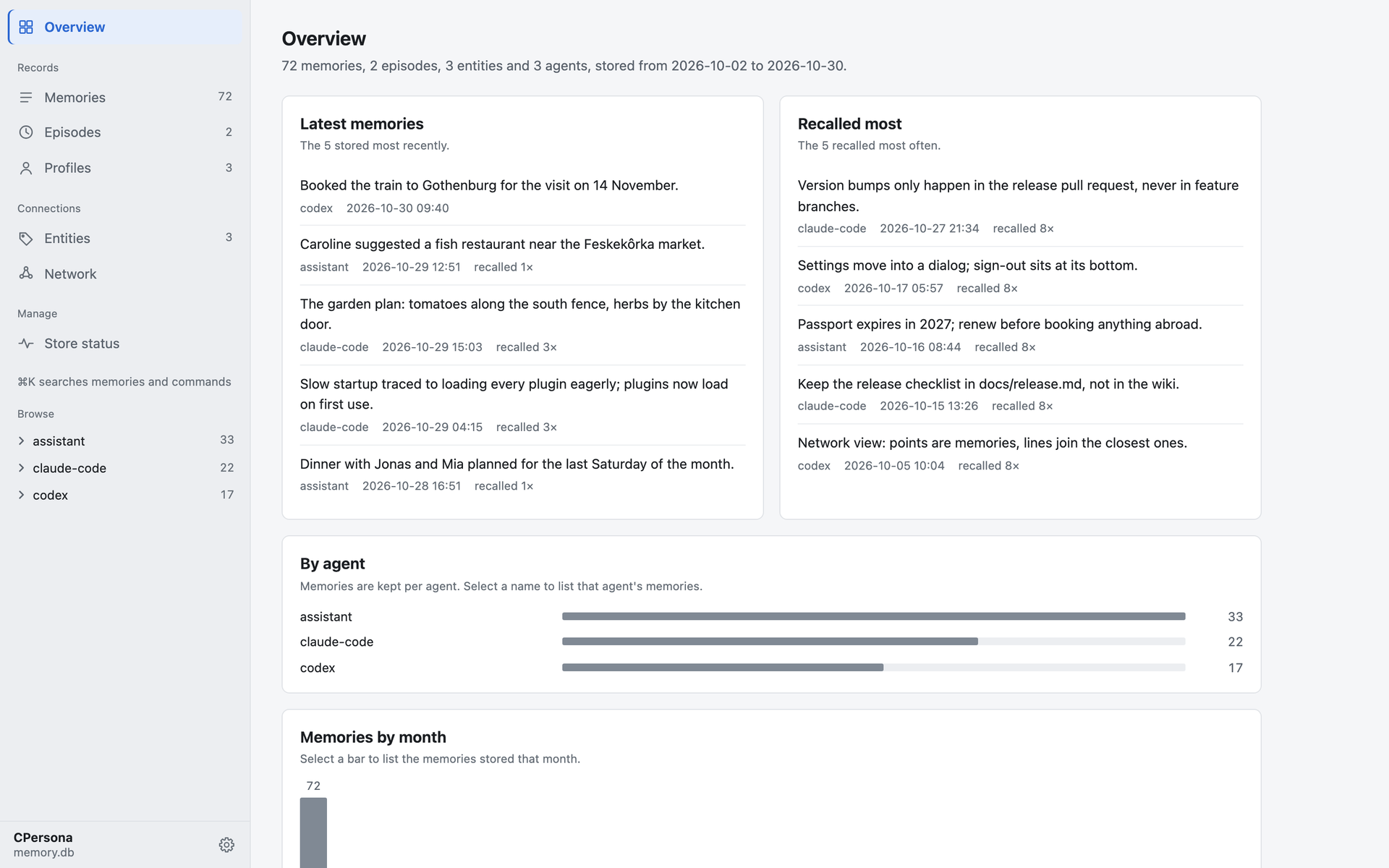
The built-in dashboard, showing a made-up store of 72 memories.
Why CPersona
Every new session with a coding agent starts from zero. CPersona gives the agent a memory it can write to as it works and read from before it acts.
- Yours, on your machine. Everything lives in a single SQLite file. No account, no cloud,
no external database;
sqlite3 .backupcopies it. - No language model inside. CPersona never calls a generative model to store or recall. Your agent writes the summary; CPersona keeps it and finds it again.
- Answers you can trace.
reconstruct, the recommended way to answer from memory, quotes the stored records behind each item, so you can see where an answer came from. - Search that catches what vectors miss. Vector search runs beside full-text and keyword search, so exact names, identifiers and error strings are found too, in Japanese and other scripts without spaces as well.
- See what it remembers.
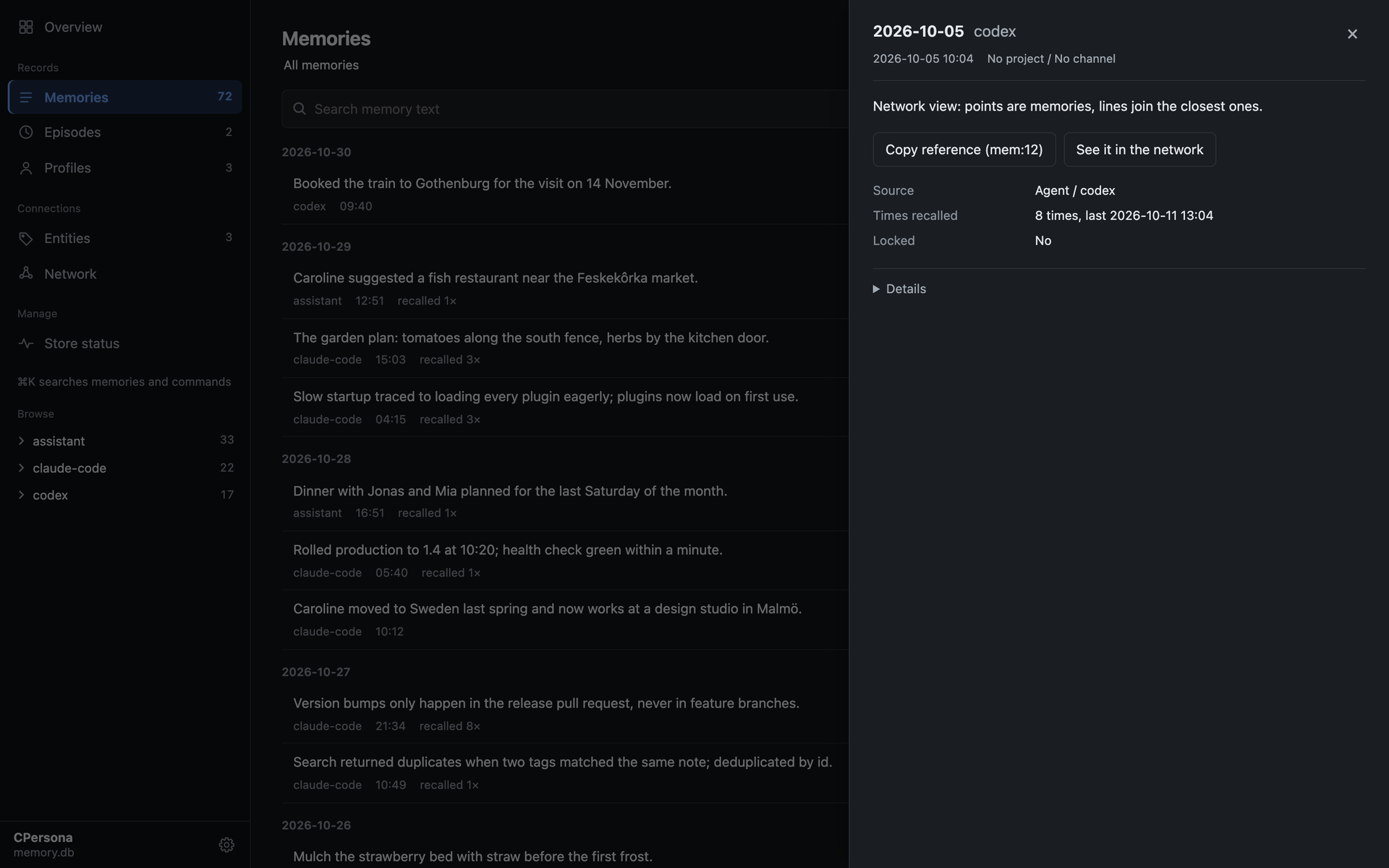
cpersona dashboardopens a read-only page of the store: what was stored last, what is recalled most, every memory in full, and the network above. - Honest when it degrades. Without an embedding server it still runs on keyword search, and says so on every recall instead of quietly returning less.
Quick start
With Claude Code or Codex, install the agent plugin and let the agent do the rest:
/plugin install cpersona --marketplace Cloto-dev/cpersona
Then say "Set up CPersona." The plugin carries the setup skill and the hooks that remind the
agent to recall before it acts and to store as it goes. (Claude Code 2.1.275 or later. In Codex:
codex plugin marketplace add Cloto-dev/cpersona, then codex plugin add cpersona@cpersona.)
By hand, in three steps:
# 1. Run an embedding server (recommended; it powers vector search)
uvx --from "cembedding[onnx]" cembedding-download-model --model bge-m3
EMBEDDING_PROVIDER=onnx_bge_m3 uvx --from "cembedding[onnx]" cembedding

# 2. Register CPersona with your client (Claude Code shown)
claude mcp add-json cpersona '{"type":"stdio","command":"uvx","args":["cpersona"],"env":{"CPERSONA_DB_PATH":"/home/you/.claude/cpersona.db","EMBEDDING_MODE":"http","EMBEDDING_HTTP_URL":"http://127.0.0.1:8401/embed"}}' -s user

# 3. In a new session, ask the agent to store something, then recall it in another new session

# 4. See what it remembers, in the browser
cpersona dashboard
Getting Started covers the other clients, Windows, containers, and the short policy block that makes every future session use the memory.
Upgrading an existing install? Read the When you upgrade section of the release notes and SUPPORT.md first.
A look inside
| Overview | A memory, opened |
|---|---|
 |  |
Memories are kept per agent, and project_id and channel let several agents and projects share
one database without mixing.
Benchmarks
On OmniMemEval's LongMemEval-S pipeline (500 questions,
answered by gpt-4.1-mini, judged by gpt-4o-mini), in this project's own run. Overall is the
share of questions judged correct; Context Tokens is the average sent to the answer model per question:
| Backend | Deployment | SS-User | SS-Asst | SS-Pref | Temp. Reas | Multi-S | Know. Upd | Overall | Context Tokens |
|---|---|---|---|---|---|---|---|---|---|
| CPersona 2.6.11 (pro mode) | local | 97.14 | 94.64 | 96.67 | 86.47 | 85.71 | 88.46 | 89.60 | 4,262.5 |
| CPersona 2.6.11 (lite mode) | local | 95.71 | 83.93 | 90.00 | 80.45 | 74.44 | 82.05 | 82.20 | 993.3 |
| MemOS | cloud | 100.00 | 100.00 | 100.00 | 89.47 | 78.95 | 84.62 | 89.20 | 4,151 |
Pro mode is level with MemOS within sampling error, and on LoCoMo it answers 84.03%. Setups, the registered rules and every departure from a clean run are in the results.
Documentation
cloto-dev.github.io/CPersona is the full reference, also in Japanese:
| Guide | What it covers |
|---|---|
| Getting Started | Install, embedding server, client registration, verification |
| Behavior Contracts | What you may rely on: recall ordering, dedup, scan window, response shapes |
| Tools | Every tool, grouped by what you reach for it for |
| Architecture | Storage, the retrieval pipeline, isolation axes |
| Roadmap | What each release line is for and may break; planned retrieval features and the scale ladder |
| Operations Runbook | Backup, degradation detection, tuning, CJK guidance, corpus sync |
| Configuration | Every environment variable and its default |
| Quality Assurance | How a release is gated: audits, the bug ledger, structural and mutation gates |
| FAQ | Short answers to the questions operators actually ask |
Contributing
Bug fixes, tests and documentation can be sent as a pull request straight away. For changes to the database schema, the tool contracts or the tool list, open an issue first. CONTRIBUTING.md has the setup — no embedding server is needed to run the ~4,150 test functions — and the three checks CI runs.
Questions and ideas are welcome in Discussions. A sentence in the docs that confused you is worth reporting too: it is a defect of its own.
Support
- Bugs and requests: open an issue.
- Security: report privately, as [SECURITY.md](https://git
// HOW IT'S BUILT
// FILES
4 files shipped with this skill. Inline text is the catalog copy. The upstream link is the source repository.
plugin/skills/cpersona-memory/SKILL.md33 KB77fed364b809truncatedupstream ↗
Showing the inlined prefix. The rest is in the upstream file.
--- name: cpersona-memory description: >- Give Claude persistent, searchable memory across sessions using the CPersona MCP server. Use this skill whenever the user wants Claude to remember things between conversations, asks to install or set up CPersona / a memory server, or when CPersona tools are available and the conversation contains decisions, rules, preferences, or a session boundary worth recording, or when a recall comes back degraded or the user says memory search stopped working. Covers install, MCP-client configuration, the embedding server, the day-to-day store / recall / archive workflow, diagnosing and repairing a degraded embedding backend, and persisting the memory policy into the user's always-loaded instructions file (CLAUDE.md, AGENTS.md, …) so the triggers survive without this skill loaded. --- # CPersona — persistent memory for Claude CPersona is an [MCP](https://modelcontextprotocol.io/) server that gives Claude persistent memory across sessions. It stores memories in a single local SQLite file and retrieves them with a 3-layer hybrid search (vector + FTS5 + keyword, merged by Reciprocal Rank Fusion). It has **zero LLM dependency** — the server never calls a model, so memory adds no generative API cost and stays out of your token budget; the calling agent (you) does all summarization. (Embedding is separate: `EMBEDDING_MODE=api` bills per store and per recall against `CPERSONA_EMBEDDING_API_URL`. The local `http` mode and `none` cost nothing.) - Single SQLite file, MIT licensed. - Works with Claude Code, Claude Desktop, Codex CLI, Cursor, VS Code, and any other MCP host. - Repo: <https://github.com/Cloto-dev/cpersona> This skill has two jobs: **(1) help the user install and configure CPersona**, and **(2) use it correctly** once it is connected. --- ## When to use this skill Activate this skill when any of the following is true: - The user asks Claude to **remember** something across sessions, or complains that Claude forgets context between conversations. - The user asks to **install / set up / configure** CPersona or "a memory server". - CPersona MCP tools (`store`, `recall`, `archive_episode`, …) are connected **and** the current turn contains a decision, a standing rule/preference, a bug finding, or a session boundary (start/end). - A `recall` response carries an `advisory` field, a `store` response comes back `embedded: false`, or the user reports that memory search has got worse. If CPersona tools are **not** connected and the user wants memory, go to **Setup**. If they are connected, go to **Usage** — or to **When recall is degraded** if a signal in the last bullet is what brought you here. --- ## Setup CPersona is a Python MCP server. Installing it has two parts: the **memory server** and a strongly recommended **embedding server** (it powers the vector-search layer). Running without an embedding backend is supported as a fallback — CPersona then serves FTS5 + keyword only — but it is not recommended for normal operation. **Prerequisites:** Python 3.11+ (Git only for from-source installs). No Python on the machine? Install [uv](https://docs.astral.sh/uv/) first — `uvx` and `uv tool install` fetch a suitable interpreter on their own, without touching the system. ### 1. Install CPersona The one-command path (needs [uv](https://docs.astral.sh/uv/)): ```bash uvx cpersona # run directly # or: pip install cpersona (then the `cpersona` command is on PATH) ``` From source (development): `git clone https://github.com/Cloto-dev/cpersona.git`, `cd cpersona`, `python -m venv .venv && source .venv/bin/activate`, `pip install .`, run with `python -m cpersona`. ### 2. Install the embedding server (recommended) CPersona is embedding-server-agnostic — it talks to any HTTP endpoint that implements `POST /embed` → `{ "embeddings": [[float,…],…], "dimensions": int }`. The reference server is [CEmbedding](https://github.com/Cloto-dev/CEmbedding) (MIT), which runs `bge-m3` on-device (CPU), MIT-licensed and multilingual — the model CPersona recommends (the earlier recommendation, `jina-v5-nano`, is licensed for non-commercial use only): ```bash # one-time model fetch into ./data/models (run both commands from the same directory) uvx --from "cembedding[onnx]" cembedding-download-model --model bge-m3 EMBEDDING_PROVIDER=onnx_bge_m3 uvx --from "cembedding[onnx]" cembedding # serves http://127.0.0.1:8401/embed ``` Or install it onto your PATH with `pip install "cembedding[onnx]"`, then run `cembedding-download-model --model bge-m3` and `EMBEDDING_PROVIDER=onnx_bge_m3 cembedding`. From source: `git clone https://github.com/Cloto-dev/CEmbedding.git`, `cd CEmbedding`, `pip install ".[onnx]"`, then `cembedding-download-model --model bge-m3` and `EMBEDDING_PROVIDER=onnx_bge_m3 python -m cembedding` — the download and the provider are not optional here any more than in the recipe above; a server started without them serves a different backend than the one just downloaded. **Keep its stdin open.** The reference server runs an MCP session on stdio and serves `/embed` from a background task, so its lifetime is bound to stdin. Started with stdin closed — `nohup … </dev/null`, a service manager, or your own background shell — it binds the port and exits within the same second with status 0, leaving CPersona pointed at a URL nothing answers. Hold the pipe: `sleep infinity | cembedding` (with the same `EMBEDDING_PROVIDER` as above). In an interactive terminal the terminal already does this. `uvx` runs the package out of uv's cache; for a server that has to come back after a reboot, `uv tool install "cembedding[onnx]"` gives a persistent install with `cembedding` on PATH. > CEmbedding is the reference and recommended backend; any other server > satisfying the contract above is equally supported and equally recommended. > > Without an embedding server, set `EMBEDDING_MODE=none`. That configuration is > supported as a fallback but is not recommended for normal operation: vector > search (the strongest retrieval layer) is disabled and recall falls back to > FTS5 + keyword. CPersona v2.4.33+ will *tell* you when it is running degraded > (see Troubleshooting) instead of silently serving reduced recall. ### 3. Register with the MCP client Pick an absolute `CPERSONA_DB_PATH` (e.g. `~/.claude/cpersona.db`). **Claude Code:** ```bash claude mcp add-json cpersona '{"type":"stdio","command":"uvx","args":["cpersona"],"env":{"CPERSONA_DB_PATH":"/absolute/path/cpersona.db","EMBEDDING_MODE":"http","EMBEDDING_HTTP_URL":"http://127.0.0.1:8401/embed"}}' -s user ``` **Every other client** (Claude Desktop, Codex CLI, Cursor, VS Code, any MCP host) — the per-client entries live in one place, [Getting Started §3](https://cloto-dev.github.io/CPersona/getting-started/#3-register-cpersona-with-your-mcp-client), and this skill does not repeat them. The shape is always the same triple: command `uvx`, args `["cpersona"]`, and the `env` above; only the file and the key names differ. > **No embedding server yet?** Drop the `EMBEDDING_*` lines (or set > `EMBEDDING_MODE=none`) — recall runs on FTS5 + keyword and reports when degraded. > **From source:** use `"command": "python", "args": ["-m", "cpersona"]` with the > venv's python. **ClotoCore users:** install from the in-app marketplace > ([ClotoHub](https://hub.cloto.dev)) instead. **Choose the `agent_id` now** — one stable id for this user and client (e.g. `"claude-code"`, `"claude-desktop"`), reused on every call from here on. Recall is scoped to an exact `agent_id`: a later session that guesses a different one gets an empty result, not an error. With the cpersona plugin installed, its session-start note already names one: the plugin's `agent_id` option, else `CPERSONA_AGENT_ID`, else `default`. Keep that one, or, if the user wants another, set it there as well (`/config` in Claude Code, `CPERSONA_AGENT_ID` for Codex) so the notes and the policy block below name tplugin/skills/cpersona-memory/references/always-loaded-index.md6.2 KB4ce942c3c023upstream ↗
# Using an always-loaded index over this store Some MCP clients keep a small file that is injected into **every** session — Claude Code's `MEMORY.md` is the one this reference is written against. This page is about pairing such a file with CPersona. It is loaded on demand; the one-line rule that belongs in every session lives in the policy block in `SKILL.md`. Read this before moving any existing memory. **The migration is not a setup step and this skill will not perform it for you** — see "Moving existing memories" below for why. ## Why pair them at all The two channels fail in opposite directions, and that is the whole value: | | always-loaded index | CPersona | | --- | --- | --- | | arrives | **deterministically**, every session | when a `recall` happens to retrieve it | | holds | one line per memory | the full text, vector-searchable | | bounded by | a hard size cap | corpus size | | readable by | one client | every client sharing the `agent_id` | An index alone cannot hold bodies; it runs out of room. A store alone cannot guarantee that an agent ever learns a memory exists, because retrieval is ranked and a query that does not resemble the memory will not surface it. Put the pointers where arrival is certain and the bodies where search works, and each channel does the thing the other cannot. ## The shape One line per memory in the index: ``` - <slug> — <one sentence that changes behaviour without opening anything> ``` The line is not a title. It is the part that has to work when nothing else loads, so write the conclusion, not the topic: `never delete the -wal file` is a line, `about WAL files` is not. Keep it short enough that the index stays well under its cap — a line that costs 180 bytes buys nothing a 90-byte line does not. The body goes to CPersona with the slug as the join key, so that reading the line tells the agent exactly what to ask for: ``` store( agent_id="<AGENT_ID>", message={ "id": "memory-index:<slug>", # dedup key: re-storing edits, never duplicates "content": "[<slug>] <the full memory>", }, ) ``` Retrieve it with `recall(agent_id="<AGENT_ID>", query="<slug>")`. The prefix is what makes the join checkable in both directions (below); `message.id` is what makes a re-store idempotent, because CPersona deduplicates on it. ### Not everything should move Split by whether the memory is **fired** or **queried**: - **Fired** — behavioural rules that must act without anyone asking for them ("always do X", "never do Y"). The index line is the working copy; the body in CPersona is the evidence and the reasoning. - **Queried** — lookups you open on purpose (a runbook, a table of endpoints, a design decision you cite). These want a real file at a real path, because citing one means naming where it is. Keep the body wherever your client keeps files, and give it an index line too. Splitting this way also keeps the index honest about its own cost: the bodies that grow without bound are exactly the ones that left. ## Keeping the two in step The index and the store can disagree in two directions, and **both are silent**: - a line whose row was never written, or was deleted — it costs its bytes in every session and points at nothing; - a row with no line — it is in the store, and no session is told it exists. Nothing detects either one for you. `check_health` audits the store's internal consistency, not its agreement with a file it has never heard of. So check the join yourself, on the two sets of slugs: ```bash # every slug named by an index line grep -oE '^- [a-z0-9-]+' MEMORY.md | sed 's/^- //' | sort > /tmp/index-slugs # every slug stored under the prefix, via list_memories on the agent # -> extract the text between "[" and "]" at the start of each content # -> sort into /tmp/store-slugs comm -23 /tmp/index-slugs /tmp/store-slugs # lines with nothing behind them comm -13 /tmp/index-slugs /tmp/store-slugs # rows no session will hear about ``` Both outputs empty is the invariant. Run it after any bulk change, and treat a non-empty result as a defect rather than as drift to be tidied later — a half-migrated corpus is worse than either whole one, because neither channel can be trusted on its own. ## The cap is the binding constraint The index has a hard limit (Claude Code's is 25,000 bytes / 200 lines), it is paid in every session, and **exceeding it does not raise an error** — the content is simply not injected, which from inside the session is indistinguishable from having no memories at all. So decide the rule before you need it: - Set a working threshold well below the cap (80% is a reasonable warning line) and act at the threshold, not at the limit. - At the threshold, **consolidate rather than compress**. Merging several related lines into one durable document — one you can cite, and reference by a single line — reduces the growth rate. Shortening existing lines is a one-off saving that buys a few sessions and changes nothing about the slope. - Never solve a full index by deleting entries you have not read. A line you cannot justify is a line whose body you should read first; the body is in the store, which is the point of putting it there. ## Moving existing memories **Ask before moving anything, and do the move yourself rather than having the agent do it unattended.** This skill deliberately does not automate it: - It is destructive in a way that is hard to see. If the bodies are deleted from their old location after being stored, the old location is the only copy that existed; if they are not deleted, you now have two copies that will drift. - It is not idempotent until the join key exists. Re-running a half-finished move without `message.id` set as above writes second copies of everything it already wrote. - It is unbounded. A corpus of any size is a long sequence of writes, and nothing reports that it stopped halfway. If you do move a corpus, the order that survives an interruption is: store the body (with `message.id`), verify the row, then rewrite the index line, then remove the old body — one memory at a time, so an interruption leaves a consistent prefix rather than a scattered mixture. Run the join check above afterwards, in both directions, and read the result rather than the exit code of the loop.plugin/skills/cpersona-memory/references/embedding-backend-repair.md13 KBf67db63b5911upstream ↗
# Repairing a degraded embedding backend CPersona answers `recall` from three retrieval layers. Two of them — FTS5 and keyword — live inside the SQLite file and cannot fail on their own. The third, vector search, reaches an embedding server over HTTP, and it is the one that degrades silently at the network boundary. This file is the walkthrough for that single failure: how to tell which condition you are in, what to say about it, what to propose, and how to prove the repair worked. It is a separate file because it is only needed when something is actually wrong — the day-to-day store / recall / archive workflow in `SKILL.md` never reaches it. --- ## 0. What this file authorizes Diagnosing and explaining: freely. Everything else: a proposal. Starting a process, editing an MCP client's configuration file, changing an environment variable, restarting a server — each is a change to the user's machine, and the approval rules you already operate under govern them here exactly as they do anywhere else. Show the exact command or the exact edit, say what it will do, ask, and wait for an answer. Nothing about a degraded backend makes that urgent. The memories are intact, writes keep succeeding, and one of three search layers is off. There is no state that decays while you wait for the user to reply. --- ## 1. Name the condition before you explain anything Two conditions degrade recall and they need different conversations. Telling them apart is the first step, not a detail. | | **HINT** | **FAULT** | |---|---|---| | Configuration | no embedding backend configured (`mode=none`) | a backend is configured (`mode=http` or `mode=api`) | | What it means | a standing, deliberate configuration | an outage: the configured endpoint did not answer | | `advisory.severity` | `hint` | `fault` | | `advisory.evidence` | `mode=none / no embedding backend configured` | names the mode, the endpoint, and the failure | | Raised after | the first `recall` | two consecutive failed embed calls (one blip is debounced) | | Right response | offer to connect a backend | find out why it stopped answering | | Wrong response | treating it as a fault the user must fix now | treating it as a configuration choice | A `hint` is not a smaller `fault`. The user chose a supported configuration and may keep it; your job is to make sure they chose it knowingly. A `fault` is something that used to work and stopped. --- ## 2. The signals, and what each one can and cannot tell you - **`advisory` on a `recall` response** — the primary surface, and the only one that fires on its own. Shape: `{degraded, severity, reason, evidence, runbook, advisory_scope}`. The first time in a degraded episode it carries the full runbook; afterwards a short reminder. `advisory_scope` says whose "already told" state you are seeing: `session` when the caller declared a session key, `process` when the state is the whole server's and the transport is shared. - **Running a `recall` is the liveness test — with two caveats.** It embeds the query through the real client, so a success clears the degraded state and re-arms the full runbook, and a failure feeds the fault counter. There is no separate probe to run. The first caveat is that it is not always read-only: with `CPERSONA_CONFIDENCE_ENABLED=true` a successful, non-deep recall that is not a gate fallback updates `recall_count` and `last_recalled_at` on the rows it returns. The flag ships off, so a default install is unaffected — but this page tells you to run the test repeatedly, and an install that turned confidence on is ranking on state those runs move. It writes nothing while the session is paused, which is what keeps the test safe during a no-persist window. The second caveat: a single-text embed is cached for five minutes, and a cache hit returns the stored vector without a request leaving the process. It no longer clears the degraded state — an advisory therefore survives a repeated query — but it cannot confirm a repair either. **Test with a query you have not just used**, or the answer describes the cache rather than the backend. - **`embedded` on a `store` response** — `false` means the write landed without a vector. The memory is saved and searchable by keyword; the vector is repairable later (§6). - **`check_health(agent_id, fix=true)`** — probes the backend and reports `embedding_backend_unreachable` (`warn`) with the failing call's own evidence when a configured backend does not answer. No finding means it answered; an answer to this run's own probe outranks a fault latched earlier. - **`check_health(agent_id, fix=false)`** — does not judge liveness. It may still contact the backend (the dimension check's probe embed, the backend's identity, token counts for the node scan) but reads none of those calls as liveness, and says so: `embedding_backend_not_probed` (`info`). A fault a recall already latched is still reported. Do not read a quiet `fix=false` run as evidence that the backend is up. A `fix=true` run reports the same finding when the probe hit the embed cache instead of the endpoint; its `reason` field distinguishes `served_from_cache` from `no_probe_on_this_run`. - **No backend configured is deliberately not a `check_health` finding.** It is permanent, it was never confusable with "the server is up", and a finding that can never be resolved teaches an operator to skim past the check. That state is raised on the recall advisory instead, which is the surface a user reads. - **`get_session_findings()`** — `_meta.server_version` is the version of the code answering the request, not of whatever distribution sits beside it. Quote that when a version matters. --- ## 3. HINT — no backend is configured ### Say this - CPersona is working. Memories are being stored and recalled right now. - No embedding backend is configured, so recall runs on FTS5 + keyword only. - That configuration is **supported** — it is not a broken install. - It is **not recommended for normal operation**: recall matches on shared words, so a memory phrased differently from the question can be missed, and so can older ones. - Connecting a compatible embedding server is strongly recommended, and it is a one-time setup. - CEmbedding is the reference implementation and the first recommendation; any server satisfying the embedding contract is equally supported. ### Then propose one of two paths **The reference backend.** Both commands run from the same directory; the first downloads the model once, into `./data/models`: ```bash uvx --from "cembedding[onnx]" cembedding-download-model --model bge-m3 EMBEDDING_PROVIDER=onnx_bge_m3 uvx --from "cembedding[onnx]" cembedding ``` That serves `http://127.0.0.1:8401/embed`. On a PATH install (`pip install "cembedding[onnx]"`) the same two steps are `cembedding-download-model --model bge-m3` and `EMBEDDING_PROVIDER=onnx_bge_m3 cembedding`; from a source checkout, `python -m cembedding.download_model --model bge-m3` and `EMBEDDING_PROVIDER=onnx_bge_m3 python -m cembedding`. **Any conforming backend.** CPersona is embedding-server-agnostic. The server must implement `POST /embed`, taking `{"texts": ["…"]}` and returning `{"embeddings": [[float, …], …]}`. Three requirements are easy to miss and each degrades ranking quietly: embeddings **must be L2-normalized** (similarity is a raw dot product, so unnormalized vectors bias ranking by magnitude); the contract is **role-less**, with queries and documents embedded through the same call and no instruction prefix, which is why prompt-prefix model families underperform behind it; and CPersona sends **at most 32 texts per request**. ### Point CPersona at it Both variables belong in the MCP client's `env` block for the `cpersona` server — the same block that carries the database path — and the client has to be restarted to pick them up: - `CPERSONA_EMBEDDING_MODE=http` - `CPERSONA_EMBEDDING_URL=http://127.0.0.1:8401/embed` `EMBEDDING_MODE` and `EMBEDDING_HTTP_URL` are accepted as aliases, and the `CPERSONA_`-prefixed names win when both are set. Check for an existing pair before editing: setting the alias while the prefixed one is already present changes nothing, and it looks exactly like a repair that did not take. ### If the user declines That is a legitimate answer, and `CPERSONA_DEGRADED_ADVISORY=false` records it — it stops the report, not the degradation. Offer it only after they have heard what the configuration costs, and say plainly that it does not make running without a backend the recommended setup. --- ## 4. FAULT — the configured backend is not answering ### Say this - A backend is configured and is currently unavailable. - Only the vector layer is affected. Storing and recalling both still work; the fallback in force is FTS5 + keyword. - Writes made while it is down come back `embedded: false`. They are saved, and their vectors are repairable once the backend returns (§6). - Quote `advisory.evidence` verbatim. It is built from the client's own configuration and the exception, never from request headers, and the endpoint is stripped of any userinfo and query string — so it names the mode, the endpoint and the failure without carrying a credential. ### Work through the causes in this order 1. **Read the endpoint in the evidence.** If it is not the endpoint the user expects, the configuration is the fault and no amount of restarting the server will help. 2. **Is the backend process alive?** It may have exited, or never been started in this session. 3. **Is the port reachable from this host?** A backend on another machine, in a container, or behind a firewall answers locally and not here. 4. **Did the model ever get downloaded on this machine?** A freshly provisioned host — or a database copied to a new one — has the configured URL and no model cache behind it. 5. **Did the client's configuration change?** A port moved, or a second `CPERSONA_`-prefixed variable was introduced and now takes precedence. A direct probe separates "the backend is down" from "CPersona cannot reach it", and it is read-only: ```bash curl -s -X POST http://127.0.0.1:8401/embed \ -H 'Content-Type: application/json' -d '{"texts":["ping"]}' ``` An `embeddings` array back means the backend is healthy and the problem is between it and CPersona. ### Then propose the matching repair Restart the backend; or correct the URL and restart the MCP client; or download the model on this machine and start it. One cause, one proposal — and say which of the five checks led you there, so the user can disagree with the diagnosis rather than only with the command. --- ## 5. Verify the repair — do not stop at "it started" Run these in order. The first three prove liveness; only the fourth repairs what the outage left behind. 1. **`curl` the endpoint** (command above) — the backend answers at all. 2. **Run a `recall` with a query you have not just used** — no `advisory` on the response. An embed that reaches the backend clears the degraded state, so this is the check that says CPersona itself is satisfied. A repeated query can be answered from the five-minute embed cache; that hit clears nothing, so a still-present advisory after one would tell you about the cache, not the backend. 3. **`store` a fact** — the response carries `embedded: true`. 4. **`check_health(agent_id, fix=true)`** — no `embedding_backend` finding, and the rows written during the outage are re-embedded. A `not_probed` finding with `reason: served_from_cache` means step 4 asked the cache, not the backend; re-run it once the entry expires. A green step 2 with a skipped step 4 leaves the user with working recall over a corpus that still has holes in it. --- ## 6. Backfill what was written while it was down `check_health(agent_id, fix=true)` re-embeds rows whose embedding is NULL — exactly the rows that came back `embedded: false`. One run re-embeds up to 500 of them, so on a long outage run it until the finding count reaches zero rather than assuming a single pass caught everything. --- ## 7. What repair cannot reach Swapping a **different model of the same dimension** behind the same URL is undetectable and unrepairable by these tools. CPersona fingerprints a backend by embedding dimension only, so nothing is flagged; the dimension check NULLs blobs of the wrong length, so nothing is NULLed; and `fix=true` re-embeds only NULL blobs, so nothing is re-embedded. The corpus is then scored against a model that did not produce it, and every layer above reports healthy. The remedy is to treat a model swap as a corpus rebuild, not as a configuration change — see the Getting Started guide at <https://cloto-dev.github.io/CPersona/getting-started/>.README.mdupstream ↗
Contents are not inlined in the catalog. Open the upstream file.
Plain-text copy, no login: /skill-bundles/cloto-dev-cpersona-plugin-skills-cpersona-memory.md