⏳ This skill is pending AI review.
Scores will appear once the review pipeline completes.
skills-atlas
Find, compare, read, install, update and uninstall public Agent Skills (SKILL.md) from a catalog of about 75,000, with the skills-atlas CLI. Use when the user wants a skill for some task ("is there a skill for…", "find me a skill to…"), asks what skills are installed or outdated, wants to install, update or remove skills for one or several agents, or to copy their skills to another machine or project.
Choose how to use this skill
You do not need every option. Choose the path your AI client supports. The stable page stays the same; versioned files are immutable.
1. Native installer
This listing has no registered native installer command. Use the complete package or source fallback below, depending on what your client supports.
Do not guess an installer command or replace an existing version without reviewing the diff.
2. Complete package recommended
Download the ZIP when available. It includes SKILL.md plus the references, security notes and version metadata.
No complete ProSkills package is published for this listing yet.3. Prompt-only
Copy the prompt above when the agent can read the stable page or when you want to adopt the workflow without installing a skill.
Need only the instruction file?
Download SKILL.md only if your client requires a single file. The complete ZIP is safer for a full installation because it preserves the references and release context.
No path installs or executes anything by itself. Your agent still needs access to the project files. Before updating, compare the installed version and review the diff.
// RATINGS
// README
Browse public Agent Skills (SKILL.md format) by theme in a collapsible terminal tree or a local web interface. Tick several and install them together through npx skills add. Installed skills start ticked: untick one to uninstall it.
🤖 Visit Website.
- Find: about 75,000 skills from skills.sh, claude-plugins.dev and Smithery, in 20 themes, plus ★ Recommended repositories, 🔥 Trending skills and 📦 Packs to install as a block.
- Check before installing: read any skill's
SKILL.mdwithp, with a risk check that points at what it runs, reads or sends. A skill that would replace another of the same name is flagged before anything runs. - Keep up to date: installed skills are detected and ticked; untick to uninstall, press
uto update the outdated ones, and see which agent has what. - Share:
exportandimporta selection, or commit askills-atlas.jsonso thatskills-atlas syncgives every teammate the same skills. - From your agent: a skill, an MCP server and a Claude Code plugin let Claude and other agents search, read and install skills for you.
- Everywhere: 79 agents, a terminal tree and a web page, nine languages, shell completion, and it works offline.
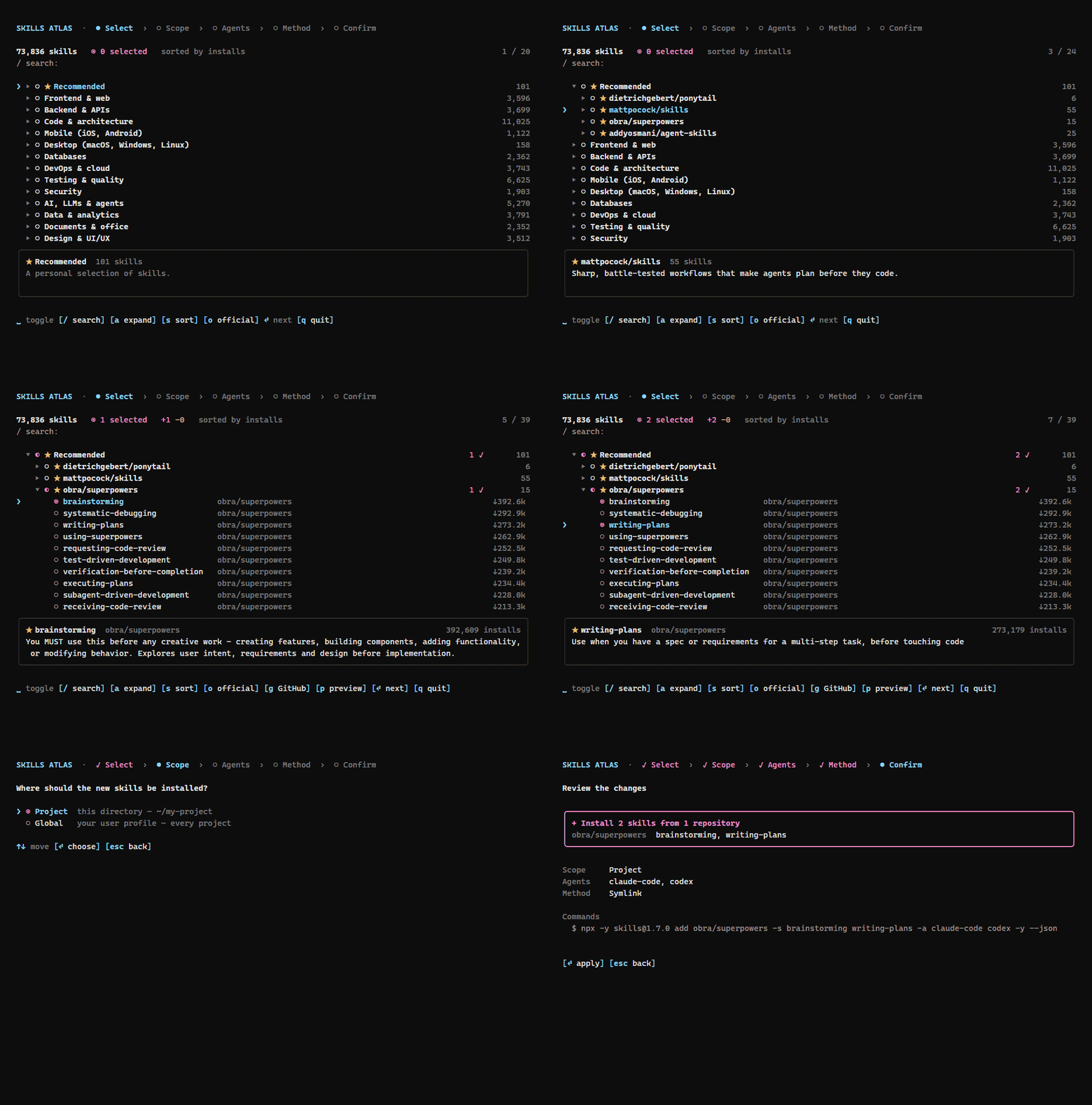
A session: tick skills in ★ Recommended, read a SKILL.md with p, then review the npx skills command. Try the web interface online, nothing installs there.
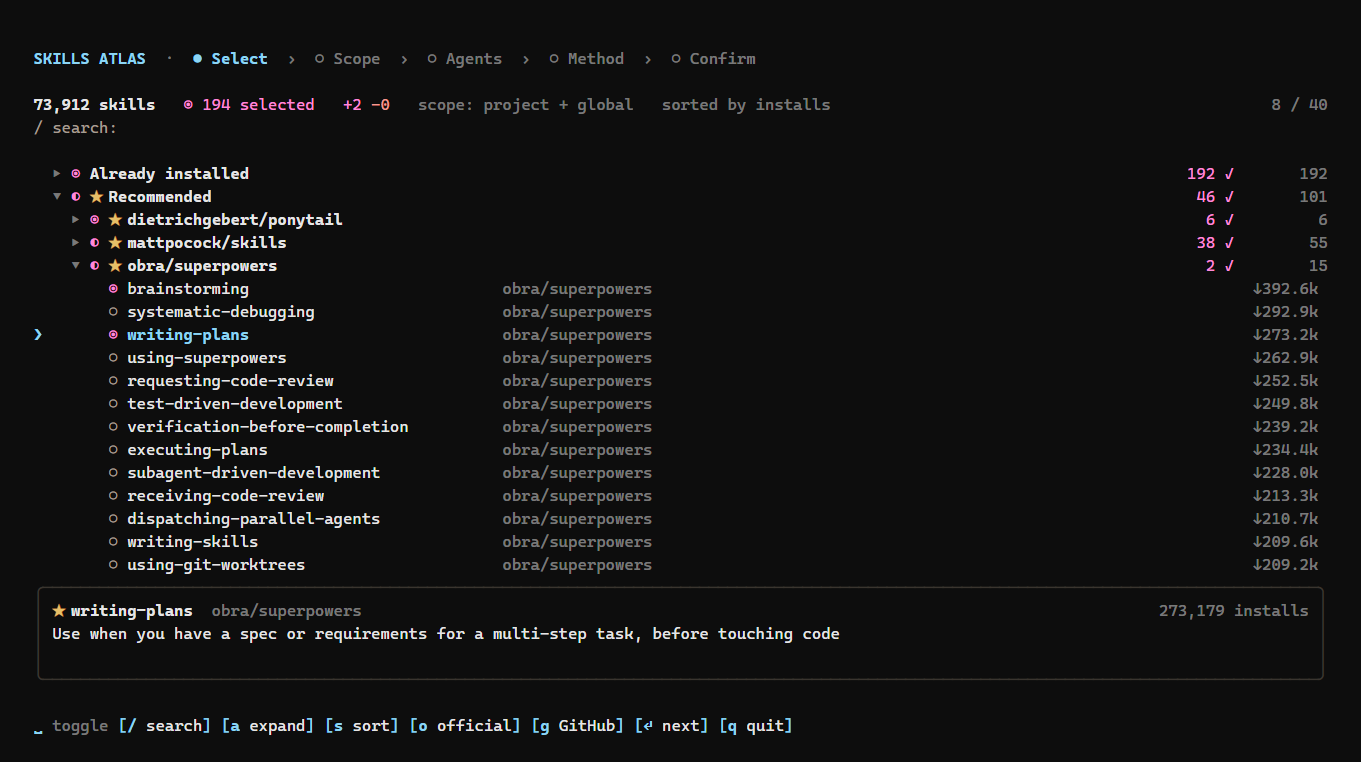
Terminal: installed skills ticked, ★ Recommended opened by repository, candy-pink selections.
Installation
npx skills-atlas # or: npm i -g skills-atlas
Node ≥ 20. A catalog snapshot ships inside the package, so it works offline; online, the CLI fetches the latest snapshot, rebuilt every other day (see The catalog).
Updating
npm i -g skills-atlas@latest   # global install
skills-atlas --version         # check the installed version
npx skills-atlas@latest        # with npx, which may otherwise run a cached older version
npx clear-npx-cache            # if npx still runs the old version
The catalog updates on its own, without a new version: the CLI checks for a newer snapshot at most every 12 hours. skills-atlas --refresh checks now.
Usage
skills-atlas                                  # interactive: tree → scope → options → confirm, then back to the tree
skills-atlas browse -t security -q audit      # tree pre-filtered by theme and text
skills-atlas browse -a claude-code cursor -g  # options given as flags are not asked; -g/-p also limits the tree to that scope
skills-atlas themes                           # themes and their skill counts
skills-atlas list -t databases -n 10          # non-interactive listing (--json available)
skills-atlas agents                           # ids accepted by --agent (★ = detected here)
skills-atlas install anthropics/skills@pdf supabase/agent-skills@supabase -a claude-code -p -y
skills-atlas ui                               # the same in your browser, with the mouse
skills-atlas export > my-skills.json          # installed skills as a selection file (-g / -p for one scope)
skills-atlas import my-skills.json -a claude-code -g  # install the same skills on another machine or project
skills-atlas show obra/superpowers@brainstorming      # a skill's SKILL.md, read from GitHub (--json available)
skills-atlas outdated                         # global skills with a newer version on GitHub (--json available)
skills-atlas update                           # update them all (or name some; --dry-run available)
skills-atlas mcp                              # MCP server on stdio, for Claude and other agents
skills-atlas installed -a claude-code codex   # installed skills by agent: what each one sees (--json available)
skills-atlas packs                            # curated packs: frontend, security, quality, writing
skills-atlas install --pack security -a claude-code -g   # install a whole pack
skills-atlas sync                             # install what this project's skills-atlas.json lists and is missing
skills-atlas completion bash                  # shell completion script (bash, zsh, fish, powershell)
Shell completion completes commands, options, skill ids, agents, themes and languages. Load it from your shell's startup file:
| Shell | Line to add |
|---|---|
bash (~/.bashrc) | eval "$(skills-atlas completion bash)" |
zsh (~/.zshrc) | eval "$(skills-atlas completion zsh)" |
fish (~/.config/fish/config.fish) | skills-atlas completion fish | source |
PowerShell ($PROFILE) | skills-atlas completion powershell | Out-String | Invoke-Expression |
It needs skills-atlas installed (npm i -g skills-atlas), not run through npx. Skill ids come from the cached catalog, so Tab never waits for the network.
export writes the installed skills that have a GitHub source as { "skillsAtlas": 1, "skills": ["owner/repo@skill", …] }; home-made skills are listed on stderr and left out. import takes the same options as install and asks for what they leave open. A selection file is checked before anything runs: a malformed id, or a name that could pass for a flag, stops the import.
When a newer skills-atlas is published, a dim line says so above the tree and under the ui address. npm is asked at most once a day, in the background, so it never slows the start; --offline skips it.
Risk check
The SKILL.md preview (p), skills-atlas show and the MCP server's show_skill point at what a skill asks for beyond its description:
| Level | Warning sign |
|---|---|
| high | downloads and runs code (curl … | sh, base64 -d | sh), reads or sends credential files (~/.ssh, ~/.aws…), deletes broadly (rm -rf ~), asks the agent to hide things from the user or ignore its instructions |
| medium | runs commands as administrator, reads secrets from the environment, sends data to a server |
| info | installs or runs packages or bundled scripts |
It is a pattern check on the text, tuned on the 150 most installed skills: it points at lines worth reading, it does not prove a skill safe. show prints the warning signs on stderr, so that stdout stays the SKILL.md alone; show --json add
// HOW IT'S BUILT
KEY FILES