⏳ This skill is pending AI review.
Scores will appear once the review pipeline completes.
qikly
Write tests that can actually fail, by withholding the acceptance criteria from the agent that writes the code. Use when someone does not trust a suite that passes. Use when they want tests written from a specification rather than from the code. Use when they ask whether a specification is testable, or want an existing suite scored by planting faults in the code. Python modules, through the qikly tool. Also use whenever qikly or spec-driven testing is mentioned.
Choose how to use this skill
You do not need every option. Choose the path your AI client supports. The stable page stays the same; versioned files are immutable.
1. Native installer
This listing has no registered native installer command. Use the complete package or source fallback below, depending on what your client supports.
Do not guess an installer command or replace an existing version without reviewing the diff.
2. Complete package recommended
Download the ZIP when available. It includes SKILL.md plus the references, security notes and version metadata.
No complete ProSkills package is published for this listing yet.3. Prompt-only
Copy the prompt above when the agent can read the stable page or when you want to adopt the workflow without installing a skill.
Need only the instruction file?
Download SKILL.md only if your client requires a single file. The complete ZIP is safer for a full installation because it preserves the references and release context.
No path installs or executes anything by itself. Your agent still needs access to the project files. Before updating, compare the installed version and review the diff.
// RATINGS
// README
qikly








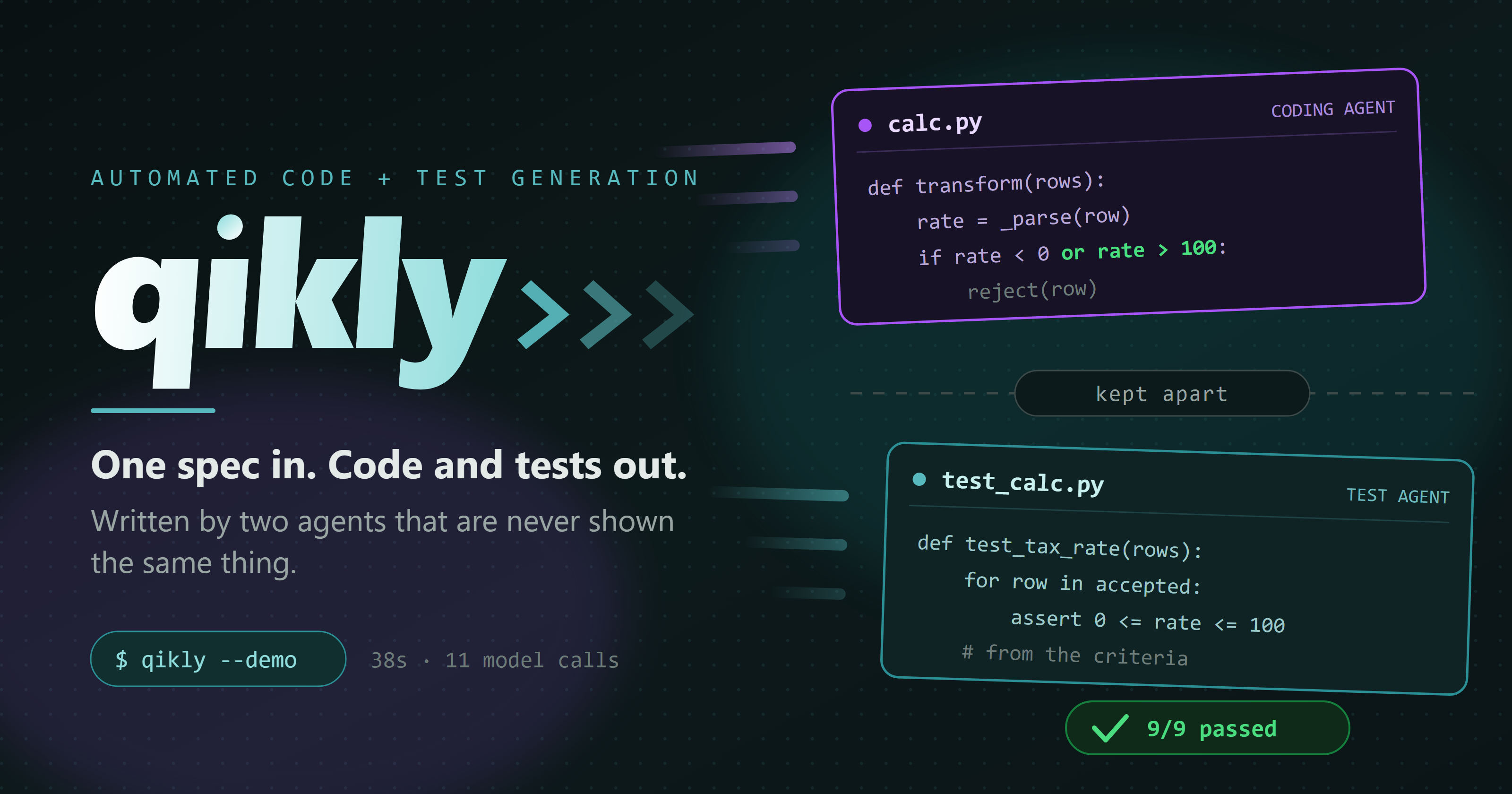
The problem: Your AI writes both the code and its tests. How do you know the tests are really valid?
One logged run. Only the test agent was told a rate may not exceed 100. The
coding agent worked that bound out from a failing test and wrote or rate > 100
itself, so the 9 of 9 is code meeting a bar it never read.
A student who writes the exam paper, writes the answer key and then sits the exam will pass. That is what happens when one model is given the acceptance criteria and asked to produce both the implementation and the suite that checks it. Everything goes green, and the green means nothing. qikly takes the answer key away from the student: the coding agent never sees the acceptance criteria.
In one session, a suite an AI wrote from the code scored 8 out of 8 on a fault-planting check and still missed four real bugs. A suite qikly wrote from a spec which the coding agent never saw found them. That gap is what qikly is for.
Start here
pip install --upgrade qikly
Start on your own code, not on ours. This needs no API key, no task file, no specification and no decision from you, and it answers the question you probably arrived with.
qikly --score-code my_module.py --score-tests tests/
Other ways in
| If you want to | Run | Costs |
|---|---|---|
| Point it at your own module and write tests from a spec | qikly --scaffold my_module.py | nothing to set it up |
| Start from a finished example in a project of your own | qikly --example | nothing to set it up |
| See the split for yourself, on a bundled task | qikly --explain CALC_TAX | nothing, no API key |
| Watch a real run end to end | qikly --demo | needs a key, about half a minute and well under a cent |
--score-code is the one to try in a meeting. Point it at a module or a
package, with the tests you already have. It plants one fault at a time in a
copy of your code, runs those tests against each one, and names the faults
nothing noticed. Both flags are needed: one says what to break, the other says
what should notice.
It tells you what your tests would notice changing. It cannot tell you whether the code was right to begin with, because it works by breaking code that is there, so anything the code never did is invisible to it. That is the gap above: the suite that scored 8 out of 8 was thorough about the code that was there and blind to what the code should have done. No model is called, nothing of yours is modified, and no code leaves your machine.
--demo works in a throwaway demo/throwaway_<timestamp>/ folder it expects you to
delete. It is for watching, not for building in. --example and --scaffold
create a real project in the directory you are standing in, and those are the
two to build from.
--upgrade rather than a bare install, because the Skill ships inside the
package: pip install qikly on a machine that already has an older one
prints "Requirement already satisfied", changes nothing, and
--install-skill then writes that older Skill.
Then five steps from your module to a first run.
test.qikly.com is the two minute version of this page, and the one to send to somebody else.
New: an agent Skill.
qikly --install-skillteaches Claude Code, Gemini CLI, Codex, Cursor or GitHub Copilot how to drive qikly. What the Skill contains.
Who it is for: a developer or team pointing an AI coding agent at a
self-contained Python module that transforms data, for example an ETL step, a
merge, a calculation or a validation routine, who does not want to trust a
green suite when the same agent wrote both the code and the tests. It suits one
module at a time in small to mid-sized repositories: when a test fails, only
the files that failure names are loaded, so runs stay small and quick. It fits
most naturally where verification already has to be independent, such as
automotive, medical devices, fintech and defence: ADAS_HEADWAY, a bundled
example, checks following distance from forward-radar samples. See What it is for.
The idea
qikly takes the answer key away from the student. It generates a test suite from the acceptance criteria, then writes an implementation and repairs it against that suite until every test passes or a retry budget runs out, recording every failure, every piece of reasoning and every diff.
The part that makes the result mean something: the coding agent never sees
acceptance_criteria. It gets the specification with that section stripped
out, the same vague brief a developer works from, while test generation gets
it in full. When a test fails, the agent sees pytest's output for that test and never
the acceptance criteria. Without that asymmetry both sides read the same spec
identically and every test passes first try, which proves nothing.
Purple is what the coding agent can see. Teal is what the standard is written from. They never touch. A run that never converges is still
// HOW IT'S BUILT
KEY FILES