⏳ This skill is pending AI review.
Scores will appear once the review pipeline completes.
fractal
Hierarchical agent loops with recursive self-organization.
Choose how to use this skill
You do not need every option. Choose the path your AI client supports. The stable page stays the same; versioned files are immutable.
1. Native installer
This listing has no registered native installer command. Use the complete package or source fallback below, depending on what your client supports.
Do not guess an installer command or replace an existing version without reviewing the diff.
2. Complete package recommended
Download the ZIP when available. It includes SKILL.md plus the references, security notes and version metadata.
No complete ProSkills package is published for this listing yet.3. Prompt-only
Copy the prompt above when the agent can read the stable page or when you want to adopt the workflow without installing a skill.
Need only the instruction file?
Download SKILL.md only if your client requires a single file. The complete ZIP is safer for a full installation because it preserves the references and release context.
No path installs or executes anything by itself. Your agent still needs access to the project files. Before updating, compare the installed version and review the diff.
// RATINGS
Not yet listed on ClawHub or SkillsMP
// README
fractal




Hierarchical agent loops with recursive self-organization.
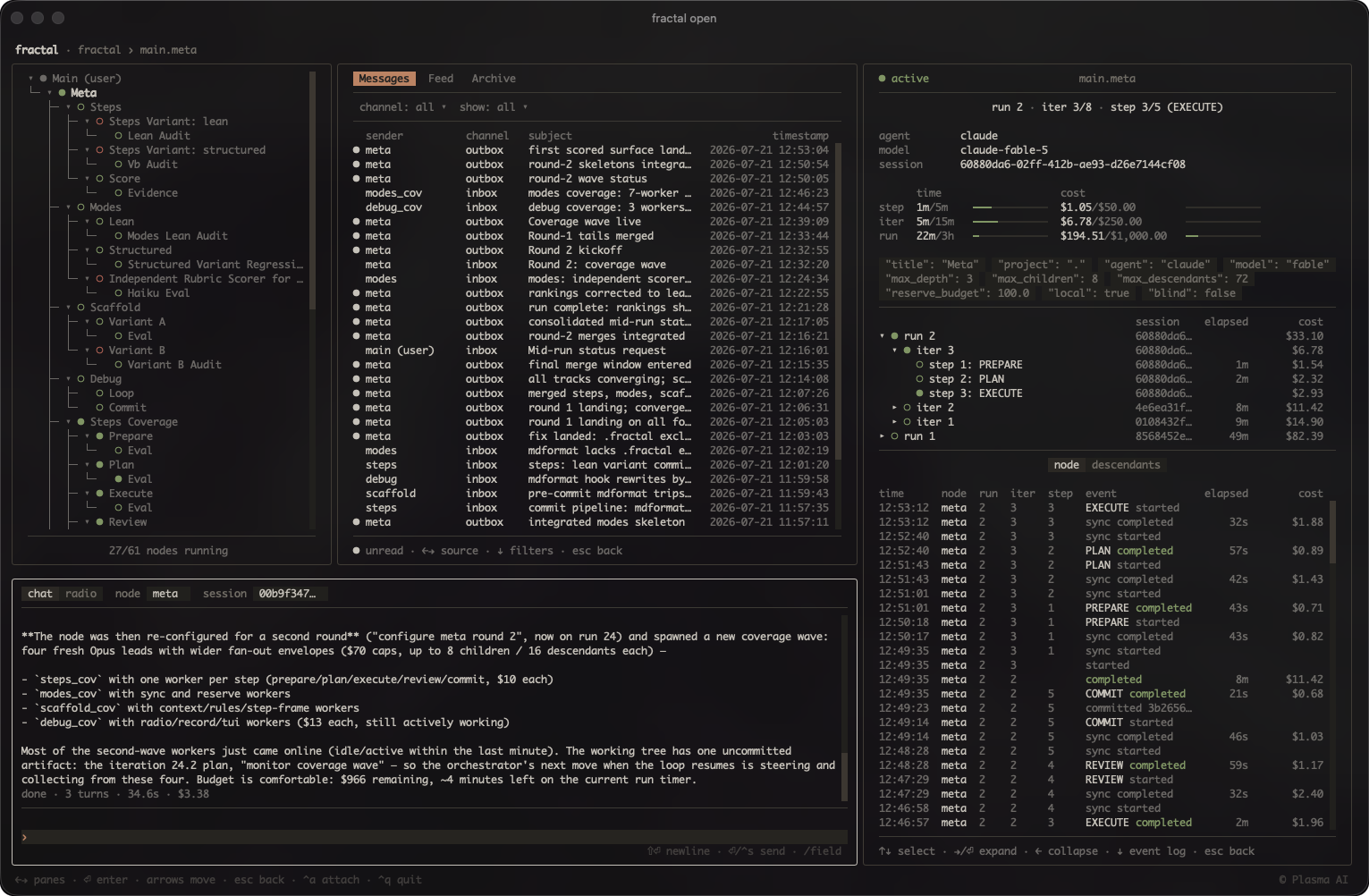
In a fractal, autonomous agent loops arrange themselves into a tree: a node
iterates toward a goal in its own git worktree and spawns child nodes for
separable subtasks, so the tree grows to fit the problem rather than a fixed
plan. Hard caps (iterations, depth, children, cost, time) keep each loop
bounded, and an operator can steer or stop it at any point. Run metadata
(including cost) lands in one local SQLite database, which can be interacted
with live in a terminal UI.
[!WARNING] Nodes run their agent without permission prompts by default. Unattended loops cannot stop to ask, so every seeded agent config disables the approval gate — Claude
bypassPermissions, Codexdanger-full-access, Grok--always-approve, opencode--auto, omp--yolo. A node can therefore run any command its agent decides to run, with your credentials and your machine's reach. The per-nodegit worktreeisolates the branch it commits to, not the filesystem, the network, or anything else outside it. Only launch nodes whose task you would trust to run unsupervised, and prefer a sandboxed or otherwise disposable host for anything else.
Source: https://github.com/plasma-ai/fractal
Package: https://pypi.org/project/plasma-fractal/
Documentation: https://docs.plasma.ai/fractal
Installation
Install the fractal package from PyPI:
pip install plasma-fractal
or
pip install fractal
Use pipx install or uv tool install to install the package in an isolated
environment. If you use one of these two methods, you must also install
plasma-wiki (a plain pip install pulls plasma-wiki and puts wiki on your
PATH, but this is not the case when using pipx install or
uv tool install).
uv tool install plasma-fractal --with-executables-from plasma-wiki does the
same in one command.
Open the dashboard from your project root with fractal open (requires an
initialized fractal). Pass --light if your terminal uses a light color scheme.
Skill
Install the skill for your agent via the plugin marketplace (Claude Code and Codex):
# Claude Code
/plugin marketplace add plasma-ai/plugins
/plugin install fractal@plasma

# Codex
codex plugin marketplace add plasma-ai/plugins
codex plugin add fractal@plasma
Another install route is from the CLI, which copies (or symlinks) the fractal
and wiki skills into ~/.claude/skills and ~/.agents/skills (add --project
for the current project only):
fractal install [--link]
After upgrading the package, re-run fractal install to refresh the copied
skills (pass --link for symlinked install).
Usage
A fractal is a tree of git worktrees, each running an autonomous agent loop. The
root (user) node is your current branch itself — it has no worktree or loop of
its own; top-level nodes branch from it, and child nodes branch from their
parent. Agents iterate in tmux sessions (or, with --headless, in detached
process groups), and all state (runs, iters, steps, costs, signals) is tracked
in a local SQLite database.
Five agent backends are supported — Claude Code (claude), Codex (codex),
Grok Build (grok), OpenCode (opencode), and Oh My Pi (omp) — selected per
node with --agent (children inherit it). Claude and Codex can additionally
route through OpenRouter with --provider=openrouter, which authenticates via
OPENROUTER_API_KEY from the launching shell; OpenCode and Oh My Pi reach
OpenRouter natively through their own openrouter/<author>/<model> model ids.
Use the /fractal skill to spawn and manage agent nodes. The fractal CLI is
also available directly — run fractal --help and fractal <command> --help to
explore.
The skill is invoked as /fractal [directive] and takes plain-language
instructions. The agent interprets the directive and prints any suggested
NODE.md instructions and completion requirement it can distill from the
directive, plus a table of every parameter (empty where the directive said
nothing), then asks for anything it could not infer. From there it walks you
through refining the node's definition and, once you approve, launches the node
in a tmux session. On hosts where tmux cannot run, add --headless; the node's
output appends to headless.log, delegated child starts follow the parent's
backend, and an unflagged relaunch reuses the backend the node last launched
with.
Parameters the skill interprets from the directive:
name: node name (required; letters, digits, and_only — no-)path: project root, repo root or monorepo sub-project (default:.)title: human-readable display name (default: de-slugged node name)scope: restrict commits to subdirectories within the worktree (comma-separated, e.g.parent/child,tests)base: branch to start from (default: current branch)meta: target node branch for meta-configurationinherit: seed surfaces from the parent node instead of the package seed (comma-separated:steps,scripts,skills,config, orall); agent config always inherits. A top-level spawn's parent is the user node, which carries no steps, scripts, or skills — the parameter is for configured nodes spawning childrenagent: agent command; inherits the user node's default when omittedprovider: provider route for the agent (e.g.openrouter); inherits the user node's default when omittedmodel: model override; when omitted, the agent uses its own default model (Claude runs on the seed'sbestalias, oranthropic/claude-sonnet-4.6when routed through OpenRouter)effort: reasoning-effort override; when omitted, the Claude and Codex seeds' own pinned level (high) applies rather than the vendor default, while Grok, OpenCode, and Oh My Pi fall back to the vendor defaultmax-iters: per-run iteration capmax-depth: maximum child node nesting depthmax-children: maximum direct child nodesmax-descendants: maximum total descendant nodestimeout: per-run time limit (e.g.30m,1.5h)iter-timeout: per-iteration time limit (e.g.30m,1.5h)step-timeout: per-step time limit (e.g.30s,10m); caps each stepinterval: fixed iteration schedule (e.g.1h)sleep: delay between iterations (e.g.10s)wait: sleep between approval-wait sync invocations (default:1m)max-cost: cost ceiling in USD per run — runs are isolated,
// HOW IT'S BUILT
KEY FILES