⏳ This skill is pending AI review.
Scores will appear once the review pipeline completes.
agentic-walkthrough

Prove that a reported run caused its intended real effect. Walk the executor path from entry to effect, capture one observable per hop, and report a result a no-op could not produce.
Choose how to use this skill
You do not need every option. Choose the path your AI client supports. The stable page stays the same; versioned files are immutable.
1. Native installer
This listing has no registered native installer command. Use the complete package or source fallback below, depending on what your client supports.
Do not guess an installer command or replace an existing version without reviewing the diff.
2. Complete package recommended
Download the ZIP when available. It includes SKILL.md plus the references, security notes and version metadata.
No complete ProSkills package is published for this listing yet.3. Prompt-only
Copy the prompt above when the agent can read the stable page or when you want to adopt the workflow without installing a skill.
Need only the instruction file?
Download SKILL.md only if your client requires a single file. The complete ZIP is safer for a full installation because it preserves the references and release context.
No path installs or executes anything by itself. Your agent still needs access to the project files. Before updating, compare the installed version and review the diff.
// RATINGS
Not yet listed on ClawHub or SkillsMP
// README
Sno Station Skills — The working habits of a real team, installed into your AI agents.




Find out more on our website, sno.ai.
Install
All skills with Sno Station
Copy this prompt into your agent's chat:
Install sno.ai from GitHub.
This installs Sno Station and sets up all 38 skills, plus the programs they call, for the supported agents it finds on your machine.
Or paste this command into your terminal:
curl -fsSL https://sno.ai/install | sh
Already have Sno Station? Run sno setup to install the skills into your agents.
Run it again if you add another agent later.
Install one skill
Use the copy button on either prompt below, then paste it into your agent's chat. Your agent finds and installs the skill; you do not need to download or copy files yourself.
peer-review checks code, plans and documents with a reviewer from another model vendor.
It needs Sno Station programs and a logged-in reviewer. The prompt checks those dependencies first.
Install only the peer-review skill from https://github.com/sno-ai/sno-station-skills
for this project, including its scripts and references.
Check its dependencies and tell me what is missing before installing anything else.
less-is-more helps your agent write less code and remove unnecessary complexity.
It can run without Sno Station.
Install only the less-is-more skill from https://github.com/sno-ai/sno-station-skills
for this project, including its scripts and references.
tag-team puts two agents on one task: one builds, the other reviews, and they settle the
findings between themselves. It needs Sno Station's Reach program. The prompt checks for it first.
Install only the tag-team skill from https://github.com/sno-ai/sno-station-skills
for this project. Check that `sno reach pair --help` works and tell me what is missing
before installing anything else.
Supported agents for Sno Station: Claude Code, Codex, OpenClaw and Hermes Agent. Each skill declares what it needs from the agent. Setup uses that declaration to install it fully, install it in a reduced form, or skip it when the agent cannot run it.
Updates come by themselves: sno updates itself when it finds a newer release. The full
command list is in Sno Station's command reference.
Install as a plugin
Claude Code:
claude plugin marketplace add sno-ai/sno-station-skills
claude plugin install sno-station@sno-ai
Codex:
codex plugin marketplace add sno-ai/sno-station-skills
codex plugin add sno-station@sno-ai
sno-station holds all 38 skills; most of them call Sno Station programs, so install Sno Station too.
For only the 7 skills that run without Sno Station, install sno-station-standalone@sno-ai instead.
Install · What changes for you · Why these skills · The pain, and what fixes it · Stories from our own machine · The skills · Built to be trusted · For skill authors · License
What changes for you
You keep working exactly as before, in whichever agent you like. Then:
- You finish a change and want it checked. Say "peer-review this". A reviewer from the other vendor reads it cold, reports what would break in real use, and the author fixes the root cause, round after round, until the review comes back clean.
- You start a long run before bed. Say "arm rotate-agent". If the working agent's quota drops to the threshold overnight, it hands the task to a fresh agent from the other vendor, with the brief verified before a single file is touched.
- You come back. Say "away brief". One page, at most 60 lines: what got done, what is stuck and why, what waits for your answer, and what it cost in quota.
- You have a job for someone else. Say "write a charter". You get one file that says what
to deliver, what is out of bounds, what you already decided, and how each success check will
be proven. Any agent can then
deliverit, and every check is proven by a recorded real run. - Every night, the team looks back. The nightly loop reads the day's Claude Code and Codex
sessions, finds the mistakes that repeat, and proposes lessons and skill changes. In the
morning you accept the ones you like with
sno rem-reflect accept <id>. Nothing changes without that accept.
Why these skills
One AI agent is a brilliant new hire with no colleagues. It reviews its own work, so it misses what it cannot see. It stops dead when its quota runs out, at 3 a.m., halfway through your build. It says "done" when the tests are green and nothing actually happened. It builds three layers of machinery you never asked for. And tomorrow it makes the same mistake it made today, because nobody told it otherwise.
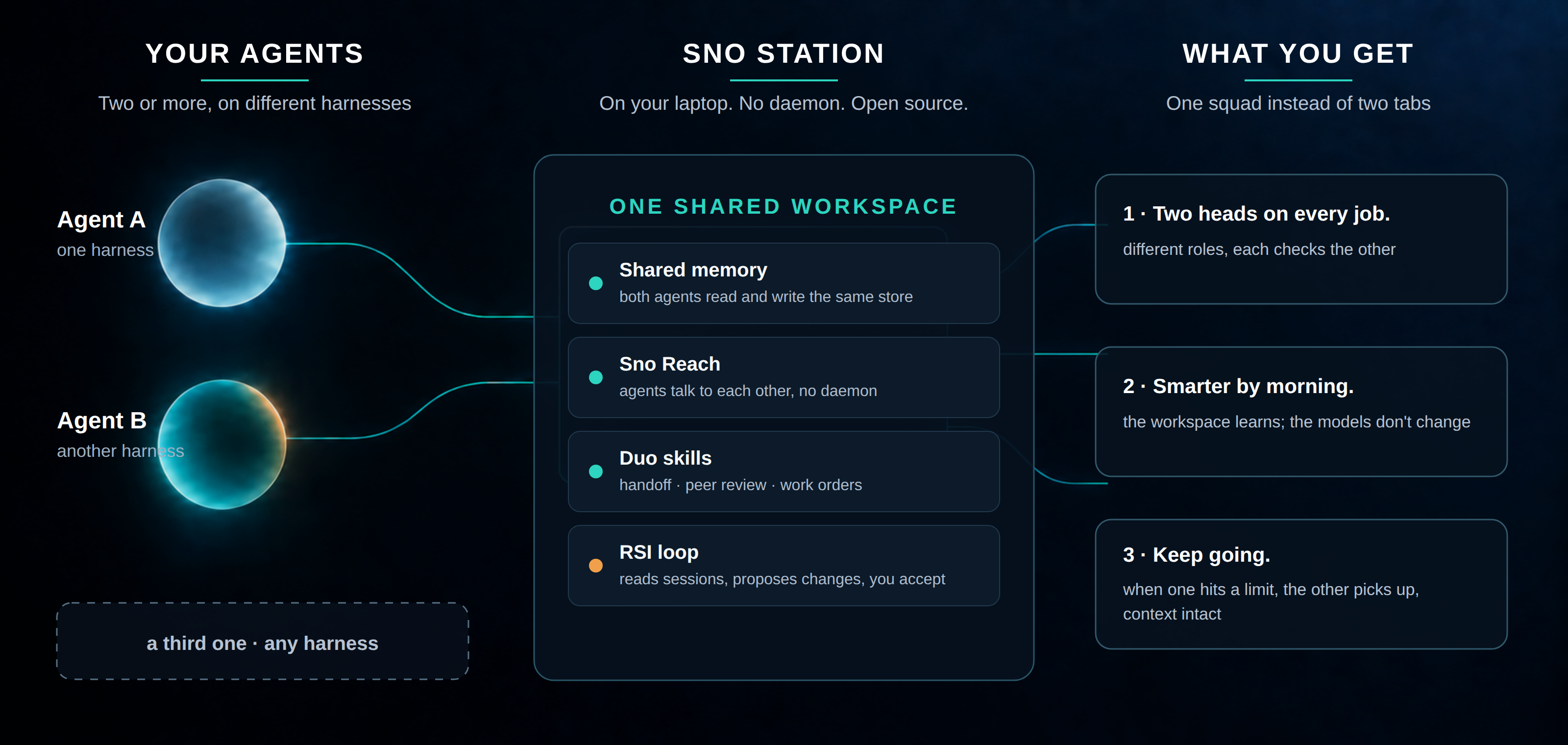
Sno Station Skills fixes the team, not the model. These are the skills Sno Station installs into the agents you already run. They give Claude Code and Codex the habits every good engineering team has: a second pair of eyes from a different vendor, a clean handover when someone has to leave, a lead who hands out work with a written definition of done, a one-page brief when you come back, and a retrospective every night that turns this week's mistakes into next week's rules.
Dual Brain: different roles, one team. One agent carries out your task. The other reviews the result against your requirements. Claude Code and Codex can take either role. When both CLIs are installed, the review runs in the other vendor's CLI, in a fresh session with none of the author's conversation. The agents exchange findings and corrections. Add more roles, and you have an Agent Squad.
Work that finishes while you sleep. Arm it before bed, and when the working agent's subscription runs low it writes a handover brief while it still can, wakes an agent from the other vendor, and hands the task over with the exact commit to continue from. Your build does not care which vendor finished it.
"Done" means proven. Every task can carry a written list of success checks, each one answered pass or fail by a real run. Nothing counts as done because an agent said so.
Tested before it ships. Every skill in a release passed its own self-tests on a clean copy, was scanned for personal paths and leftovers, and carries a stamp that says so. A skill that fails is not published.
The pain, and what fixes it
Last updated 2026-10-23. Every line in the left column is a real complaint from r/ClaudeCode, r/codex or r/ClaudeAI in the week of October 20, 2026. The right column is what runs on our own machines, free and open source, to make it stop.
| What people said this week | What fixes it | Where |
|---|---|---|
| “Ran out of my 5-hour limit within 30 minutes.” | Stop sending the biggest model to do everything. Opus plans and reviews; Codex writes the code, called as an age |
// HOW IT'S BUILT
// FILES
3 files shipped with this skill. Inline text is the catalog copy. The upstream link is the source repository.
plugins/sno-station-standalone/skills/agentic-walkthrough/SKILL.md6.6 KBa438b2479478upstream ↗
--- name: agentic-walkthrough description: "Prove that a reported run caused its intended real effect. Walk the executor path from entry to effect, capture one observable per hop, and report a result a no-op could not produce." requires: programs: [] harness: - {slot: 4.shell, need: required} - {slot: 4.file-read-write, need: required} --- # Agentic Walkthrough — take the program's seat The stance is the whole method. You are not a reviewer standing outside the code with a checklist; you are the thing the source describes — the job, the stage, the handler — and you run it in your head, hop by hop, exactly as it would run, noticing every switch you pass and every place your output goes. Only then do you turn to the real system and make it show you that what you just walked actually happened. The principle: BE the executor, then make the executor prove itself. Ordinary debugging starts from a failure — an error, a red test, a wrong number. This starts from the opposite and much quieter case: **everything reports success and you still do not know whether the work happened.** That case is real and it is not rare. A stage that cannot do its work can still report `done`. A job can start, finish, write a trace, and pass its own verification while touching nothing. No test suite catches this, because no assertion in the suite is false. Three moves, in order. How far to take each is your judgment — often the first cannot finish without the ones after it. ## 1. Walk the path — be the program, read, don't run Put yourself where the code sits and go hop by hop from entry point to effect. You are reading, not executing, which is the whole point: a live run cannot show you the branch it never took. Three questions at each hop are usually enough: - **What switch controls this hop, and what is its value right now?** A config key, an env var, a feature flag, a job type, a default argument. - **If that switch is off, does it fail loud or continue quiet?** Quiet defaults are where these bugs live. Loud failures are already visible — you are hunting the silent ones. - **What does this hop actually do — which line?** If you cannot name the line, you have not shown the hop does anything. **The last hop is the one everyone skips and it is usually the decisive one: is this output visible to whatever consumes it downstream?** A stage that runs perfectly and writes where nothing reads is indistinguishable from a stage that never ran. Check the reader's path, not the writer's — they are frequently not the same file, the same directory, or the same database. Where to start and how deep to go is judgment. Go where the switches are dense, or where the evidence gets thin. ## 2. Probe every hop that has to be real The walk tells you which hops matter. A probe is how you make one of them prove itself. **Keep each probe narrow: one observable that only the real thing could have produced.** A broad health check is worth little here, because everything passes it — that is the whole problem. The walk already told you what this hop is supposed to do; probe exactly that. These classes come up again and again, and each fails in a way that looks fine from the caller's side. Treat them as places to look, not a checklist to complete. - **Stored state — the rows themselves.** Take a concrete failing case and pull out the actual record behind it. A log says a write happened; only the row can distinguish a correct write from one that hit the wrong record, wrote the wrong value, or was counted but never committed. Landed → the defect is downstream. Did not land → the write logic is wrong, and nothing built on top of it is worth tuning. **Expect to need the product's own accessor** — encryption, a key held elsewhere, a custom codec. A generic CLI failing to open the store is normal, not a wall. - **Database identity.** Which file did the process actually open — resolve the real path — and is it the same one the reader queries? Path resolution usually consults several sources in an order nobody remembers, and the first one wins. - **Model and API calls.** Did a request actually leave? How many, to which endpoint, under which model or account? Then the part usually skipped: **does the response contain what the caller assumes?** A 200 with an empty body sails through an `if (ok)` check. Zero calls is the loudest possible answer and the easiest one to miss. - **Accelerator and environment setup.** A path that silently falls back to CPU still finishes, just differently. Ask which device the work actually landed on, not whether setup returned without error. Same shape for any "configure, then hope" step. - **File input and output.** Did the bytes land where the consumer looks? A temp directory that gets cleaned, a relative path resolved from a different working directory, an output written somewhere nothing reads — all of these leave a successful write behind. - **Child processes and third-party services.** Did it actually start, is the thing you matched actually it, is it listening, and did it stay up — or exit a second later while the parent carried on? ## 3. Report a number, not an impression This is the one part worth being strict about, because it is what separates a gate from a reading exercise. **Finish with a number a no-op could not have produced, plus the line where each action happens.** *N rows changed, M requests sent, and here is where I can see those N rows differ.* - **Zero is a failure of the walk, not a result.** It means you found the path broken. - **"The walk went well" is not a finding.** Neither is a summary with the numbers dropped. - **If you cannot name the line, that action is not proven to run.** ## Before any absence becomes a finding, check your instrument Most wrong conclusions here come from a check that could never have said anything else. **Prove your check could have produced the other answer** — feed it a case you know is positive and watch it fire. Shapes this actually takes: - `grep -c` against a path that does not exist returns `0`, identical to a real file with no matches. Confirm the path exists before the count means anything. - A process match can match the wrong process: a wrapper, a script that names your target as an argument, or your own shell. - A progress check can range over the wrong quantity and read as stalled while the job is healthy. - **Timestamps are asymmetric.** An *unchanged* modification time is strong evidence nothing touched the file. A *changed* one is evidence of almost nothing — opening a store, checkpointing, or migrating a schema all touch the file without doing the work you are after. <!-- reminders:start --> <!-- reminders:end -->plugins/sno-station-standalone/skills/agentic-walkthrough/scripts/selftest/run-selftest.sh1.2 KB1cb83e1bd1c9upstream ↗
#!/usr/bin/env bash # Text contract for this skill only. Reads nothing outside this payload. set -Eeuo pipefail selftest_dir="$(cd -- "$(dirname -- "${BASH_SOURCE[0]}")" && pwd)" skill="$(cd -- "$selftest_dir/../.." && pwd)/SKILL.md" python3 - "$skill" <<'PY' import pathlib import sys text = " ".join(pathlib.Path(sys.argv[1]).read_text(encoding="utf-8").split()) rules = { "take the program seat": "BE the executor, then make the executor prove itself.", "check the consumer side of the last hop": "Check the reader's path, not the writer's", "report a number a no-op could not produce": "Finish with a number a no-op could not have produced, plus the line where each action happens.", "zero is a broken path, not a result": "Zero is a failure of the walk, not a result.", "an unnamed line is not proof": "If you cannot name the line, that action is not proven to run.", "prove the instrument can answer otherwise": "Prove your check could have produced the other answer", } missing = [name for name, phrase in rules.items() if phrase not in text] if missing: raise SystemExit(f"agentic-walkthrough: missing load-bearing rules: {', '.join(missing)}") PY printf 'agentic-walkthrough text contract passed\n'README.mdupstream ↗
Contents are not inlined in the catalog. Open the upstream file.
Plain-text copy, no login: /skill-bundles/sno-ai-sno-station-skills-plugins-sno-station-standalone-skills-agentic-walkthro.md