⏳ This skill is pending AI review.
Scores will appear once the review pipeline completes.
investigation

>
Choose how to use this skill
You do not need every option. Choose the path your AI client supports. The stable page stays the same; versioned files are immutable.
1. Native installer
This listing has no registered native installer command. Use the complete package or source fallback below, depending on what your client supports.
Do not guess an installer command or replace an existing version without reviewing the diff.
2. Complete package recommended
Download the ZIP when available. It includes SKILL.md plus the references, security notes and version metadata.
No complete ProSkills package is published for this listing yet.3. Prompt-only
Copy the prompt above when the agent can read the stable page or when you want to adopt the workflow without installing a skill.
Need only the instruction file?
Download SKILL.md only if your client requires a single file. The complete ZIP is safer for a full installation because it preserves the references and release context.
No path installs or executes anything by itself. Your agent still needs access to the project files. Before updating, compare the installed version and review the diff.
// RATINGS
Not yet listed on ClawHub or SkillsMP
// README





Social LEAP Estimates Animal Poses (SLEAP)
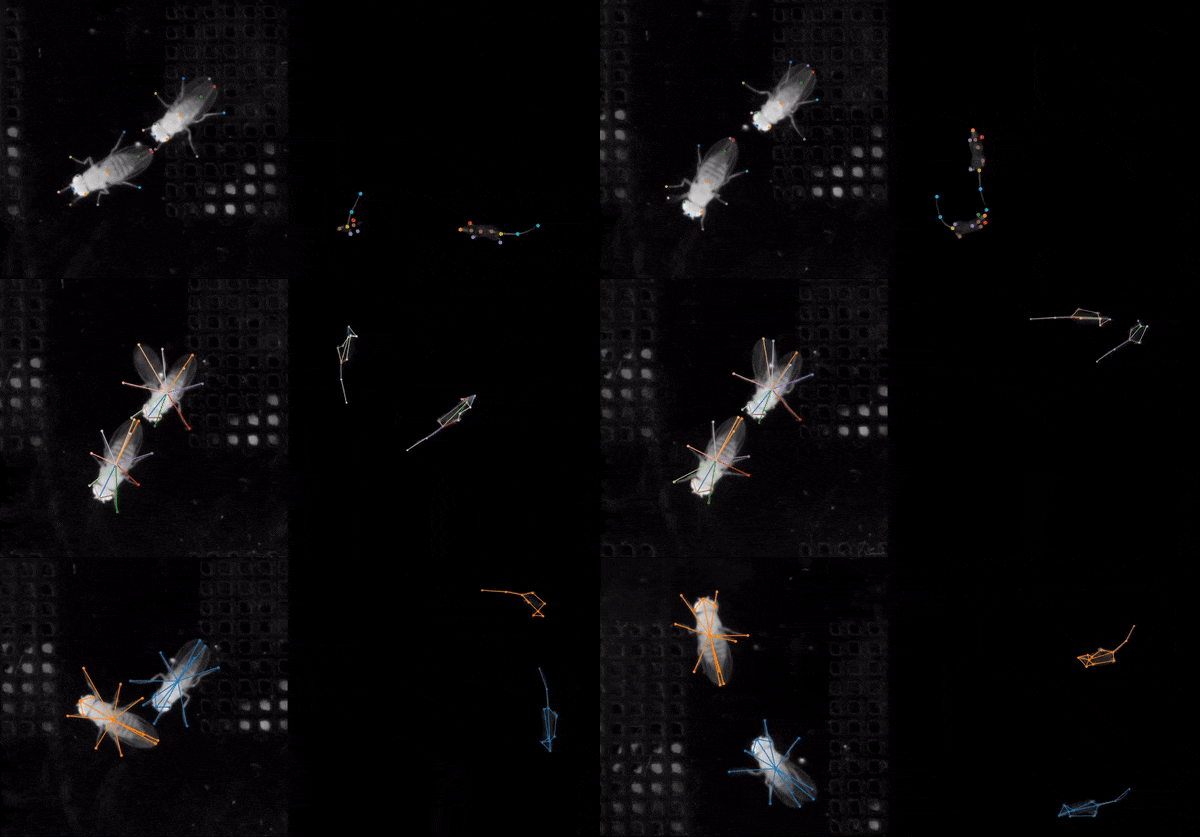
SLEAP is an open-source deep-learning based framework for multi-animal pose tracking (Pereira et al., Nature Methods, 2022). It can be used to track any type or number of animals and includes an advanced labeling/training GUI for active learning and proofreading.
Features
- Easy, one-line installation with support for all OSes
- Purpose-built GUI and human-in-the-loop workflow for rapidly labeling large datasets
- Single- and multi-animal pose estimation with top-down and bottom-up training strategies
- Customizable neural network architectures that deliver accurate predictions with very few labels
- Fast training: 15 to 60 mins on a single GPU for a typical dataset
- Fast inference: up to 600+ FPS for batch, <10ms latency for realtime
- Support for remote training/inference workflow (for using SLEAP without GPUs)
- Flexible developer API for building integrated apps and customization
- Two independent backends—
sleap-nnandsleap-iofor training/inference pipelines & handling SLEAP files respectively
Get some SLEAP
SLEAP is installed as a Python package. We strongly recommend using uv to install SLEAP in its own environment.
You can find the latest version of SLEAP in the Releases page.
Quick install
Python 3.14 is not yet supported
SLEAP currently supports Python 3.11, 3.12, and 3.13.
Python 3.14 is not yet tested or supported.
By default,uvwill use your system-installed Python.
If you have Python 3.14 installed, you must specify the Python version (≤3.13) in the install command.For example:
uv tool install --python 3.13 "sleap[nn]" ...Replace
...with the rest of your install command as needed.
uv tool install (any OS):
First, install uv if you haven't already:
# macOS/Linux
curl -LsSf https://astral.sh/uv/install.sh | sh

# Windows
powershell -ExecutionPolicy ByPass -c "irm https://astral.sh/uv/install.ps1 | iex"
Then install SLEAP:
# Windows/Linux CUDA 12.8
uv tool install "sleap[nn]" --index https://download.pytorch.org/whl/cu128 --index https://pypi.org/simple

# macOS / CPU-only
uv tool install "sleap[nn]" --index https://download.pytorch.org/whl/cpu --index https://pypi.org/simple
Run the SLEAP GUI after installation:
sleap
See the docs for full installation instructions.
Learn to SLEAP
- Learn step-by-step: Tutorial
- Learn more advanced usage: Guides and Notebooks
- Learn by watching: COSYNE 2024 Tutorial (Part 1), COSYNE 2024 Tutorial (Part 2), ABL:AOC 2023 Workshop, and MIT CBMM Tutorial
- Learn by reading: Paper (Pereira et al., Nature Methods, 2022) and Review on behavioral quantification (Pereira et al., Nature Neuroscience, 2020)
- Learn from others: Discussions on Github
References
SLEAP is the successor to the single-animal pose estimation software LEAP (Pereira et al., Nature Methods, 2019).
If you use SLEAP in your research, please cite:
T.D. Pereira, N. Tabris, A. Matsliah, D. M. Turner, J. Li, S. Ravindranath, E. S. Papadoyannis, E. Normand, D. S. Deutsch, Z. Y. Wang, G. C. McKenzie-Smith, C. C. Mitelut, M. D. Castro, J. D'Uva, M. Kislin, D. H. Sanes, S. D. Kocher, S. S-H, A. L. Falkner, J. W. Shaevitz, and M. Murthy. Sleap: A deep learning system for multi-animal pose tracking. Nature Methods, 19(4), 2022
BibTeX:
@ARTICLE{Pereira2022sleap,
   title={SLEAP: A deep learning system for multi-animal pose tracking},
   author={Pereira, Talmo D and
      Tabris, Nathaniel and
      Matsliah, Arie and
      Turner, David M and
      Li, Junyu and
      Ravindranath, Shruthi and
      Papadoyannis, Eleni S and
      Normand, Edna and
      Deutsch, David S and
      Wang, Z. Yan and
      McKenzie-Smith, Grace C and
      Mitelut, Catalin C and
      Castro, Marielisa Diez and
      D'Uva, John and
      Kislin, Mikhail and
      Sanes, Dan H and
      Kocher, Sarah D and
      Samuel S-H and
      Falkner, Annegret L and
      Shaevitz, Joshua W and
      Murthy, Mala},
   journal={Nature Methods},
   volume={19},
   number={4},
   year={2022},
   publisher={Nature Publishing Group}
   }
}
Technical issue with the software?
- Check the Help page.
- Ask the community via discussions on Github.
- Search the issues on GitHub or open a new one.
General inquiries? Reach out to [email protected].
Acknowledgments
SLEAP was created in the Murthy and Shaevitz labs at the Princeton Neuroscience Institute at Princeton University.
SLEAP is currently being developed and maintained in the Talmo Lab at the Salk Institute for Biological Studies.
Maintainers
- Divya Murali (@gitttt-1234), Salk Institute for Biological Studies
- Amick Licup (@alicup29), Salk Institute for Biological Studies
- Elizabeth Berrigan (@eberrigan), Salk Institute for Biological Studies
- Andrew Park (@7174Andy), Salk Institute for Biological Studies
- Tom Han (@tom21100227), Salk Institute for Biological Studies
- Talmo Pereira (@talmo), Salk Institute for Biological Studies
Contributors
SLEAP would not be possible without major contributions from many folks, including:
- Liezl Maree, Salk Institute for Biological Studies
- Arlo Sheridan, Salk Institute for Biological Studies
- Arie Matsliah, Princeton Neuroscience Institute, Princeton University
- Nat Tabris, Princeton Neuroscience Institute, Princeton University
- David Turner, Research Computing and Princeton Neuroscience Institute, Princeton University
- **Joshua S
// HOW IT'S BUILT
// FILES
2 files shipped with this skill. Inline text is the catalog copy. The upstream link is the source repository.
.claude/skills/investigation/SKILL.md3.6 KBb1d47fcec2b8upstream ↗
--- name: investigation description: > Scaffolds a structured investigation in scratch/ for empirical research and documentation. Use when the user says "start an investigation" or wants to: trace code paths or data flow ("trace from X to Y", "what touches X", "follow the wiring"), document system architecture comprehensively ("document how the system works", "archeology"), investigate bugs ("figure out why X happens"), explore technical feasibility ("can we do X?"), or explore design options ("explore the API", "gather context", "design alternatives"). Creates dated folder with README. NOT for simple code questions or single-file searches. --- # Set up an investigation ## Instructions 1. Create a folder in `{REPO_ROOT}/scratch/` with the format `{YYYY-MM-DD}-{descriptive-name}`: ```bash mkdir scratch/$(uv run python -c "import datetime; print(datetime.date.today().isoformat())")-{descriptive-name} ``` 2. Create a `README.md` in this folder with: task description, background context, task checklist. Update with findings as you progress. 3. Create scripts and data files as needed for empirical work. 4. For complex investigations, split into sub-documents as patterns emerge. ## Investigation Patterns These are common patterns, not rigid categories. Most investigations blend multiple patterns. **Tracing** - "trace from X to Y", "what touches X", "follow the wiring" - Follow call stack or data flow from a focal component to its connections - Can trace forward (X → where does it go?) or backward (what leads to X?) - Useful for: assessing impact of changes, understanding coupling **System Architecture Archeology** - "document how the system works", "archeology" - Comprehensive documentation of an entire system or flow for reusable reference - Start from entry points, trace through all layers, document relationships exhaustively - For complex systems, consider numbered sub-documents (01-cli.md, 02-data.md, etc.) **Bug Investigation** - "figure out why X happens", "this is broken" - Reproduce → trace root cause → propose fix - For cross-repo bugs, consider per-repo task breakdowns **Technical Exploration** - "can we do X?", "is this possible?", "figure out how to" - Feasibility testing with proof-of-concept scripts - Document what works AND what doesn't **Design Research** - "explore the API", "gather context", "design alternatives" - Understand systems and constraints before building - Compare alternatives, document trade-offs - Include visual artifacts (mockups, screenshots) when relevant - For iterative decisions, use numbered "Design Questions" (DQ1, DQ2...) to structure review ## Best Practices - Use `uv` with inline dependencies for standalone scripts; for scripts importing local project code, use `python` directly (or `uv run python` if env not activated) - Use subagents for parallel exploration to save context - Write small scripts to explore APIs interactively - Generate figures/diagrams and reference inline in markdown - For web servers: `npx serve -p 8080 --cors --no-clipboard &` - For screenshots: use Playwright MCP for web, Qt's grab() for GUI - For external package API review: clone to `scratch/repos/` for direct source access ## Important: Scratch is Gitignored The `scratch/` directory is in `.gitignore` and will NOT be committed. - NEVER delete anything from scratch - it doesn't need cleanup - When distilling findings into PRs, include all relevant info inline - Copy key findings, code, and data directly into PR descriptions - PRs must be self-contained; don't reference scratch filesREADME.mdupstream ↗
Contents are not inlined in the catalog. Open the upstream file.
Plain-text copy, no login: /skill-bundles/talmolab-sleap-claude-skills-investigation.md